

ShipInventoryUpdated
Adds an inventory to the ship, allowing it to store items and retrieve them.Details
Ship Inventory Updated
This repository is a fork of the original ShipInventory with permission. Adds a ship object that allows players to safely store items inside the ship's inventory.
Special Thanks to
- minimusubi: Rework of the terminal UI
- WarperSan: Original creator of the mod
- This mod is required on all clients for it to work.
- Highly customizable
- All accessible by one command in terminal:
ship - Compatible with saving and loading the game. The inventory is stored in the save file itself.
- Note: Adding or Removing Mods that add items or remove may corrupt the save
- Has support for different languages.
- Copy the lang-en.json file and replace values. And put the file in the same folder as the mod itself.
Features
Vent Chute
By holding an item to the vent chute, you can put items into the ship's inventory. You can also retrieve them using the terminal.

Command
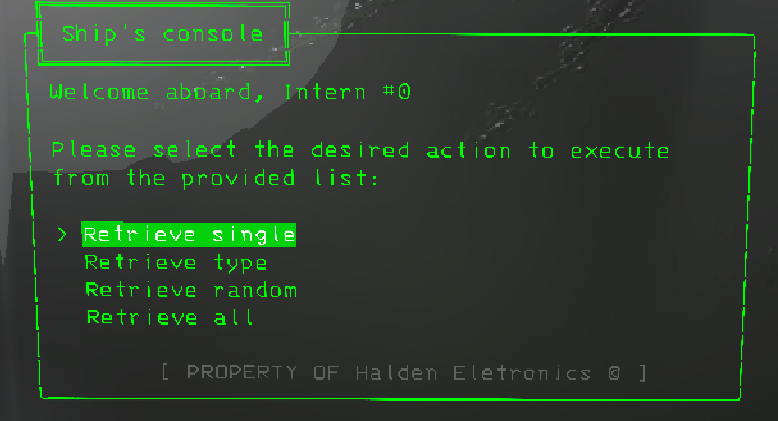
To access the ship's inventory, you need to type ship into the terminal. A window will show up, showing you every option available for the mod.
Configuration
This mod tries to give a lot of configuration and control to the user to customize how they want to. If you would like to know more
Config Settings
General
Language
This setting determines what language package the mod uses. Upon starting up, the mod will look for the file named lang-CODE, where CODE is the value of this parameter. This allows anyone to create their own language pack.
Time to Store
This setting determines how long a player has to hold the interact button in order to store an item. If players usually store items in bulk, the setting can be set to a lower value, allowing them to store items faster.
Time to Retrieve
This setting determines how fast each item takes to be retrieved. If players usually retrieve items in bulk, the setting can be set to a lower value, allowing the process to be done way faster.
Blacklist
This setting determines which items are not allowed to be stored in the chute. The mod already blocks certain items due to not working with the system, but players can also block certain items that they don't want to allow.
Here are the different things you should know about it:
- It is case insensitive (
flashlightandFlASHLiGhtare the same); - It is space insensitive (spaces before and after an item are removed);
- It supports REGEX expression (
.*lightfor every items that ends withlight); - It only checks for the
itemName(it is the name shown in the terminal); - Each item is separated by a
,(item1,item2,item3,item4);
If a player tries to store an item that is blacklisted, a special message will appear to notify them that this item is not valid.
Inventory
Safe Once Stored
This setting determines if the inventory is cleared when all players die. This is useful if you want to use this mod as a safe, allowing you to keep some items in order to recover better from the loss.
Maximum Item Count
This setting determines how many items can be stored in the inventory. For example, if the setting is set to 20, players will only be able to store 20 items in the inventory before needing to retrieve some items to free up space.
If a player tries to store an item while the inventory is full, a special message will appear to notify them that the inventory is already full.
Terminal
Inventory Command
This setting determines the command to type in order to access the inventory. Commands are something exclusive, so you might need to change the command to something else in order to be able to type it.
Yes Please!
This setting determines if the cursor is placed on the yes option when retrieving an item. This is useful when you need to retrieve items in bulk, but you don't want to have to scroll down each time.
Terminal Confirmation
This setting determines if the inventory shows a confirmation when retrieving an item. This is useful when you need to retrieve items in bulk, without worrying about the confirmation.
Show Trademark
This setting determines if the inventory shows the trademark in the terminal. Even though the trademark is themed around Lethal Company (I could've put my own trademark), it takes unnecessary space in the terminal.
Sort Order
This setting determines in which order the items are shown in the inventory. For example, if the setting is set to VALUE_DESC, the most valuable items are going to be on the first pages while the least valuable items will be at the end.
Network
Refresh Rate
This setting determines how often clients will update their copy of the inventory.
This was implemented due to past problems with desync between clients. However, this comes at a cost of an higher WIFI cost, sending a small request every time (the cost is actually very small, almost negligible).
Unlock
Is Unlockable
This setting determines if the chute is an unlockable upgrade. If you enter a lobby with the setting set to false, the chute will be permanently unlocked for this save.
Unlock Cost
This setting determines how expensive the upgrade is to buy. This is useful if you want to balance this mod.
Unlock Name
This setting determines the command to type in order to buy the inventory. Commands are something exclusive, so you might need to change the command to something else in order to be able to type it.
Credits
- "vent_chute" (https://skfb.ly/ozTrw) by jazz-the-giraffe is licensed under Creative Commons Attribution (http://creativecommons.org/licenses/by/4.0/).
Support
If you enjoy the original work, consider supporting the original creator on Ko-Fi ❤️

Developer Contact
| Discord Server | Forum | Post |
|---|---|---|
| Lethal Company Modding | #mod-releases |
ShipInventoryUpdated |
- Email: [email protected]
- Twitch: softdiamond
License
This project is Licensed under the MIT License.