You are viewing a potentially older version of this package. View Latest Version
I have been coding and learning how to code since the start of 2026, so I am still new and learning as I go. Please do not assume every part of this project was made by someone with years of experience.
AI assistance has also been used while working on this project for things like organization, planning, debugging, understanding/fixing errors. Unless clarified the rest is not AI. Apologies in advance for any misunderstanding or lack of clarification.
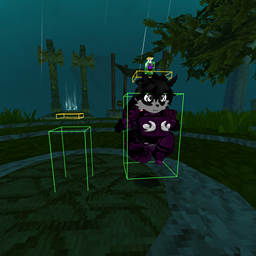
ATLYSS Player Collision adds local-client collision boxes to other players so you can bump into them, stand on their head platform, use stick/anchor mode while riding, and tune the box sizes through EasySettings.
This mod is meant to make player-to-player interaction feel more physical and playful. It does not add server-authoritative physics and it does not send custom collision packets.
ATLYSS Player Collision requires:
/stick toggles stick/anchor mode so you can stay attached to the player you are standing on. Use /stick on, /stick off, or /stick status if you want a specific action.
/remove lists players detected on your head box. Use /remove <player name> or /collider remove <player name> to remove one detected rider locally.
/collider whitelist on enables whitelist mode. Use /boxallow <player name> to allow a remote player, /boxdeny <player name> to remove them, and /boxlist to show saved Steam64 IDs. You do not need to add your own Steam64 ID.
Short whitelist commands: /boxwhitelist, /boxwl, /cwl, /wl.
Max size cap migrated back to uncapped defaults.This mod is local-client only.
Each player needs the mod installed for their own collision experience. If you install the mod, you can collide with the boxes that your client creates around other players. Another player without the mod will not automatically experience your local collision.
The mod uses the normal networked ATLYSS Player objects that already exist. It does not add server-authoritative collision physics. Because of that, exact behavior may differ between clients, especially in crowded sessions, during lag, or while players are using custom scale/race mods.
Whitelist mode is also local-client only. Your whitelist controls which remote players get active boxes on your client. It cannot force another unmodded or differently configured client to obey your whitelist.
ATLYSS Player Collision adds a Player Collider tab through EasySettings.
Settings are backed by the normal BepInEx config file, so they can also be edited manually after first launch.
Basic settings include:
Mod enabledLocal collisionDebug wiresStick to carrierRotate with carrierWhitelist modePush strengthMax pushLimit boxes by distanceBox render distanceReduce rendered boxesMax rendered boxesAdvanced fit settings are lower in the tab:
Solid bodyHead platformBreak distanceSpawn graceBody/head gapPlatform thicknessHead top estimatePlatform clearanceBody widthBody depthBody heightHead widthHead depthHead heightBase widthBase depthBase heightWidth multDepth multHeight multWidth paddingHeight paddingMin sizeMax size capMost numeric tuning sliders support wide positive and negative ranges. Unsafe values are clamped internally so a bad setting should not create invalid collider sizes.
For giant players, keep Max size cap at 0 unless you intentionally want to cap collider size.
Limit boxes by distance hides boxes and debug wires for remote players farther than Box render distance.Box render distance controls the horizontal range used by distance limiting.Reduce rendered boxes keeps only the nearest eligible remote players active.Max rendered boxes controls the nearest-player cap when reduction is enabled.Hidden players from these performance options do not keep active body/platform colliders or debug wires, and pose measuring is skipped until they become eligible again.
Main commands:
| Command | Description |
|---|---|
/collider on |
Enable local collision and recover the mod if either main toggle was off |
/collider off |
Disable local collision |
/collider toggle |
Toggle local collision |
/collider debug |
Toggle debug wireframes |
/collider status |
Show local collider diagnostics |
/collider status all |
Show diagnostics for all tracked players |
/collider reset |
Reset box tuning settings |
/collider panic |
Emergency disable and reset grace period |
/collider help |
Show command help |
Aliases:
/col/collision/pcollisionStick mode tries to keep you attached to the player you are standing on.
| Command | Description |
|---|---|
/stick |
Toggle stick/anchor mode |
/stick on |
Enable stick/anchor mode |
/stick off |
Disable stick/anchor mode |
/stick status |
Show stick status |
/anchor on |
Enable stick/anchor mode |
/anchor off |
Disable stick/anchor mode |
/anchor status |
Show anchor status |
/ca on |
Short alias for anchor on |
/ca off |
Short alias for anchor off |
/ca status |
Short alias for anchor status |
Rotation commands:
| Command | Description |
|---|---|
/stick rotate on |
Rotate rider with carrier turns |
/stick rotate off |
Stop rotating rider with carrier turns |
/anchor rotate on |
Rotate rider with carrier turns |
/anchor rotate off |
Stop rotating rider with carrier turns |
/anchor rotate status |
Show rotation setting |
Stick/anchor behavior is best-effort. ATLYSS animations, emotes, sitting, dashing, lag, and custom scale changes can still make riding imperfect.
If someone is detected on your head platform, you can list or remove them locally.
| Command | Description |
|---|---|
/remove |
List players detected on your head box |
/remove <player name> |
Remove a detected rider from your head box |
/collider remove <player name> |
Same as /remove <player name> |
This is local only. It moves the detected rider from your client view and gives a short grace period.
Whitelist mode lets you limit who gets active colliders.
When whitelist is enabled, only remote players whose Steam64 IDs are listed get active body/platform boxes on your client. You do not need to add your own Steam64 ID.
| Command | Description |
|---|---|
/collider whitelist on |
Enable whitelist mode |
/collider whitelist off |
Disable whitelist mode |
/collider whitelist status |
Show whitelist status |
/boxallow <player name or steam64> |
Add a remote player |
/boxdeny <player name or steam64> |
Remove a remote player |
/boxlist |
List saved Steam64 IDs |
Short whitelist aliases:
/boxwhitelist/boxwl/cwl/wlCollider command aliases:
/collider allow <player name or steam64>/collider deny <player name or steam64>/collider listYou can save up to three box tuning presets.
| Command | Description |
|---|---|
/save boxpreset 1 |
Save current box settings to slot 1 |
/save boxpreset 2 |
Save current box settings to slot 2 |
/save boxpreset 3 |
Save current box settings to slot 3 |
/load boxpreset 1 |
Load slot 1 |
/load boxpreset 2 |
Load slot 2 |
/load boxpreset 3 |
Load slot 3 |
Extra aliases:
/boxsave 1/boxload 1/boxdel 1/boxpresets/collider preset save 1/collider preset load 1/collider preset delete 1/collider preset listMax size cap set to a deliberate nonzero value, giant players may still be capped until it is set back to 0.Useful troubleshooting commands:
/collider reset/collider debug/collider status/collider status all/collider panicInstall BepInExPack for ATLYSS.
Install the required dependencies:
Place AtlyssPlayerCollision.dll in:
BepInEx/plugins/AtlyssPlayerCollision/
