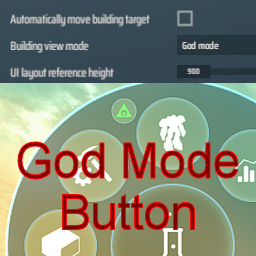
DSP God Mode Button is a mod for the Unity game Dyson Sphere Program developed by Youthcat Studio and published by Gamera Game. The game is available on here.
This mod will display the god build mode setting on the HUD and allow you to change it with a button click.
This mod was requested by KoS.
If you want to toggle god build mode with a key press, I suggest you try doobist's Toggle God Mode mod. This mod is not intended to replace Toggle God Mode, but instead to work with it by showing the mode state on the HUD.

If you like this mod, please click the thumbs up at the top of the page (next to the Total rating). That would be a nice thank you for me, and help other people to find a mod you enjoy.
If you have issues with this mod, please report them on GitHub. You can also contact me at GreyHak#2995 on the DSP Modding Discord #tech-support channel.
This mod uses the BepInEx mod plugin framework. So BepInEx must be installed to use this mod. Find details for installing BepInEx in their user guide. This mod was tested with BepInEx x64 5.4.11.0 and Dyson Sphere Program 0.10.34.28470 on Windows 11.
To manually install this mod, add the DSPGodeModeButton.dll to your %PROGRAMFILES(X86)%\Steam\steamapps\common\Dyson Sphere Program\BepInEx\plugins\ folder.
This mod can also be installed using ebkr's r2modman mod manager by clicking "Install with Mod Manager" on the DSP Modding site.
The source code for this mod is available for download, review and forking on GitHub here under the BSD 3 clause license.