Mod for Dyson Sphere Program. Needs BepInEx.
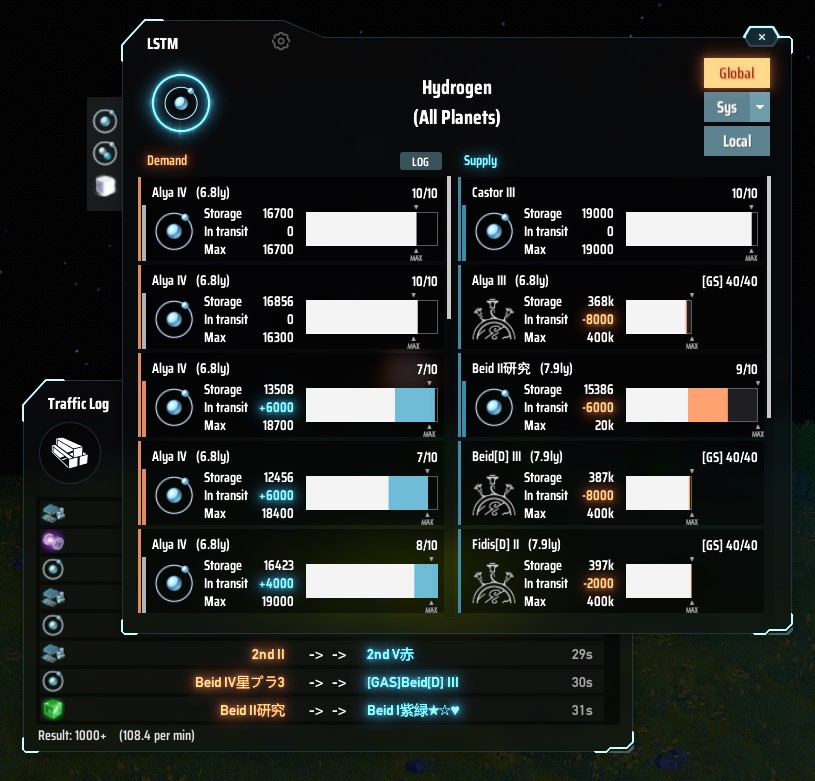
Lists the supply and demand balance of the Logistics Station by item and by planet.
Show overall status for each item
Show the status of all stations on specific planet
Display the target planet in the starmap (Universe Exploration lv4 is required)
Display navigation of the target station location
Open station window directly (right-click locate button)(only current local planet)
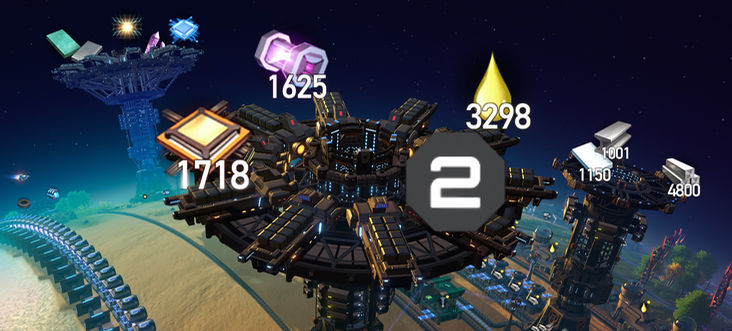
Display station contents and empty slot count as icon
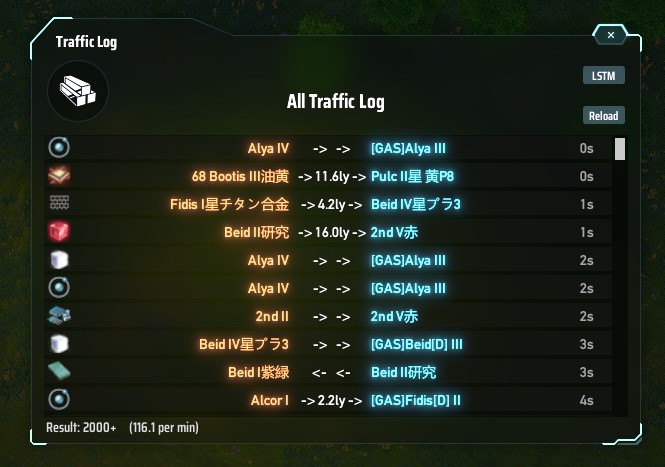
Display traffic logs
How to open a window
When opening with the keyboard shortcut, if the item information is found under the mouse pointer, it is used as a item filter (e.g. Inventory, Storage, Replicator, Statistics Panel and much places where item icon is displayed).
Main Window
Icon Info
Displays transport logs from game startup (up to 10,000 entries). To use it, you must turn it on in the config window and restart the game.
The log window can be opened from the "LOG" button in the main window or from the menu that appears by right-clicking. Shortcuts can also be set, but they are not present in the settings window and must be edited directly in the config file.
Right-clicking on a row brings up a panel where you can refine filters and view them in the starmap.
LSTM has some settings depend on BepInEx (file name is com.hetima.dsp.LSTM.cfg). Most settings can be edited in the config window (from gear icon at the top of the main window).
| Key | Type | Default | Description |
|---|---|---|---|
| mainWindowHotkey | shortcut | LCtrl+T | Hotkey to open/close LSTM window |
| showMaterialPicker | bool | true | Add Material Picker for quick item switching to LSTM window |
| indicatesWarperSign | bool | false | true: show sign on the list if station has warper |
| reactClosePanelKeyE | bool | true | true: close window when close panel key(E) is pressed |
| actAsStandardPanel | bool | true | true: close with other panels by esc key. false: one more esc needed |
| showStationInfo | bool | false | Show station contents and empty slot count as icon. Also affected by in-game building icon display *setting |
| showStationInfoOnlyInPlanetView | bool | false | showStationInfo is only displayed in planet view |
| bool | true | ||
| showButtonInStationWindow | bool | true | Add open LSTM button to Station Window |
| showButtonInStatisticsWindow | bool | false | Add open LSTM button to statistics panel |
| showButtonInStarmap | bool | true | Add open LSTM button to detail panel on starmap |
| bool | false | true: set the construction point of stations to ground level instead of top of the tower (currently disabled) | |
| enableNaviToEverywhere | bool | false | double-click (left and/or right click) on Planet View to display navigation to anywhere |
| suppressOpenInventory | bool | false | Suppress open inventory when opening station window |
| enableTrafficLog | bool | false | Enable traffic log window (needs restart game) |
| hideStoragedSlot | bool | true | hide storaged slot in list view |
Hidden settings
The following settings cannot be edited from config window. You need to edit the file directly.
| Key | Type | Default | Description |
|---|---|---|---|
| switchDisplayModeHotkey | shortcut | Tab | Hotkey to switch between planet name and station name on LSTM window |
| dropSorterKeyEracesNavi | bool | false | clear navi line when "Remove Copied Sorter Previews" shortcut is pressed |
| logWindowHotkey | shortcut | none | Hotkey to open/close Traffic Log window |
| trafficLogDisplayMax | int | 2000 | Maximum rows that can be displayed in Traffic Log window. min=100 max=9999 |
| stationInfoIconSize | float | 10.0 | Station Info icon size. min=5.0 max=15.0. default is 10.0f |
輸送ステーションの状況をアイテムごとや惑星ごとに一覧表示して需給バランスを確認できます。
アイテムごとに全体の状況を表示
惑星内の全ステーションの状況を表示
対象の惑星を星間ビューで表示(宇宙探査レベル4が必要)
対象のステーションの場所をナビ表示
ステーションウィンドウを開く(ナビボタンを右クリック)(現在の惑星のみ対象)
ステーションの内容をアイコンサインで表示
輸送ログの表示
ウィンドウの開き方
キーボードショートカットで開くときに、マウスポインタ上にアイテム情報を見つけたらそのアイテムでフィルタ表示します(インベントリ、ストレージ、合成機、統計パネル、その他のアイコンが表示されている場所)
TrafficLogic and One-time Demand for 0.10.30.22292setConstructionPointToGround is disabledstationInfoIconSizeenableNaviToEverywhere. default is off) (this feature is basically unrelated to this mod, but I introduced it because it's easy to incorporate)showStationInfoOnlyInPlanetView)setConstructionPointToGround and showStationInfo have been changed to falseshowStationInfo or ConfigWindow) (also affected by in-game building icon display setting)TLLocalDemandDelay default is falsesetConstructionPointToGround for faster construction. default is trueshowStatInStatisticsWindow default is true)showMaterialPicker for customize this)reactClosePanelKeyE close window when close panel key(E) is pressed. default is true.switchDisplayModeHotkey for customize this)indicatesWarperSignTLRemoteDemandDelay will now be applied to all remote demandsTLSmartTransportTLConsiderOppositeRange ignores when the capacity of demand is smallTLDCBalance wrong demand rangeTLRemoteDemandDelayTLDCBalanceTLConsiderOppositeRange, TLRemoteCluster and TLLocalClusterdropSorterKeyEracesNaviactAsStandardPanel (I forgot to list it)