

Dyson Sphere Program
You are viewing a potentially older version of this package. View Latest Version
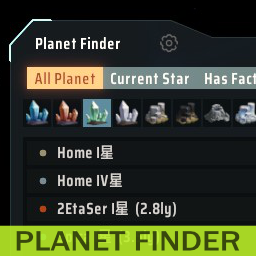
Mod for Dyson Sphere Program. Needs BepInEx.
This mod adds a window that lists the planets and allows you to search by criteria.
It can be opened from the button that will be added to the panel at the bottom left of the game screen and the bottom right of the star map. It can also be opened with a shortcut (default LCtrl+F). Whether the button is shown or not, and the shortcut can be customized by clicking on the gear icon at the top of the main window.
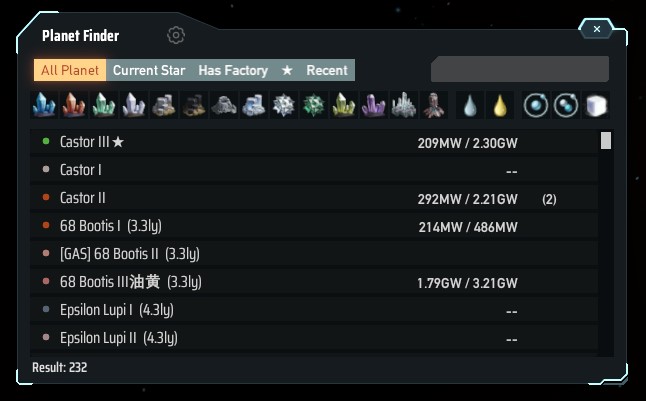
The scope of the list can be narrowed down by "all planets", "current star system", "planets where facilities are being built", and "recently visited planets". From there, you can further filter by which resources are present.
Resources can be multi-selected by shift-clicking, narrowing down the list of planets that have all the resources.
The display area shows the name of the planet, distance from the current star system, and the actual number of selected resources and approximate number of chunks of veins. The power status can also be displayed and switched to resource information by pressing the Tab key. If the electricity supply-demand ratio exceeds 90%, an orange display warns.
Clicking the arrow button displays the planet in the starmap view.
The resource calculation method has changed since version 0.4.1. Information on all planets cannot be retrieved immediately after loading. Information acquisition begins when the Planet Finder window is first opened. This will take some time. During the calculation, "*" mark will be added to the window title and will disappear when all information has been calculated.
惑星を一覧表示し、条件を指定して検索できるウィンドウを追加するmodです。
ゲーム画面左下のパネルと星図ビューの右下に追加されるボタンから開くことができます。ショートカットでも開くことができます(デフォルトLCtrl+F)。ボタンを表示するかどうか、ショートカットのカスタマイズはメインウィンドウ上部の歯車アイコンから変更できます。
一覧表示する範囲を「すべての惑星」「現在の星系」「施設を建てている惑星」「最近訪れた惑星」で絞り込みます。そこから更にどの資源が存在するかでフィルタできます。
資源はシフトクリックすると複数選択することができ、すべての資源が揃った惑星を絞り込みます。
検索結果表示部分には惑星の名前、現在の星系からの距離、選択した資源の実数とおおまかな鉱脈の数が表示されます。電力の状態も表示でき、Tabキーを押すことで資源の情報と切り替わります。電力需給率が90%を超えていたらオレンジ色の表示で警告します。
矢印のボタンをクリックするとその惑星を星図ビューで表示します。
バージョン0.4.1から資源の算出方法が変わりました。ロード直後はすべての惑星の情報を取得することができません。最初にPlanet Finderのウィンドウを開いた時点で情報取得を始めます。これにはしばらく時間がかかります。ウィンドウタイトルに「*」マークが追加され、全情報の算出が完了すると消えます。
gasGiantPrefix and tidalLockedPrefix as string)