

Dyson Sphere Program
You are viewing a potentially older version of this package. View Latest Version
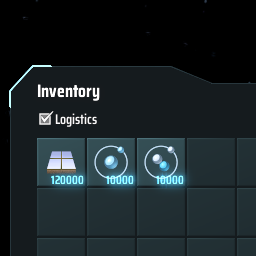
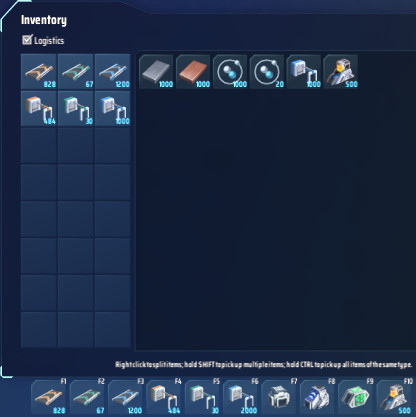
Via r2modman, or manually download the file and put DeliverySlotsTweaks.dll in BepInEx/plugins folder.
Run the game one time to generate BepInEx\config\starfi5h.plugin.DeliverySlotsTweaks.cfg file.
If you're using mod manager, you can find the file in Config editor.
The changes will take effects after reboost, or go to game settings and click 'Apply' button.
Inventory stacksize overwrite only apply when the value is set to a positive number before entering the game.
Some effects will last in save after the mod is disabled.
When reducing ColCount, please clean up logistic slots first to prevent hidden slots not being accessible.
| Default | Description | |
|---|---|---|
ColCount |
0 | No Change:0 TechMax:2 Limit:5 |
StackSizeMultiplier |
0 | No Change:0 TechMax:10 |
DeliveryFirst |
true | When logistic bots send items to mecha, send them to delivery slots first. |
PlayerPackage - StackSize |
0 | No Change:0 |
配置文件(.cfg)需要先运行过游戏一次才会出现。
在修改完配置文件后重启游戏, 或进入游戏设置, 点击'应用设置'即可套用新的数值设定。
注意玩家背包物品堆叠上限要在进入游戏前先预先设置一个正数, 才能使用以上的方法调整数值。
部分修改后的效果在停用mod后依然会存在。
管理器安装: 左边选项Config editor -> 找到starfi5h.plugin.DeliverySlotsTweaks -> Edit Config
手动安装: 更改BepInEx\config\starfi5h.plugin.DeliverySlotsTweaks.cfg文件
当减少物流清单容量时, 请先清空清单避免无法存取的残留栏位影响物流
| Default | Description | |
|---|---|---|
ColCount |
0 | 物流清单容量-列(不变:0 原版科技:2 最高上限:5) |
StackSizeMultiplier |
0 | 物流清单物品堆叠倍率(不变:0 原版科技:10) |
DeliveryFirst |
true | 配送机会优先将物品送入物流清单的栏位 |
PlayerPackage - StackSize |
0 | 覆蓋玩家背包中的物品堆疊上限(不变:0) |
v1.1.0 - Add playerpackage stacksize config option. Now can apply mod config changes in game settings.
v1.0.1 - Fix a bug that some logistics solts are not usable.
v1.0.0 - Initial release. (DSPv0.9.27.15466)
All trademarks, copyright, and resources related to Dyson Sphere Project itself, remain the property of Gamera Game and Youthcat Studio as applicable according to the license agreement distributed with Dyson Sphere Program.