

Dyson Sphere Program
You are viewing a potentially older version of this package. View Latest Version
The Error Analyzer mod enhances the error reporting in game by adding useful features to help you identify and resolve issues caused by mods.
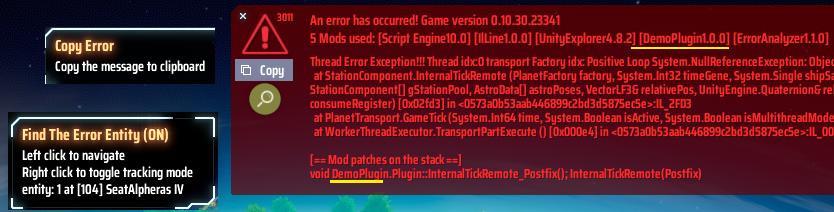
Below is an example of the error message that can be copied to your clipboard:
An error has occurred! Game version 0.10.30.23350
5 Mods used: [Script Engine10.0] [IlLine1.0.0] [UnityExplorer4.8.2] [DemoPlugin1.0.0] [ErrorAnalyzer1.1.0]
Thread Error Exception!!! Thread idx:0 transport Factory idx: Positive Loop System.NullReferenceException: Object reference not set to an instance of an object
  at StationComponent.InternalTickRemote (PlanetFactory factory, System.Int32 timeGene, System.Single shipSailSpeed, System.Single shipWarpSpeed, System.Int32 shipCarries, StationComponent[] gStationPool, AstroData[] astroPoses, VectorLF3& relativePos, UnityEngine.Quaternion& relativeRot, System.Boolean starmap, System.Int32[] consumeRegister) [0x02f66] ;IL_2F66
  at PlanetTransport.GameTick (System.Int64 time, System.Boolean isActive, System.Boolean isMultithreadMode) [0x00213] ;IL_0213
  at WorkerThreadExecutor.TransportPartExecute () [0x000e4] ;IL_00E4
[== Mod patches on the stack ==]
void DemoPlugin.Plugin::InternalTickRemote_Postfix(); InternalTickRemote(Postfix)
Explanation:
StationComponent.InternalTickRemote function.DemoPlugin.Plugin::InternalTickRemote_Postfix() in the DemoPlugin mod.Notes:
Re-intialize planet in UXAssist. If they still not work then you'll have to roll back to the previous normal save.The config file is BepInEx\config\aaa.dsp.plugin.ErrorAnalyzer.cfg, which can be found in mod manager's Config editor.
## Settings file was created by plugin ErrorAnalyzer v1.2.2
## Plugin GUID: aaa.dsp.plugin.ErrorAnalyzer

[DEBUG Mode]

## Enable DEBUG mode to track the entity when starting up the game
# Setting type: Boolean
# Default value: false
Enable = false

[Message]

## Show all mod patches on the stacktrace (By default it will not list GameData.Gametick() and below methods)
# Setting type: Boolean
# Default value: false
Show All Patches = false

## Dump Harmony patches of all mods when the game load in BepInEx\LogOutput.log
# Setting type: Boolean
# Default value: false
Dump All Patches = false
When the DEBUG tracking mode is on, the navigate button will change color. In this mode, it will track the entity that throws errors and move the player to the location when it is on the same planet. Errors in the following methods will be handled too in this mode to let the player dismantle the corrupted building:
CargoTraffic.SetBeltState, CargoContainer.RemoveCargo, CargoTraffic.PickupBeltItems
CargoTraffic.PickupBeltItems error in debug tracking mode.CargoTraffic.SetBeltState and CargoContainer.RemoveCargo error in debug tracking mode to dismantle the belts.错误分析器mod添加有用的功能来增强游戏中的错误报告,帮助您识别并解决由模组引起的问题。
An error has occurred! Game version 0.10.30.23350
5 Mods used: [Script Engine10.0] [IlLine1.0.0] [UnityExplorer4.8.2] [DemoPlugin1.0.0] [ErrorAnalyzer1.1.0]
Thread Error Exception!!! Thread idx:0 transport Factory idx: Positive Loop System.NullReferenceException: Object reference not set to an instance of an object
  at StationComponent.InternalTickRemote (PlanetFactory factory, System.Int32 timeGene, System.Single shipSailSpeed, System.Single shipWarpSpeed, System.Int32 shipCarries, StationComponent[] gStationPool, AstroData[] astroPoses, VectorLF3& relativePos, UnityEngine.Quaternion& relativeRot, System.Boolean starmap, System.Int32[] consumeRegister) [0x02f66] ;IL_2F66
  at PlanetTransport.GameTick (System.Int64 time, System.Boolean isActive, System.Boolean isMultithreadMode) [0x00213] ;IL_0213
  at WorkerThreadExecutor.TransportPartExecute () [0x000e4] ;IL_00E4
[== Mod patches on the stack ==]
void DemoPlugin.Plugin::InternalTickRemote_Postfix(); InternalTickRemote(Postfix)
以例图来说, 可以得知模组DemoPlugin对于StationComponent.InternalTickRemote的前缀补丁DemoPlugin.Plugin::InternalTickRemote_Postfix导致了例图中的错误
注意