

Dyson Sphere Program
You are viewing a potentially older version of this package. View Latest Version
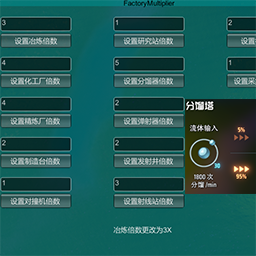
Speed up your factory facilitys,include Smelter/Chemical/Refinery/Assembler/Particle Collider and Lab's speed,Rail Ejector and Launching Silo's launch speed,Ray Receiver's product photons and power generate speed.
All facilitys work consumption will be mutiplied too.
You can change the possibility of product Deuterium in Fractionator, and work consumption will increase exponential ,but still more efficent than Particle Collider with low multiple,about lower than 50X.
You can modify the cfg file in the "BepInEx\config\waRNing.dsp.plugins.FactoryMultiplier.cfg"to adjust their multiples. (To generate a cfg file, the game must be run once.)
After the cfg file is modified, you need to restart the game to take effect.
You can set mutiples to 1,To reset relevant facilitys speed.
After modify , it will directly affect all the facilitys when you start the game. There is no need to change the facility's recipes or build a new facility to make the effect happen(but apply to new facility too). So please ensure that you have sufficient power, otherwise there will be a blackout with large mutiple!:)
Fix the problem of most facilitys mutiple re-change invalid.
加快工厂生产速度,包括熔炉、化工厂、精炼厂、制造台、对撞机、矩阵研究站的生产速度,加快弹射器和发射井的发射速度、射线接受站的光子生产和发电速度.
修改后的生产设备耗电量同样加倍, 更快的速度,更大的耗电。
可以更改分馏塔生产重氢的概率,同时消耗电量指数加倍,50倍率下仍比对撞机单位生产耗电低,再往上会超级加倍!
你可以在 BepInEx\config\waRNing.dsp.plugins.FactoryMultiplier.cfg 中调整所有生产设备的倍率.
你可以把修改倍率设为1,将设备的工作速度和工作电量重置为游戏设定值
cfg文件修改后(游戏必须先运行一次才会出现cfg文件), 需要重启游戏才会生效.
修改倍率后会直接作用到所有设备,无需修改配方和新建设备来生效(新建设备同样有效),请确保电网电量足够,否则高倍率下会大停电!:)