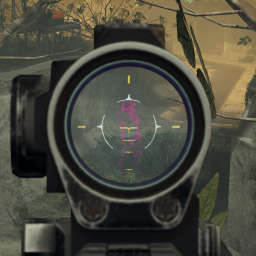

Adds the ability give any item thermal vision. Each item can be invidually configured, and the plugin exposes APIs so that other developers can add even more customizations and integrate with their own custom weapons.
By default, this mod does nothing! Load up the game with it running once, then use the BepInEx config file to choose which gear you want converted. Configs have been included to help make vanilla weapons feel unique, but this mod will automatically detect new weapons and apply a default configuration to them, too, if you want to convert them.
If you wish to customize weapons further, check the guides included in the plugin folder, at BepInEx/plugins/ThermalOverlay
Currently, the below items are supported:
All melee, main, special, and tool items are supported. However, auto configs only tend to work well on main and special guns, meaning you will need to apply manual configs for tools and melee weapons if you want them. I've provided configs for the two vanilla spears (because I feel spears deserve a fun boost), but I haven't provided configs for other weapons mainly because I cannot think of a good spot to place the overlay for consistent and psuedo- realistic gameplay.
Support for other items, such as long-range flashlights, is planned but not currently available.
HowTo docs for applying custom configs and for plugin extension can be found in the plugin folder,
at BepInEx/plugins/RoboRyGuy-ThermalOverlay.
The config file for the plugin is at BepInEx/GameData/ThermalOverlay/ThermalOverlayConfig.json. This is automatically
generated if it's missing, but left untouched when updating the plugin (so as to not overwrite custom configs). If you
want new configs provided by updates to the mod, you can delete this file to regenerate it; otherwise, you can reference
the DoNotDelete.json file from which default configs are sourced, and copy over configs as desired. Again, read the HowTo
docs for help on this.