Curses
This mod is currently in an alpha release. It shouldn't crash your game, but it might not work 100% of the time. I'm still testing.
Requirements
As with most mods, you need BepInEx installed. There are no other requirements.
Installation
The zip file should be structured in the same way as your Inscryption root directory. Just drop the 'BepInEx' folder into your Inscryption directory and you're golden.
If you've installed any of my other mods, you may be told that there is a conflict for 'Infiniscryption.Core.dll'.
What is a Curse?
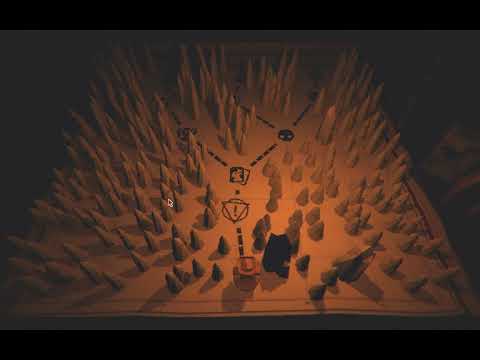
A 'Curse' is a difficulty modification that changes the way the game plays. Each curse you take on increases the overall difficulty of your run. They are completely optional, but they clearly make you more of a badass for accepting them.
Curse of the Empty Backpack
Backpack encounters now only gain you a single consumable, even if you have none.
Curse of the Lone Candle
This forces the player to only have a single candle flame available for the run.
You can't gain more from winning boss battles, and you also won't get smoke at boss battles.
Curse of the Strong Survivors
Campfire events are harder. If you've successfully upgraded a card previously, there's even a chance of failure on the first try. And failure costs you more than just a bad card.
What if I want to program my own Curse?
Technical Stuff
I'll do my best to summarize it here:
- You need to create a new curse class that inherits from CurseBase.
- There are a number of abstract fields you have to implement:
- Title: This will display in the rulebook, prefixed with 'Curse Of'. So if you title your curse 'Flatulence,' the rulebook will refer to it as 'Curse Of Flatulence.'
- Description: This describes what the curse does and will appear in the rulebook.
- IconTexture: This is the icon that will appear in the middle of the curse card. It should be a 56x56 PNG. You can use AssetHelper to load it if you want, but AssetHelper will assume the PNG is in the 'Infiniscryption/assets' folder.
- Reset: This is incredibly important. This logic will run at the beginning of every run and whenever you leave the Curse selection node. If you need to do something at the start of the run, do it here (look at OneCandleMax to see how this is used).
- Do whatever patching you need to do to make your curse work.
- There is an instance variable called 'Active' which will tell you if your curse is active. If you're in a static method (like a patch), you can get the value of this flag using CurseManager.IsActive<T>, where T is the class name of the mod.
- I can't stress this enough. The framework does not check whether or not your curse is activated by the player - you have to do that! So if your curse makes the Mycologists put three copies of a card named 'Wet Fart' into your deck, you better make sure it only happens when that active flag is set.
- Register the curse using CurseManager.Register. This will also take care of any patches defined in your curse.
That should be enough. Once a curse is registered, the Curse node will automatically pick it up and display it as an option for the player. If they leave it turned up, the Active flag will be set to true.