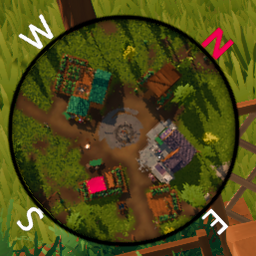
Adds a minimap to Len's Island. Actively under development, so expect the odd bug or incomplete feature.
| Perspective | Orthographic | Orthographic + Flatten |
|---|---|---|
See Rendering Style for more information about each mode.
Several options are provided for customising the minimap to behave however you see fit.
If you are using the default overlay, you may wish to disable the vanilla compass as the default overlay includes cardinals.
You can toggle rotation, or have the minimap in fixed orientation. Whatever floats your boat.
If you're artsy or simply hate the bland default, a Krita template is provided in the Overlays directory for you to customise the border of the minimap to your heart's content.
If you are creating a custom overlay to distribute via Thunderstore, your package should have the following structure:
.
├── BepInEx/
│   └── plugins/
│       └── smrkn-Minimap/
│           └── Overlays/
│               └── YourOverlay.png
├── icon.png
├── manifest.json
└── README.md
Typically, you won't need to touch this by hand. This is just how the plugin remembers your previous zoom level.
Zoom is currently controlled with 9 and 0, keybind support will be available in future updates.
There are currently two different styles provided, aiming to cover different preferences for how a minimap should look/feel.
Orthographic more commonly resembles what many people are familiar with when they think of minimaps. Very two dimensional with limited to no depth.
[!NOTE] The game's water shader does not work with orthographic mode out of the box.
I've had to improvise a little with making something appear in place of water.
If orthographic mode still isn't quite what you're after, there's an optional "Flatten" mode.
Perspective rendering behaves just like the main game camera except top down. This may be renamed to something like "3D Mode" for simplicity in future.
This is the default setting.