

Lethal Company
You are viewing a potentially older version of this package. View Latest Version
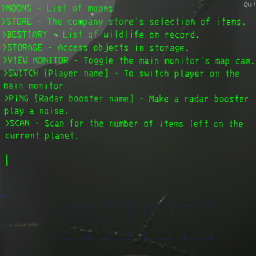
Allows customising every single displayText on the terminal
warning: contains spoilers for creatures and log-messages

Download and follow the guide for BepInEx 5.4.22.
Download Release\NewTerminal.dll and put it into \Lethal Company\BepInEx\plugins.
Run LethalCompany and enter the spaceship once to generate the config files.
Modify the config file in \Lethal Company\BepInEx\config.
Example of an entry in a category:
[TerminalMenus.Other] # <--- this is a category

# Setting type: String
# Default value: >MOONS\nTo see the list of moons the autopilot can route to.\n\n>STORE\nTo see the company store\'s selection of useful items.\n\n>BESTIARY\nTo see the list of wildlife on record.\n\n>STORAGE\nTo access objects placed into storage.\n\n>OTHER\nTo see the list of other commands\n\n[numberOfItemsOnRoute]\n
Help = >MOONS\nTo see the list of moons the autopilot can route to.\n\n>STORE\nTo see the company store\'s selection of useful items.\n\n>BESTIARY\nTo see the list of wildlife on record.\n\n>STORAGE\nTo access objects placed into storage.\n\n>OTHER\nTo see the list of other commands\n\n[numberOfItemsOnRoute]\n
can be modified into the following:
[TerminalMenus.Other]

# Setting type: String
# Default value: >MOONS\nTo see the list of moons the autopilot can route to.\n\n>STORE\nTo see the company store\'s selection of useful items.\n\n>BESTIARY\nTo see the list of wildlife on record.\n\n>STORAGE\nTo access objects placed into storage.\n\n>OTHER\nTo see the list of other commands\n\n[numberOfItemsOnRoute]\n
Help = >MOONS - List of moons\n>STORE - The company store\'s selection of items.\n>BESTIARY - List of wildlife on record.\n>STORAGE - Access objects in storage.\n>VIEW MONITOR - Toggle the main monitor\'s map cam.\n>SWITCH [Player name] - To switch player on the main monitor\n>PING [Radar booster name] - Make a radar booster play a noise.\n>SCAN - Scan for the number of items left on the current planet.\n\n
# are comments. Feel free to add/remove them as you see fit, although BepInEx might also create the default comments and remove new comments.
\n are newlines. You can temporarily make newlines for each \n and then delete the newlines when you're done editing an entry.
[totalCost] is an example where the game replaces a part of the text with a value.
\n\n at the end of the text is to place the cursor at a new line. These are nice to have but not required.
Some letters need to be escaped by putting a \ before them such as \'.
if a value stops working just delete the entire entry. The plugin will automatically add it back the next time you enter a ship.
if you have other useful tips for other players feel free to create a Github issue on it.
Note that lib is left empty on purpose as the game DLLs are considered intellectual property.
Please find the needed DLLs on your own in your LethalCompany folder at \Lethal Company\Lethal Company_Data\Managed and insert them in the lib folder.
Then either run dotnet build -> dll produced in Release folder
or dotnet build -p:BuildInPlugin=true -> dll produced in Lethal Company folder.