

Lethal Company
You are viewing a potentially older version of this package. View Latest Version
A Library to help manage large Lethal Company Mods. Makes registering with LethalLib/WeatherRegistry/etc easier and contains other useful scripts and utilities.
Currently supports:
You should have a Main AssetBundle ("main bundle" from here) that contains a ContentContainer ScriptableObject. This contains definitions to all the types of content that will be registered in your mod.
Each content bundle like my_item_bundle will contain an AssetBundleData ScriptableObject and as many content definitions as needed.
To register and get content out of the asset bundles in C# use:
[!NOTE] Currently your packaged mod structure needs to be:
com.example.yourmod.dll
assets/
-> main_bundle
-> my_item_bundle
There is a template for your plugin that you can use to get started:
dotnet net install .CodeRebirth (that's my mod's name, it's just an example).dotnet new sln --name CodeRebirthdotnet new crlibmod -M com.github.xuuxiaolan.coderebirth -MM "PATH\TO\MMHOOK\FOLDER" -B "PATH\TO\MODMANAGER\PLUGINS\FOLDER" --name CodeRebirth-M is the mod guid, -MM is the folder to mmhook files -B is folder to the bepinex plugin folder. also make sure to include --name otherwise it just dumps it wherever!?dotnet tool install -g tcli and from there you can do builds and stuff.// In your plugin
public static CRMod Mod { get; private set; }
private void Awake()
{
AssetBundle mainBundle = CRLib.LoadBundle(Assembly.GetExecutingAssembly(), "main_bundle");
Mod = CRLib.RegisterMod(this, mainBundle);
Mod.Logger = Logger; // optional, but highly recommended
// Load Content
Mod.RegisterContentHandlers();
}
Then to divide up your content use the ContentHandler class to register. The specifics here might change slightly.
public class DuckContentHandler : ContentHandler<DuckContentHandler>
{
    public class DuckBundle : AssetBundleLoader<DuckBundle>
    {
        public DuckBundle(CRMod mod, string filePath) : base(mod, filePath)
        {

        }
    }

    public DuckContentHandler(CRMod mod) : base(mod)
    {
        RegisterContent("duckbundle", out DuckBundle assets); // returns bool on if it registered succesfully
    }
}
For the above example and in cases where you don't need to retrive anything from the asset bundle
DefaultBundlecan be used instead (e.g. replacing theDuckBundlehere)
After running Mod.RegisterContentHandlers(); the registries in your CRMod will be populated. You can then get access to your content by running
if (mod.WeatherRegistry().TryGetFromWeatherName("Meteor Shower", out CRWeatherDefinition? definition))
{
    // do something with the Meteor Shower definition.
    // i.e. grabbing the prefab.
    var prefab = definition.GameObject;
}
Finally just do a release build and everything should just be put into your mod manager's specific profile that you gave to the template.
CodeRebirthLib supports registering mods in the editor. However, it is untested. To register automatically you need to:
.crmodModInformation Scriptable Object named exactly Mod InformationExpected structure is:
yourmod.crmod
my_item_bundle
Assets/LethalCompany/Mods/plugins/ and create a folder there that's just your mod's name, so something like CodeRebirth.CodeRebirthLib and all its dependencies and just drag them in there so it should look something like this: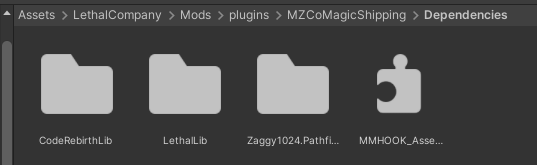
Validate References so it doesn't check for soft dependencies like LethalConfig or WeatherRegistry.ModNameFolder into the plugins folder like how it is in the previous unity project you had, that's it.[!NOTE] If you use a vanilla asset in your unity project into your mod, make sure to move it somewhere in your own mod's folder, so that when you do update to latest lethal version, it doesnt get lost from accidently deleting it.
res folder in your project if you have a CSharp/Code project, and if not, just make an Assetbundles folder next to Dependencies folder and put them all in there.And finally, for any troubles in setting anything up, contact @xuxiaolan on discord for help.