OpenBodyCams
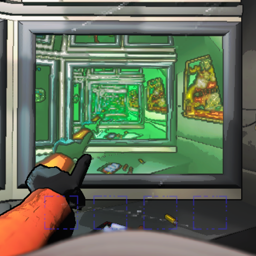
An open-source implementation of a body/head camera that is displayed on the bottom right monitor in the ship, with the goal of appearing almost identical to the player's actual perspective while providing good performance.
The camera view will display only the first person hands and disable the third person model as well as MoreCompany cosmetics to prevent obstructed vision.
Features
- Selectable camera perspective between the head and body.
- Camera view is designed to render identically for the local player as well other players in the game.
- MoreCompany and AdvancedCompany cosmetics support, see the Compatibility.
- All enemies, terrain, etc. that is visible to the player will be visible in the camera view.
- The same green flash animation used when switching targets on the radar is displayed by the camera view.
- Performance:
- The camera is attached to the player model in the engine rather than copying the transform from it.
- Camera setup logic is done ahead of time based on game events whenever possible.
Compatibility
MoreCompany and AdvancedCompany cosmetics are both supported. They will be hidden when viewing other players in the body cam, and your cosmetics will be visible on the camera when you are viewing another player looking at you.
Configuration
- Camera mode: The attachment point of the camera. The head and the body are selectable.
- Resolution: The horizontal resolution of the rendered view.
- Field of view: The vertical FOV of the body cam's view.
- Render distance: The far clip plane of the camera.
- Framerate: The number of frames to render per second. The default setting renders at the game's framerate and has the least impact on performance.
- Night vision brightness: A multiplier for the brightness and range of the night vision light. A value of 1 matches the vision of the player being viewed.
- Disable internal ship camera: Disables the camera at the front of the ship facing towards the center. This may improve performance inside the ship slightly.
Notes
As mentioned above, using no framerate limit results in the best performance. Forcing the camera to render at certain intervals outside of the render pipeline seems to cause a lot of overhead, so setting the framerate limit to anything above 30fps may cause a severe dip in the game's framerate.