

Lethal Company
You are viewing a potentially older version of this package. View Latest Version
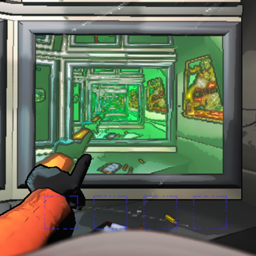
An open-source implementation of a body/head camera that is displayed on the bottom right monitor in the ship, with the goal of appearing almost identical to the player's actual perspective while providing good performance.
The camera view will display only the first person hands and disable the third person model as well as MoreCompany cosmetics to prevent obstructed vision.
MoreCompany and AdvancedCompany cosmetics are both supported. They will be hidden when viewing other players in the body cam, and your cosmetics will be visible on the camera when you are viewing another player looking at you.
GeneralImprovements' extended monitors set is supported through a config option to select the monitor number to use for the body cam. The body cam will override any selection in the GeneralImprovements config.
Mode: The attachment point of the camera. The head and the body are selectable.HorizontalResolution: The horizontal resolution of the rendered view.FieldOfView: The vertical FOV of the body cam's view.RenderDistance: The far clip plane of the camera.Framerate: The number of frames to render per second. The default setting renders at the game's framerate and has the least impact on performance.NightVisionBrightness: A multiplier for the brightness and range of the night vision light. A value of 1 matches the vision of the player being viewed.MonitorEmissiveColor: The color to emit from the screen displaying the body cam. Represented as comma-separated numbers to avoid losing precision by using a 32-bit color.RadarBoosterPanRPM: This controls the number of turns that the camera should make each minute. If set to 0, the camera will be fixed in the direction that the player placing the radar booster was facing.DisableCameraWhileTargetIsOnShip: This will cause the screen to turn off while the camera's target is onboard the ship. This can be used to avoid the load of rendering large numbers of items on the ship in long runs.EnableCamera: When this is enabled, the screen will be powered off. This can be changed in-game with LethalConfig or any similar mod.DisableInternalShipCamera: Disables the camera at the front of the ship facing towards the center. This may improve performance inside the ship slightly.FixDroppedItemRotation: Defaulted to true, this fixes a desync of items' rotations when dropping them. See Notes.As mentioned above, using no framerate limit results in the best performance. Forcing the camera to render at certain intervals outside of the render pipeline seems to cause a lot of overhead, so setting the framerate limit to anything above 30fps may cause a severe dip in the game's framerate.
An optional fix is included for items' rotations being desynced between the player dropping them and all other clients, which is caused by an ignored rotation parameter in the function handling dropped items. This is included to allow the radar boosters to face in a consistent direction for all clients in a game. The patch is designed to fail gracefully and allow the mod to still run, in case any other mods apply the same fix, but if problems arise, it can be disabled with the FixDroppedItemRotation config option.