

Lethal Company
You are viewing a potentially older version of this package. View Latest Version
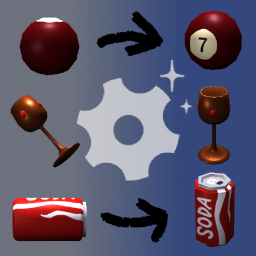
The difference between "rotation" and "image" here is that the former are coordinates that tell RuntimeIcons how each item will be rotated when the icon is generated. The latter are direct
.pngreplacements for when an item already has a special icon that can't be replaced with a normal rotation, or has additional edits made.
If you find there are any items i missed in a supported mod, want to request a mod to be supported, or have suggestions on existing rotations, feel free to let me know on the thread in the modding discord.
Not EVERY item changed will be shown here, this is just meant for you to get an idea of what kinda changes are made for most things.


In the config file com.github.lethalcompanymodding.runtimeicons.cfg, make sure "List Behaviour" is set to BlackList, then in the "Item List" field, enter the desired path/item.
Below is the list of tools you can copy/paste to disable them all:
Vanilla/Pro-flashlight, Vanilla/Lockpicker, Vanilla/Shovel, Vanilla/Walkie-talkie, Vanilla/Key, Vanilla/Stun grenade, Vanilla/Zap gun, Vanilla/Boombox, Unknown/clipboard


Make sure you have SellBodiesArachnophobiaSupport installed
Navigate to
[YourProfile]/BepInEx/plugins/RuntimeIcons/png/15sellbodiesfixed/, rename or deletedead bunker spider.pngand then renamedead bunker spider arachnophobia.pngtodead bunker spider.png(Be sure the filename is all lowercase). The image replacement should take affect next time the game is launched (however, I've found that even if you load a save file with Arachnophobia mode turned on, any existing dead bunker spiders on the ship will retain the original model, so be aware of that. Newly spawned-in spiders should be fine.)


