
Patch for Northstar.Client to enable client-side mods on official servers.
A page explaining how to solve most of the common issues with Vanilla+: https://github.com/NachosChipeados/NP.VanillaPlus/blob/main/FAQ.md
Northstar.Client installed in the mods directory, or a version thats called NanohmProtogen-VanillaPlus, delete those too!1.) Install Northstar if you don't already have it
2.) Create a folder in your Titanfall2 Directory called R2Titanfall
3.) Inside of that folder, create a folder called packages
4.) Place the unzipped Thunderstore download of Vanilla+ in the packages folder, and extract it
5.) The file structure should look like this:
Titanfall2
  R2Titanfall
    packages
      NachosChipeados-VanillaPlus-2.5.1
        mods
          NP.VanillaPlus
(Titanfall2/R2Titanfall/packages/NachosChipeados-VanillaPlus-2.5.1/mods/NP.VanillaPlus)
Note that the folder in packages is NOT a .zip file. If the file path looks like this: R2Titanfall/packages/NP.VanillaPlus, then you didn't install Vanilla+ correctly.
There are multiple ways you can launch this profile. You only need to do one of these, and it's recommended you do A.
A.) Add -northstar -vanilla -profile=R2Titanfall as launch options to Titanfall 2 on Steam or EA, then launch Titanfall 2 from either launcher (recommended, as this will count hours and achievements, where as a .bat won't)
B.)
On steam, on the bottom left of your library click Add a Game -> Add a Non-Steam Game -> Browse, and locate your Titanfall2 Directory.
After you do this, select Titanfall2.exe and click Add selected Programs. This will create an extra Titanfall2 entry in your library.
Right click on this new entry, and rename it to Titanfall 2: Vanilla+. Then, add -northstar -vanilla -profile=R2Titanfall as launch options for it. This will allow you to launch regular Titanfall 2, and Vanilla+ separately, as well as count hours and achievements.
Do note that there's a chance the game won't launch, without giving you any signs or errors, because the EA app is hot garbage. If this happens, keep trying to launch until it finally lets you in.
C.)
R2Titanfall.txt in your Titanfall2 folder, then put the following text in it:NorthstarLauncher.exe -northstar -vanilla -profile=R2Titanfall
Now save it and rename it to R2Titanfall.bat
Double click R2Titanfall.bat to launch the Vanilla+ profile we just made. Open the EA App first if you use this method, otherwise it most likely won't work.
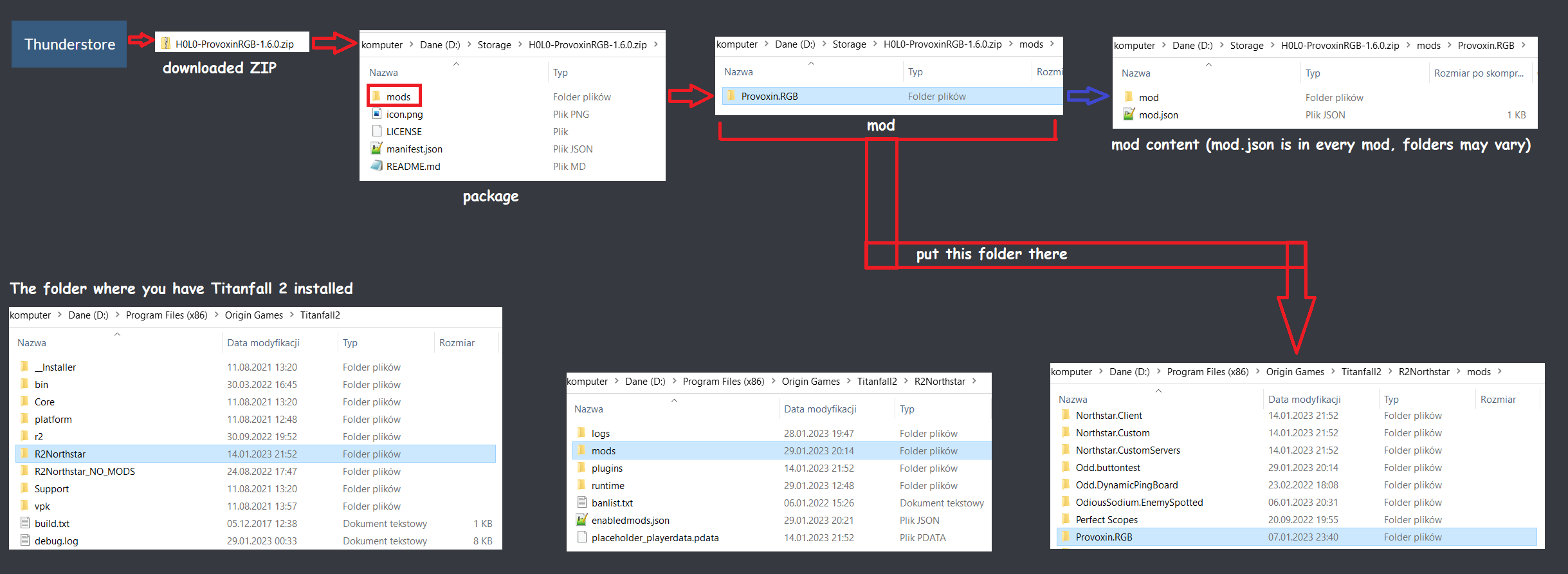
An easy way to install mods can be done by simply downloading a mod off of Thunderstore, unzipping the downloaded file, then placing that folder (usually named something like NachosChipeados-VanillaPlus-2.5.1, for example) inside the R2Titanfall/packages directory. Create it if it doesn't exist.
Alternatively, you can follow the guide for installing mods in the mods directory.
R2Titanfall/packages/NachosChipeados-VanillaPlus-2.5.1/mods. That's NOT the right folder.For both ways, remember to also download dependencies listed in the mod page (ignore Mod Settings if it's listed)