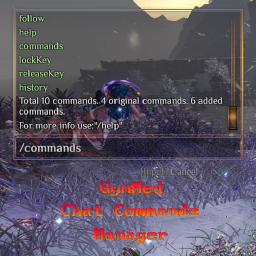

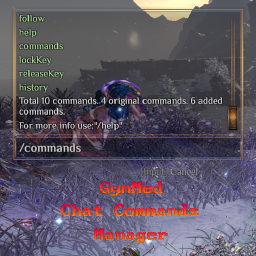



Commands can be created through the Mods Communicator without the need to build a custom UI. This provides fast and convenient access to dynamic mod methods through chat commands.
The Chat Commands Manager includes command history and allows navigation using
the ArrowUp and ArrowDown keys. It also provides several
helper commands and the ability to bind recently used commands to hotkeys.
As a command manager, it allows inspection of all registered commands, including the original Outward commands. The tool also supports creating cheat commands and debug-mode–required commands. When cheat commands are used, the current game session will be marked as unsavable, preventing progress from being saved.
Firstly, install Mods
Communicator After that,
you can publish and subscribe to ChatCommandsManager events.
All events are registered and visible in Mods Communicator’s logging system. However, it is still recommended to read the event descriptions below and review the examples.
The most important commands are:
/commands, /help, and /history.
These commands provide essential information about available commands and their usage.
For hotkey control, the following commands are available:
/lockKey and /releaseKey.
Use /help lockKey for detailed information about how to use these
commands.
gymmed.chat_commands_manager_*ChatCommandsManager@AddChatCommandAccepts all command parameters data described in the Command Parameters section.
ResourcesPrefabManager.Load. This is done for safety in case a soft
dependency is missing. Commands can be added or removed dynamically at any time.
using OutwardModsCommunicator;
...
[HarmonyPatch(typeof(ResourcesPrefabManager), nameof(ResourcesPrefabManager.Load))]
public class ResourcesPrefabManager_Load
{
    static void Postfix(ResourcesPrefabManager __instance)
    {
        Dictionary<string, (string, string)> myParameters = new()
        {
            {
                "myParameter",
                ("parameterDescription", defaultValue)
            }
        };
        Action<Character, Dictionary<string, string>> myFunction = MyCommandFunction;
        var payload = new EventPayload
        {
            // command is a chat message trigger /myCommandName
            ["command"] = "myCommandName",
            ["parameters"] = myParameters,
            ["function"] = myFunction,
            ["description"] = "Your command description that will be seen through /help myCommandName ."
        };
        EventBus.Publish("gymmed.chat_commands_manager_*", "ChatCommandsManager@AddChatCommand", payload);
    }
}
public static void MyCommandFunction(Character characterSender, Dictionary<string, string> arguments)
{
    ChatPanel panel = characterSender?.CharacterUI?.ChatPanel;
    if(panel == null)
    {
        Plugin.LogMessage("MySuperFunction Tried to use missing chatPanel.");
        return;
    }
    // send message to chat
    panel.ChatMessageReceived("System", "<color=#9900cc>Your command was triggered!</color>");
    // parameter value = argument
    arguments.TryGetValue("myParameter", out string parameterValue);
    if(string.IsNullOrWhiteSpace(parameterValue))
    {
        ...Your code when argument is missing.
        return;
    }
    ...Your code when argument is provided.
}ChatCommandsManager@RemoveChatCommandAccepts only the following parameter:
"command" — the name of the command to remove.
using OutwardModsCommunicator;
...
[HarmonyPatch(typeof(ResourcesPrefabManager), nameof(ResourcesPrefabManager.Load))]
public class ResourcesPrefabManager_Load
{
    static void Postfix(ResourcesPrefabManager __instance)
    {
        var payload = new EventPayload
        {
            // command is a chat message trigger /myCommandName
            ["command"] = "myCommandName",
        };
        EventBus.Publish("gymmed.chat_commands_manager_*", "ChatCommandsManager@RemoveChatCommand", payload);
    }
}gymmed.chat_commands_managerChatCommandsManager@AddChatCommand_AfterThis event is triggered after a command has been added and passes all command parameters back to the subscriber.
using OutwardModsCommunicator;
...
[HarmonyPatch(typeof(ResourcesPrefabManager), nameof(ResourcesPrefabManager.Load))]
public class ResourcesPrefabManager_Load
{
    static void Postfix(ResourcesPrefabManager __instance)
    {
        EventBus.Subscribe("gymmed.chat_commands_manager", "ChatCommandsManager@AddChatCommand_After", AddedCommand);
    }
}
public static void AddedCommand(EventPayload payload)
{
    if (payload == null) return;
    string commandName = payload.Get<string>("command", null);
    if(string.IsNullOrEmpty(commandName))
    {
        Log.LogMessage($"MyMod@AddedCommand didn't receive command variable!");
        return;
    }
    ...continue with execution...
}ChatCommandsManager@RemoveChatCommand_AfterThis event is triggered after a command has been removed and passes all command parameters back to the subscriber.
using OutwardModsCommunicator;
...
[HarmonyPatch(typeof(ResourcesPrefabManager), nameof(ResourcesPrefabManager.Load))]
public class ResourcesPrefabManager_Load
{
    static void Postfix(ResourcesPrefabManager __instance)
    {
        EventBus.Subscribe("gymmed.chat_commands_manager", "ChatCommandsManager@RemoveChatCommand_After", RemovedCommand);
    }
}
public static void RemovedCommand(EventPayload payload)
{
    if (payload == null) return;
    string commandName = payload.Get<string>("command", null);
    if(string.IsNullOrEmpty(commandName))
    {
        Log.LogMessage($"MyMod@RemovedCommand didn't receive command variable!");
        return;
    }
    ...continue with execution...
}| Variable Key | Type | Description |
|---|---|---|
| command | string | Required. The text players type in chat (e.g. "/command") to trigger your handler. |
| parameters | Dictionary<string, (string, string)> | Optional. Parameters with name and (description, default value) provided as dictionary. |
| function | Action <Character, Dictionary<string, string>> | Required. The method to execute when the command is triggered. Character is the command caller and Dictionary stores parameter and argument(value). |
| isCheatCommand | bool | Optional. Default false. Determines if player game can be saved after triggering your command. |
| description | string | Optional. Default null. Provides description of command for users. |
| debugMode | bool | Optional. Default false. Determines if command requires debug mode to work. |
You can view mod creation template here.
You can view outward basic chat commands mod here.
To manually set up, do the following
Outward\BepInEx\plugins\OutwardChatCommandsManager\.BepInEx\plugins\OutwardChatCommandsManager\ directory you created.Outward\BepInEx\plugins\OutwardChatCommandsManager\OutwardChatCommandsManager.dll
Launch the game.