





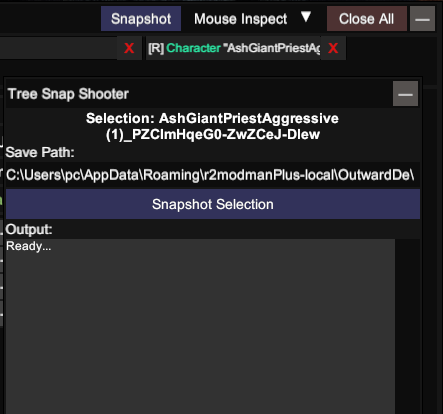
This mod requires:
InspectorPanel.ConstructPanelContent to add a "Snapshot" button in UnityExplorer's Inspector title barSnapShooterPanel with:
Game/BepInEx/plugins/The snapshot output includes:
=== PARENT HIERARCHY ===
Root (InstanceID: 100)
  Level1 (InstanceID: 200)
    Player (InstanceID: 300)
=== CHILDREN HIERARCHY ===
[0] Player (InstanceID: 300)
  [1] Child1 (InstanceID: 301)
  [1] Child2 (InstanceID: 302)
=== COMPONENTS ===
  Transform (InstanceID: 456)
  Rigidbody (InstanceID: 789)
=== GAME OBJECT REFLECTION (ALL CHILDREN) ---

--- Player (InstanceID: 300) [SELECTED] ---
  Transform (InstanceID: 456):
    property m_LocalPosition: (0, 0, 0)
    property m_LocalRotation: (0, 0, 0, 1)
  Rigidbody (InstanceID: 789):
    property mass: 1

--- Child1 (InstanceID: 301) ---
  Transform (InstanceID: 1001):
    property m_LocalPosition: (1, 2, 3)
When a field references a GameObject outside the selection, it's marked:
field m_Parent: [OUTSIDE_REFERENCE: InstanceID=999, Type=Transform] ParentName
By default, snapshots are saved to:
{Mod Location}/Snapshots/TreeSnapShooter_{GameObjectName}_{yyyy-MM-dd_HH-mm-ss}.txt
Example:
Game/BepInEx/plugins/UnityExplorerTreeSnapShooter/Snapshots/TreeSnapShooter_Player_2026-03-27_10-30-00.txt
Users can override the save path by entering a custom directory or file path in the input field.
To manually set up, do the following
Game\BepInEx\plugins\UnityExplorerTreeSnapShooter\.BepInEx\plugins\UnityExplorerTreeSnapShooter\ directory you created.Game\BepInEx\plugins\UnityExplorerTreeSnapShooter\UnityExplorerTreeSnapShooter.dll
Launch the game.