
Outward
You are viewing a potentially older version of this package. View Latest Version
Tired of running around looking like a freak in a bird mask? Change your gear's appearance with a new Transmogrify Crafting system!
| Menu | Description | |
|---|---|---|
| Transmogrify |  |
Customize your gear. Change the appearance of weapons or armor. |
| Alchemy |  |
(Optional) Adds an Alchemy crafting menu. Mix potions without deploying an alchemy kit. Enable in settings. |
| Cooking |  |
(Optional) Fully functional cooking from the character UI. Cook food without deploying a cooking pot. Enable in settings. |
| Recipe | Result | ||||
|---|---|---|---|---|---|
| Transmog Equipment |  |
 |
 |
 |
 |
| Remove Transmog | |
|
 |
|
|

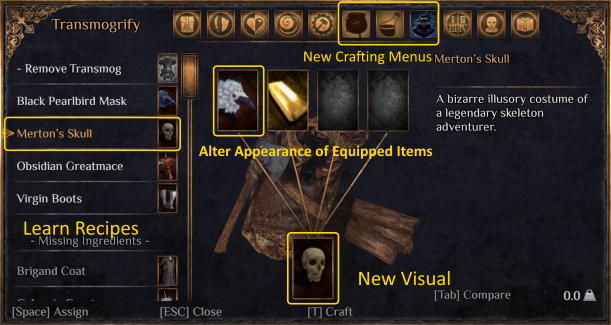
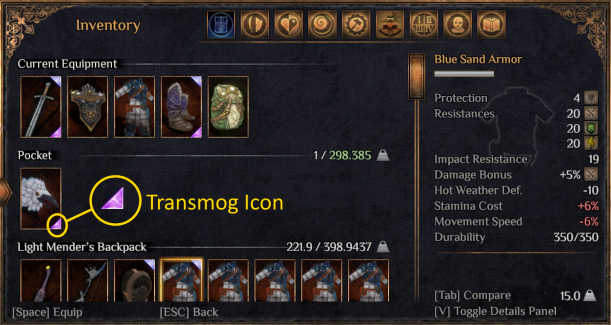
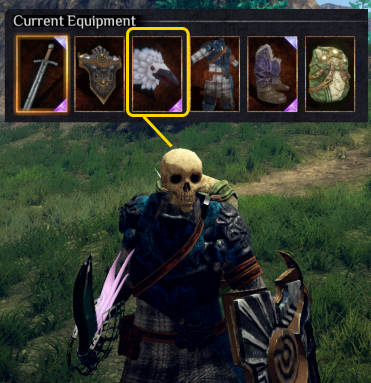
Transmorphic adds a new crafting system focused on customizing your equipment's visuals. Transmog Recipes (equipment appearances) are unlocking by finding and equipping gear. Once a transmog recipe is learned, any equipment item of the same type* can have its appearance altered to look like it in the new Transmogrify crafting menu. Only equipped items are selectable in the Transmogrify crafting menu. If the item you want to transmog (or remove) is not available to select in the new crafting menu, make sure you have it equipped.
*1h sword --> 1h sword, 2h axe --> 2h axe, Boots --> Boots, etc.
Alchemy and Cooking crafting menus can also be enabled in the Character UI. They are disabled by default in the options / settings file.