Summary
Transmogrify your equipment with a new crafting system. Weapons, Armor and now Backpacks, Lanterns and Lexicons. Plus balanced Alchemy and Cooking Menus.
Adds 3 New Crafting Menus
| Menu |
|
Description |
| Transmogrify |
 |
Customize your gear. Change the appearance of weapons or armor. |
| Alchemy |
 |
(Optional) Adds an Alchemy crafting menu. Mix potions without deploying an alchemy kit. Enable in settings. |
| Cooking |
 |
(Optional) Fully functional cooking from the character UI. Cook food without deploying a cooking pot. Enable in settings. |
New Recipes
| Recipe |
|
|
|
|
Result |
| Transmog Equipment |
 |
 |
 |
 |
 |
| Remove Transmog |
|
|
 |
|
|
Video (YouTube)

Instructions
- Learn new Transmog recipes by equipping gear.
- Transmogrify an Item (swap visuals with another).
- **Important** Equip the Item you want to change.
- Open the Transmogrify Crafting Menu
- Select the Transmog Recipe on the left.
- Confirm the Selected Item is the item you wish to apply the transmog to.
- Craft your new item.
- Any Enchantments are carried over to the new item.
- Remove a transmog from equipment with the "- Remove Transmogrify" recipe.
- Equip Item you wish to remove the Transmogrify from.
- Open the Transmogrify Crafting Menu.
- Select the "- Remove Transmog" recipe at the top.
- Select the Equipped Item you wish to remove the Transmog from.
- Craft your new item with the transmog removed.
- Any Enchantments are carried over to the new item.
Description
Transmorphic adds a new crafting system focused on customizing your equipment's visuals. Transmog Recipes (equipment appearances) are unlocking by finding and equipping gear. Once a transmog recipe is learned, any equipment item of the same type* can have its appearance altered to look like it in the new Transmogrify crafting menu. Only equipped items are selectable in the Transmogrify crafting menu. If the item you want to transmog (or remove) is not available to select in the new crafting menu, make sure you have it equipped.
*1h sword --> 1h sword, 2h axe --> 2h axe, Boots --> Boots, etc.
Alchemy and Cooking crafting menus can also be enabled in the Character UI. They are disabled by default in the options / settings file. Alchemy and Crafting menus now require 2 additional ingredients by default - Alchemy Kit or Cooking Pot and wood. The crafting kit is not consumed/destroyed on crafting. The new ingredient requirement can be disabled.
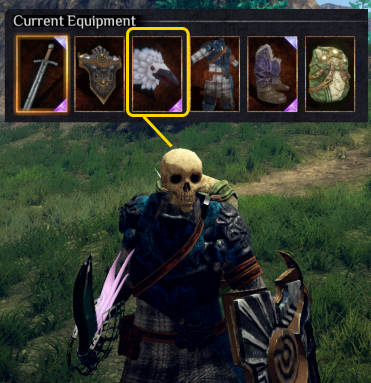
1. Equip Item

2. Transmog in New Crafting Menu
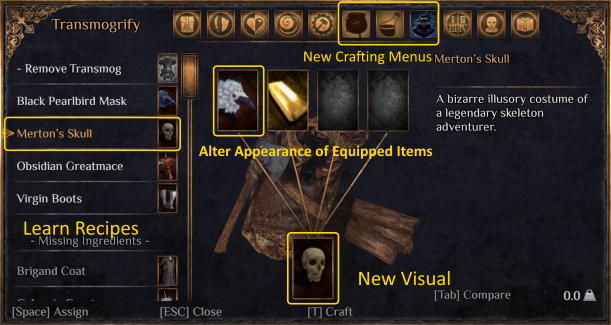
3. Custom Icon Identifies Transmog Gear
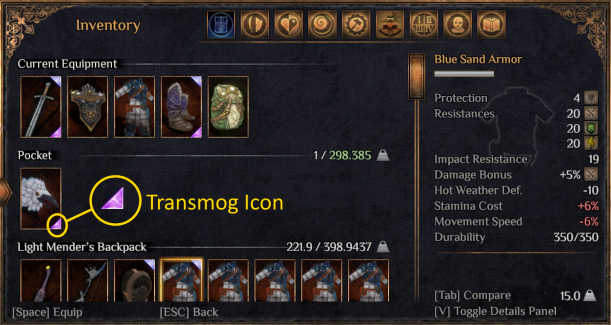
4. Re-equip Item
Change Logs
Latest Release 1.0.1
- Transmogs for Backpacks, Lanterns and Lexicons
- As with Armor and Weapons, an item must be equipped before adding or removing a transmog.
- Backpacks must be empty!
- Splitscreen support - Transmogrify, Alchemy and Cooking menus now work for the 2nd player in local co-op.
- Equipment is now automatically equipped after a transmog or remove transmog craft.
- Added 5th and 6th ingredients to Alchemy and Cooking reasons to try and balance them out.
- The 5th ingredient requires a crafting kit. Alchemy Kit or Cooking Pot. Light versions also apply. Kits are not consumed when crafting.
- The 6th ingredient is wood as a fuel source.
- The extra ingredients can be disabled in the configuration.
- Fixed issue where Alchemy menu could be shown even if it was disabled.
- Fixed issue with "Craft" footer not displaying if save is loaded with menu disabled and then its enabled.
- Controller Navigation fixes
- Fixed issue new crafting menu(s) navigation order when using a controller.
- There's a minor bug with the Tranmogrify menu when using a controller. On first navigating to the menu, you can't navigate to any of the recipes in the list. As a workaround, switch to another menu and back. This only happens the first time the menu is opened.
- Fixed issue with disabled menus still being selected when navigating with LB/RB.