PEAK
You are viewing a potentially older version of this package. View Latest Version
⚠️ You must currently load the Airport scene at least once for the Photos to work on other scenes.

## Settings file was created by plugin PhotoboothQOL v1.0.0
## Plugin GUID: PhotoboothQOL

[1. General]
## Select a UI color theme. Set to 'Custom' to use the manual hex color values.
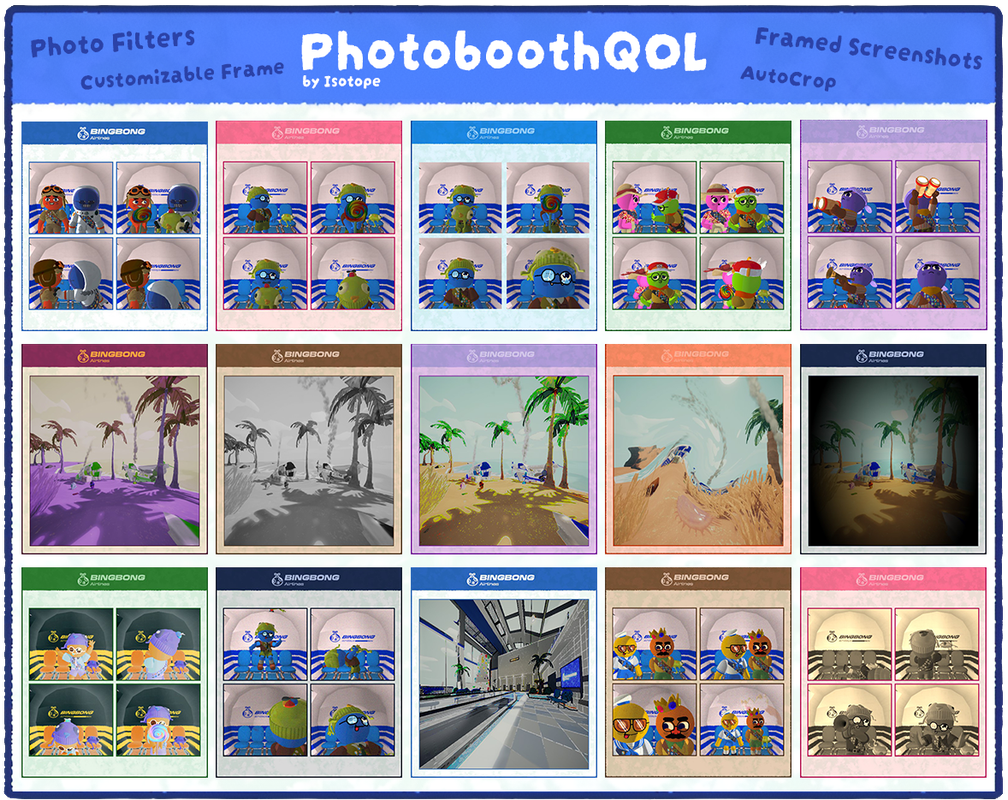
# Acceptable values: Custom, ClassicBlue, Vintage, ArcticNight, Autumn, AutumnLeaves, BingBong, BlueAndGold, BohemianSunset, CandyFloss, CherryBlossom, Cloudy, Coral, CyberpunkGlow, DeepSea, DeepSpace, Evergreen, FirstClass, Forest, Galaxy, Grapevine, Industrial, Lavender, LavenderFields, Lemonade, Mediterranean, Midnight, MidnightCity, MidnightFlight, Monochrome, Ocean, OceanBreeze, Orange, PastelDream, Peachy, PinkBlossom, RedPop, Sand, Sky, Slate, SpringMeadow, Stone, Sunflower, SunnyDay, Sunset, Tropical, Twilight, UrbanNight, VibrantOcean, VintagePostcard, Volcanic, Winter, WinterWonderland, ZenGarden
Theme Preset = Vintage

## Set to true to use a random theme for each photo, ignoring the 'ThemePreset' selection.
Enable Random Theme = false

## The visual filter to apply to photos.
# Acceptable values: None, Grayscale, Sepia, Invert, HighContrast, Psychedelic, Swirl, Pixelate, FilmGrain, Lomo, Cartoon, Glitch
Photo Filter = None

## Set to true to use a random filter for each photo, ignoring the 'PhotoFilter' selection.
Enable Random Filter = false

## The key to press to take a custom framed screenshot.
Screenshot Key = F11

## Enable an inner border around the individual photos.
Enable Inner Border = true


[2. Custom]
### Only used when Theme is set to Custom
## The color tint of the 'BINGBONG Airlines' logo.
Logo Color = #B04FE8

## The color of the main header area at the top.
Top Bar Color = #BD81E3

## The color of the paper background where the photos are placed.
Paper Color = #FFD9FA

## The color of the inner/outer border.
Border Color = #8E55B5
Please report any issues on GitHub or the PEAK Modding Discord - PhotoboothQOL Discord Thread
This mod is licensed under The MIT License (MIT) // GitHub Source Code
Feel free to use, copy, modify, merge, publish, distribute, sublicense, and/or sell copies of the Software,