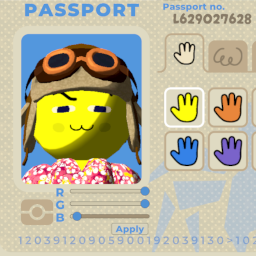
Skin Color Sliders
Lets you customize your skin color with rgb sliders allowing for full rgb color range, and syncs up with all players. Lets you add other custom preset skin mods without needing other players to have it, they only need SkinColorSliders installed.
All players will need this mod installed for it to sync.
Update!
1.1.0
- Ghosts, flares, and the scout report should now properly show the player's selected color.
- The preset skin color options are now selectable meaning you can use the default options as well as other skin mods that provide preset colors without needing everyone to have that mod, they only need to have SkinColorSliders installed.
How To Use
- When inside the Airport, opening your passport will show new controls under the passport photo.
- To set a new color, first adjust each slider to see how they affect the character in the passport photo.
- When you are ready to set your color, hit the Apply button below the sliders.
Installation
- Download the mod zip file.
- Move the SkinColorSliders folder inside the mod zip file into your BepInEx plugins folder located where you have installed Peak.
- Run the game and load into a new run. If sliders appear under the passport photo it means the installation was a success.