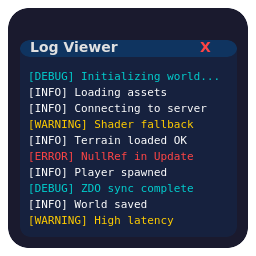
An in-game log viewer overlay for any BepInEx 5 Unity game, designed to help with debugging while developing mods.


UnityLogViewer.dll file into your BepInEx/plugins directory.Press F7 (default) to toggle the log viewer window. The window displays the most recent log output (500 lines by default, configurable via BufferSize).
The config file com.malafein.unitylogviewer.cfg is generated in your BepInEx/config folder after the first run. Settings can also be changed in-game via Configuration Manager.
| Setting | Default | Description |
|---|---|---|
| ShowWindow | false | Toggle the log viewer window on/off. Use this if the hotkey doesn't work with your game's input system. |
| ToggleShortcut | F7 | Keyboard shortcut to toggle the log viewer. |
| Filter | (empty) | Persistent filter string (supports regex). |
| FontName | (empty) | Font to use for log text. Leave empty for the default UI font. If valid OS fonts are detected at runtime, a selector appears in the log viewer window. Note: font selection has not yet been tested on all platforms. |
| BackgroundOpacity | 40 | Background opacity of the log window (0–100). |
| Pinned | false | Pin the log view in place, hiding window decorations and disabling interaction. |
| BufferSize | 500 | Maximum number of log lines to keep in the buffer (100–5000). |
These values are saved and updated automatically whenever you move or resize the window, so your preferred layout is preserved between sessions.
| Setting | Default | Description |
|---|---|---|
| WindowX | 833 | Horizontal position of the window (pixels from left). |
| WindowY | 1019 | Vertical position of the window (pixels from top). |
| WindowWidth | 1507 | Width of the window in pixels. |
| WindowHeight | 300 | Height of the window in pixels. |
Eight configurable highlight slots let you color-code log lines by pattern. Each slot has a pattern and a color setting. The first matching rule wins.
| Setting | Default | Description |
|---|---|---|
| Highlight1Pattern | \[ERROR\] |
Regex pattern for highlight rule 1. |
| Highlight1Color | red | Color for highlight rule 1. |
| Highlight2Pattern | \[WARNING\] |
Regex pattern for highlight rule 2. |
| Highlight2Color | yellow | Color for highlight rule 2. |
| Highlight3Pattern | \[DEBUG\]|\[DBG\] |
Regex pattern for highlight rule 3. |
| Highlight3Color | cyan | Color for highlight rule 3. |
| Highlight4Pattern | \[INFO\] |
Regex pattern for highlight rule 4. |
| Highlight4Color | white | Color for highlight rule 4. |
| Highlight5–8 | (empty) | Additional slots available for custom rules. |
Colors can be specified as a named color (red, yellow, cyan, green, blue, magenta, orange, white) or a hex value (#RRGGBB).
See CHANGELOG.md for version history.