

R.E.P.O.
You are viewing a potentially older version of this package. View Latest Version
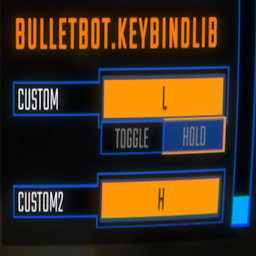
Keybinds.Register(string name, string binding) => KeybindData
To register a keybind:
Keybinds.Register("Push", "<Keyboard>/b");
If you want to have toggle states:
KeybindData keybindData = Keybinds.Register("Push", "<Keyboard>/b");
if (keybindData != null)
{
    keybindData.toggleData = new KeybindToggleData()
    {
        defaultValue = true,
        falseText = "Off",
        trueText = "On"
    };
}
If you want to use the keybind:
SemiFunc.InputDown(keybindData.inputKey);
SemiFunc.InputUp(keybindData.inputKey);
SemiFunc.InputHold(keybindData.inputKey);
SemiFunc.InputToggleGet(keybindData.inputKey); // Only use this when you actually set the "toggleData" variable otherwise it will error.
There are much more variables in the "KeybindData" class. Check the class in dnSpy for more details.