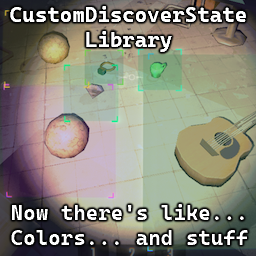
This library allows you to create custom colored highlights for ValuableDiscoverGraphic (the thing that appears when you see a valuable or a dead friend for a first time). Doesn't do anything by itself, other mods are meant to use it.
GUID: Kistras-CustomDiscoverStateLib
I suggest looking into vanilla ValuableDiscoverCustom class if you need:
This works better for my usecase, where I needed to dynamically scan for items & highlight them without interfering with the game too much. Also this was made in the time when there were no easy support for this sort of thing
ValuableDiscover.instance.New() with the state you created.Priority of the states is as follows:
ValuableDiscover.instance.New())Visit github page for working color-coding
using System;
using System.Linq;
using BepInEx;
using BepInEx.Logging;
using UnityEngine;

namespace CustomDiscoverStateExample;

using CDS = CustomDiscoverStateLib.CustomDiscoverState;
using State = ValuableDiscoverGraphic.State;

[BepInPlugin(MyPluginInfo.PLUGIN_GUID, MyPluginInfo.PLUGIN_NAME, MyPluginInfo.PLUGIN_VERSION)]
[BepInDependency("Kistras-CustomDiscoverStateLib")]
public class Plugin : BaseUnityPlugin {
    internal static new ManualLogSource Logger;

    // Apply this one manually to PhysGrabObjects
    private static State newDiscoverGraphic = CDS.AddNewDiscoverGraphic(
            middle: new Color(0.8f, 0.0f, 0.5f, 0.075f),
            corner: new Color(0.9f, 0.1f, 0.6f, 0.75f));

    // This one will be applied if the condition matches
    // In this example - if the value of an object is bigger than 1500
    private static State newConditionalDiscoverGraphic = CDS.AddNewConditionalDiscoverGraphic(
        condition: (ValuableDiscover valuableDiscover, PhysGrabObject physGrabObject) => {
            if (!physGrabObject) return false;
            ValuableObject valuableObject = physGrabObject.transform.GetComponent<ValuableObject>();
            if (!valuableObject) return false;
            return valuableObject.dollarValueCurrent > 1500;
        },
        middle: new Color(0.0f, 0.0f, 0.5f, 0.075f),
        corner: new Color(0.0f, 0.1f, 0.6f, 0.75f));

    // This one will be applied if the function will both return true and set middle/border color
    // In this example - discoverGraphic of any valuable object will be based on it's currency
    //     to initCurrency relation (red if nearly destroyed, green if wasn't damaged)
    private static Color middleColorDestroyed = new Color(1.0f, 0.0f, 0.0f, 0.075f);
    private static Color cornerColorDestroyed = new Color(1.0f, 0.1f, 0.0f, 0.75f);
    private static Color middleColorIntact = new Color(0.0f, 1.0f, 0.0f, 0.075f);
    private static Color cornerColorIntact = new Color(0.0f, 1.0f, 0.1f, 0.75f);

    private static State newDynamicDiscoverGraphic = CDS.AddNewDynamicDiscoverGraphic(
        (ValuableDiscover discover, PhysGrabObject physGrabObject, out Color? middle, out Color? corner) => {
            corner = middle = null;

            if (!physGrabObject) return false;
            ValuableObject valuableObject = physGrabObject.transform.GetComponent<ValuableObject>();
            if (!valuableObject || valuableObject.discovered == false) return false;

            // This is a value between 0 and 1, where 0 means the object is destroyed and 1 means it's in perfect condition
            float damagePercent = Math.Clamp(valuableObject.dollarValueCurrent / Math.Max(1, valuableObject.dollarValueOriginal), 0, 1);

            corner = cornerColorIntact * damagePercent + cornerColorDestroyed * (1 - damagePercent);
            middle = middleColorIntact * damagePercent + middleColorDestroyed * (1 - damagePercent);

            return true;
        });

    private void Awake() {
        Logger = base.Logger;
        Logger.LogInfo($"Plugin {MyPluginInfo.PLUGIN_GUID} is loaded!");

        // Utilize the custom discover graphic state as an example
        // NOTE: Doesn't actually do anything, since no objects are spawned when the plugin is loaded
        //       This is just an example of how to use the custom discover graphic state
        ValuableObject someValuable = FindObjectsOfType<ValuableObject>().FirstOrDefault();
        if (someValuable) {
            ValuableDiscover.instance.New(someValuable.physGrabObject, newDiscoverGraphic);
        }
    }
}

ValuableDiscoverGraphic.State baseGameReminder = CustomDiscoverState.AddNewDiscoverGraphic(
    middle: new Color(0.642f, 0.619f, 0.481f, 0.039f),
    corner: new Color(0.642f, 0.619f, 0.481f, 0.39f));
ValuableDiscoverGraphic.State baseGameBad = CustomDiscoverState.AddNewDiscoverGraphic(
    middle: new Color(1f, 0.0f, 0.067f, 0.059f),
    corner: new Color(1f, 0.1f, 0.067f, 0.59f));
ValuableDiscoverGraphic.State baseGameDiscover = CustomDiscoverState.AddNewDiscoverGraphic(
    middle: new Color(1f, 0.863f, 0f, 0.118f),
    corner: new Color(1f, 0.863f, 0f, 1f));
Because I've seen two mods already that implement this functionality and I'm in the process of making the third one. So making a library seemed like a right choice