

Risk of Rain Returns
You are viewing a potentially older version of this package. View Latest Version
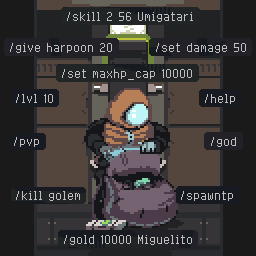
Add commands to the in-game chat.
Since we haven't found a way to get the chat in singleplayer please play multiplayer for this (don't worry it should skip the 5 second timer after you press ready).
Commands look like this : /command <Mandatory Field> [Optional Field].
I you don't specify a [username], the command will apply to you. Usernames have to be exact and are case sensitive.
/help [command] gives you a list of all commands or information on a specified command.
/give <item name or id> [amount] [username] gives the specified player any number of one item. Default amount is 1.
/remove <item name or id> [amount] [username] remove the any number of one item from the specified player. Default amount is 1.
/gold <amount> [username] gives the specified player gold.
/lvl <number> gives levels to all players (exp is shared in RoRR).
/spawntp spawns a teleporter at your location that sends you to the next stage (it cannot make you go to the final stage).
/god [username] make the specified player invulnerable (this doesn't make you invulnerable to falldamage, but falldamage can't kill you anyway).
/kill [username or monster name] kills the specified player or all monsters from the specified monstertype.
/pvp enables pvp mode in multiplayer, setting each player to different teams. You can still be damaged by monsters.
/skill <skillbar slot> <skill name or skill id> [username] replace a skill by another in your skillbar. The skillbar slots are numbered 1-4.
/peaceful prevents ennemies from spawning (except from the teleporter)
/set <field> <value> [username] sets an attribute field for the player.
The possible fields for /set are : armor, attack_speed, critical_chance, damage, hp_regen, maxhp, maxbarrier, maxshield, armor_level, attack_speed_level, critical_chance_level, damage_level, hp_regen_level, maxhp_cap, maxhp_level.
Host Only
/kick [username] kick the specified user from the game.Item Cheat Sheet with Item IDs (and skills coming soon™)
You can add your own command like this :
examplemod = true -- this lets you locate your own mod later
-- actor instance who wrote the command
-- args1... the words separated by spaces in order after the command ("/command args1 args2 args3 ..."). These are strings containing any non-space characters
function example_func(actor, args1, args2)
    -- your code here
end

mods.on_all_mods_loaded(function()
    -- find chatconsole script
    for k, v in pairs(mods) do if type(v) == "table" and v.chatconsole then ChatConsole = v end end
    -- add the function you want to add
    for k, v in pairs(mods) do
        if type(v) == "table" and v.examplemod then
            -- name in the function array, reference, usage text, command ("/example")
            -- optional fields go at the end after mandatory fields (you can avoid doing this if you know what you're doing)
            -- you can overwrite default commands by using the same name (here examplemod_examplefunc)
            ChatConsole.add_function(examplemod_examplefunc, v.example_func, "example", "<y>/example <example mandatory field> [example optional field]")
        end
    end
end)
This mod depends on the Return Of Modding loader:
ReturnOfModding/plugins folder.For questions or bug reports, you can find us in the RoRR Modding Server @Miguelito @Umigatari