

Risk of Rain 2
You are viewing a potentially older version of this package. View Latest Version

Bursts of Rain is a lightweight assembly loader that's used to load Burst compiled unity assemblies, allowwing for the usage of Burst-Compiled Jobs within mods for Risk of Rain 2.
To allow for the full utilization of the Data Oriented Technology Stack (DOTS)'s systems, this Thunderstore Package redistributes the following unity assemblies, which are not found within the base game:
| Assembly | Unity Package Version |
|---|---|
| System.Runtime | Not Applicable |
| Unity.Burst | 1.8.18 |
| Unity.Collections | 1.5.1 |
| Unity.Mathematics | 1.2.6 |
These assemblies should not cause issues on existing profiles.
Bursts of Rain is used mainly as a front-end and ease of loading for Bust Assemblies utilizing BurstRuntime.LoadAdditionalLibrary's method, BurstsOfRainMain contains a method that can be used to simplify this process, by giving it your PluginInfo, which serves as the start location, and a string, which should be the name of the bursted assembly.
//Example
public class MyModWithBurstedAssemblies : BaseUnityPlugin
{
    private void Awake()
    {
        //Load the assembly named "MyMod_Burst.dll" onto the Burst Runtime
        BurstsOfRainMain.AddBurstAssembly(Info, "MyMod_Burst.dll");
    }
}
Below are the main entries for each of the unity packages this thunderstore package redistributes, alongside a brief description:
| Package | Description |
|---|---|
| Burst | Burst is a compiler that translates from IL/.NET bytecode to highly optimized native code using LLVM. |
| Collections | A C# collections library providing data structures that can be used in jobs, and optimized by Burst compiler. |
| Mathematics | Unity’s C# SIMD math library providing vector types and math functions with a shader like syntax. Methods within are Job Safe |
While not redistributed by the mod since its part of the Core module, an understanding of the Jobs System is also required.
Development of mods utilizing burst follows very similar procedures as regular Burst-centered job development, utilization of Data oriented programming is recommended over Object oriented programming to allow for the full utilization of the Jobs and Burst system, an example on how to "Burstify" a complex behaviour can be found in this Github Repository, courtesy of Nebby.
Utilizing ThunderKit as your main mod development environment is recommended, as there you can utilize the direct packages of Burst, Collections and Mathematics.
Burstifying an existing assembly is done utilizing the BCL.exe file found within the Burst package, specifically in Burst/.Runtime
For more information on how to utilize the BCL.exe file directly, look below at the "Non ThunderKit" section.
For burstifying your assembly utilizing the ThunderKit development environment, it is recommended to utilize the RoR2ThunderBurster package, which contains the following utilities for deploying your bursted assemblies
BurstAssemblyDefinitionsDatum: A subclass of ThunderKit's AssemblyDefinitions manifest datum, which is used to mark that the Assembly Definitions within should be passed thru the Burst Compiler if possible.BurstStagedAssemblies: A custom PipelineJob that requires a BurstAssemblyDefinitionsDatum, it utilizes reflection to enqueue and compile the selected assemblies with BCL, mimicking as close as possible the actual compilation of Bursted Assemblies when a Player is Built.Replacing your Manifest's AssemblyDefinitions datum with a BurstAssemblyDefinitionsDatum, and running a BurstStagedAssemblies job after a StageAssemblies is enough to burst-compile your assembly.
To burstify an assembly without ThunderKit you'll need to get access to the internal Burst compiler (BCL.exe), a download of the package can be found in this website: https://download.packages.unity.com/com.unity.burst/. alternatively, if you trust the links in this readme, click here to download Burst version 1.8.18
Below is a small guide on how to use the compiler, this part may be moved to the R2Wiki at a later date.
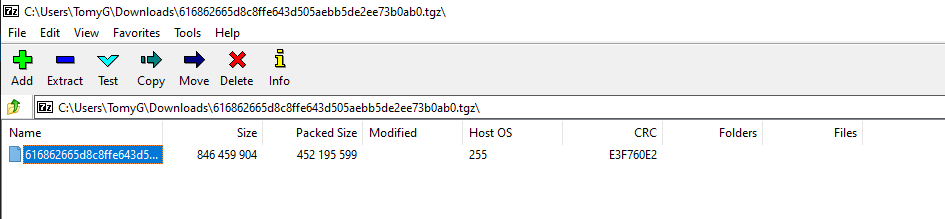
Package folder, and locate the .Runtime folder, this .Runtime folder contains the BCL.exe, which contains the compiler.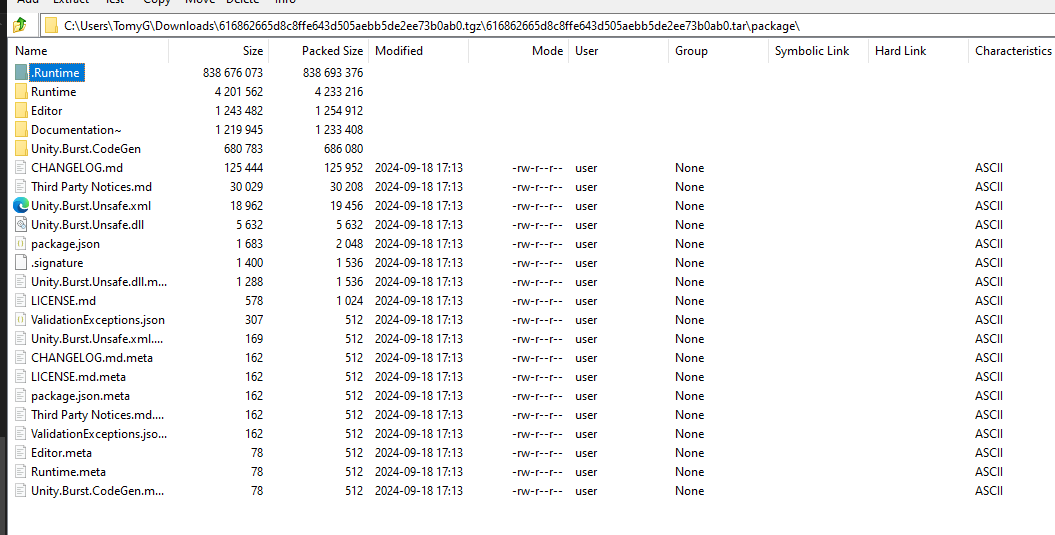
.Runtime to a folder you desire.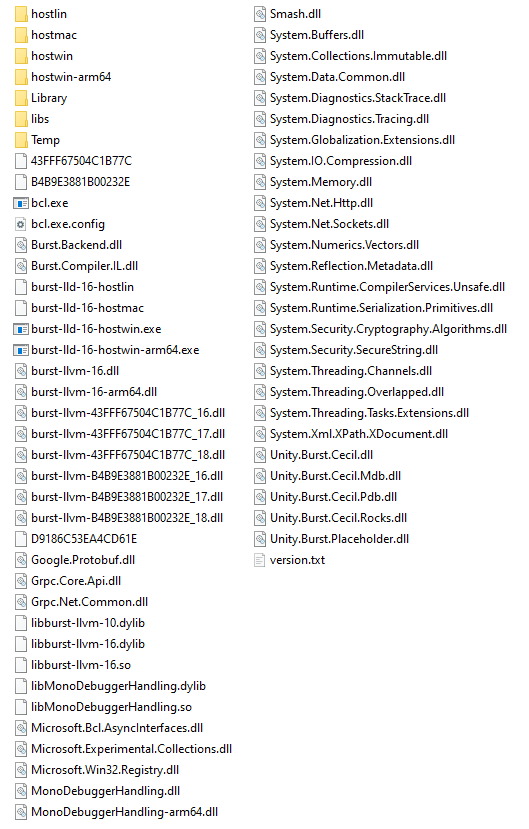
You can write a .txt file that contains the necesary arguments for Burst compiling your assembly, below is an example of one.
--key-folder=D:/ProgramFiles/UnityInstallations/2021.3.33f1/Editor/Data/PlaybackEngines/WindowsStandaloneSupport
--decode-folder=D:\RoR2Related\Projects\Starstorm2\SS2-Project\Library\Burst
--platform=Windows
--assembly-defines=Starstorm2;UNITY_2021_3_33;UNITY_2021_3;UNITY_2021;UNITY_5_3_OR_NEWER;UNITY_5_4_OR_NEWER;UNITY_5_5_OR_NEWER;UNITY_5_6_OR_NEWER;UNITY_2017_1_OR_NEWER;UNITY_2017_2_OR_NEWER;UNITY_2017_3_OR_NEWER;UNITY_2017_4_OR_NEWER;UNITY_2018_1_OR_NEWER;UNITY_2018_2_OR_NEWER;UNITY_2018_3_OR_NEWER;UNITY_2018_4_OR_NEWER;UNITY_2019_1_OR_NEWER;UNITY_2019_2_OR_NEWER;UNITY_2019_3_OR_NEWER;UNITY_2019_4_OR_NEWER;UNITY_2020_1_OR_NEWER;UNITY_2020_2_OR_NEWER;UNITY_2020_3_OR_NEWER;UNITY_2021_1_OR_NEWER;UNITY_2021_2_OR_NEWER;UNITY_2021_3_OR_NEWER;ENABLE_AR;ENABLE_AUDIO;ENABLE_CACHING;ENABLE_CLOTH;ENABLE_EVENT_QUEUE;ENABLE_MICROPHONE;ENABLE_MULTIPLE_DISPLAYS;ENABLE_PHYSICS;ENABLE_TEXTURE_STREAMING;ENABLE_VIRTUALTEXTURING;ENABLE_UNET;ENABLE_LZMA;ENABLE_UNITYEVENTS;ENABLE_VR;ENABLE_WEBCAM;ENABLE_UNITYWEBREQUEST;ENABLE_WWW;ENABLE_CLOUD_SERVICES;ENABLE_CLOUD_SERVICES_ADS;ENABLE_CLOUD_SERVICES_USE_WEBREQUEST;ENABLE_CLOUD_SERVICES_CRASH_REPORTING;ENABLE_CLOUD_SERVICES_PURCHASING;ENABLE_CLOUD_SERVICES_ANALYTICS;ENABLE_CLOUD_SERVICES_UNET;ENABLE_CLOUD_SERVICES_BUILD;ENABLE_CLOUD_LICENSE;ENABLE_EDITOR_HUB_LICENSE;ENABLE_WEBSOCKET_CLIENT;ENABLE_DIRECTOR_AUDIO;ENABLE_DIRECTOR_TEXTURE;ENABLE_MANAGED_JOBS;ENABLE_MANAGED_TRANSFORM_JOBS;ENABLE_MANAGED_ANIMATION_JOBS;ENABLE_MANAGED_AUDIO_JOBS;ENABLE_MANAGED_UNITYTLS;INCLUDE_DYNAMIC_GI;ENABLE_SCRIPTING_GC_WBARRIERS;PLATFORM_SUPPORTS_MONO;RENDER_SOFTWARE_CURSOR;ENABLE_VIDEO;ENABLE_ACCELERATOR_CLIENT_DEBUGGING;PLATFORM_STANDALONE;TEXTCORE_1_0_OR_NEWER;PLATFORM_STANDALONE_WIN;UNITY_STANDALONE_WIN;UNITY_STANDALONE;ENABLE_RUNTIME_GI;ENABLE_MOVIES;ENABLE_NETWORK;ENABLE_NVIDIA;ENABLE_CRUNCH_TEXTURE_COMPRESSION;ENABLE_UNITY_GAME_SERVICES_ANALYTICS_SUPPORT;ENABLE_OUT_OF_PROCESS_CRASH_HANDLER;ENABLE_CLUSTER_SYNC;ENABLE_CLUSTERINPUT;PLATFORM_UPDATES_TIME_OUTSIDE_OF_PLAYER_LOOP;GFXDEVICE_WAITFOREVENT_MESSAGEPUMP;ENABLE_WEBSOCKET_HOST;ENABLE_MONO;NET_STANDARD_2_0;NET_STANDARD;NET_STANDARD_2_1;NETSTANDARD;NETSTANDARD2_1;DEVELOPMENT_BUILD;ENABLE_PROFILER;DEBUG;TRACE;UNITY_ASSERTIONS;ENABLE_CUSTOM_RENDER_TEXTURE;ENABLE_DIRECTOR;ENABLE_LOCALIZATION;ENABLE_SPRITES;ENABLE_TERRAIN;ENABLE_TILEMAP;ENABLE_TIMELINE;ENABLE_LEGACY_INPUT_MANAGER;TEXTCORE_FONT_ENGINE_1_5_OR_NEWER;RISKOFRAIN2;TK_ADDRESSABLE;RISKOFTHUNDER_BEPINEX_GUI;RISKOFTHUNDER_FIXPLUGINTYPESSERIALIZATION;RISKOFTHUNDER_ROR2BEPINEXPACK;BBEPIS_BEPINEXPACK;RISKOFTHUNDER_HOOKGENPATCHER;RISKOFTHUNDER_R2API_CORE;RISKOFTHUNDER_R2API_CONTENTMANAGEMENT;RISKOFTHUNDER_R2API_ADDRESSABLES;RISKOFTHUNDER_R2API_ARTIFACTCODE;RISKOFTHUNDER_R2API_COLORS;RISKOFTHUNDER_R2API_COMMANDHELPER;RISKOFTHUNDER_R2API_DAMAGETYPE;RISKOFTHUNDER_R2API_DEPLOYABLE;RISKOFTHUNDER_R2API_DIFFICULTY;RISKOFTHUNDER_R2API_DIRECTOR;RISKOFTHUNDER_R2API_DOT;RISKOFTHUNDER_R2API_ELITES;RISKOFTHUNDER_R2API_NETWORKING;RISKOFTHUNDER_R2API_PREFAB;RISKOFTHUNDER_R2API_RECALCULATESTATS;RISKOFTHUNDER_R2API_RULEBOOK;RISKOFTHUNDER_R2API_STAGES;RISKOFTHUNDER_R2API_STRINGSERIALIZEREXTENSIONS;RISKOFTHUNDER_R2API_TEMPVISUALEFFECT;RUNE580_RISK_OF_OPTIONS;SMOOTH_SALAD_SHADERSWAPPER;NEBBY_LOADINGSCREENSPRITEFIX;UNITY_POST_PROCESSING_STACK_V2;RISKOFTHUNDER_R2API_ITEMS;RISKOFTHUNDER_R2API_LANGUAGE;RISKOFTHUNDER_R2API_ORB;AMOGUS_LOVERS_STANDALONEANCIENTSCEPTER;SS2_GAME_IMPORTED;CSHARP_7_OR_LATER;CSHARP_7_3_OR_NEWER
--root-assembly=D:\RoR2Related\Projects\Starstorm2\SS2-Project\ThunderKit\Libraries\Starstorm2.dll
--output=D:\RoR2Related\Projects\Starstorm2\SS2-Project\ThunderKit\Libraries\Starstorm2_Burst
--temp-folder=D:\RoR2Related\Projects\Starstorm2\SS2-Project\Temp\Burst
--target=X64_SSE2
--target=AVX2
--linker-options=PdbAltPath="Starstorm2_Data/Plugins/x86_64/lib_burst_generated.pdb"
--assembly-folder=D:\RoR2Related\Projects\Starstorm2\SS2-Project\ThunderKit\Libraries
--assembly-folder=D:\ProgramFiles\UnityInstallations\2021.3.33f1\Editor\Data\PlaybackEngines\WindowsStandaloneSupport\Variations\mono\Managed
--assembly-folder=D:\RoR2Related\Projects\Starstorm2\SS2-Project\Packages\BepInExPack\BepInExPack\BepInEx\core
--assembly-folder=D:\RoR2Related\Projects\Starstorm2\SS2-Project\Packages\Risk of Rain 2
--assembly-folder=D:\RoR2Related\Projects\Starstorm2\SS2-Project\Packages\mmhook-assemblies
--assembly-folder=D:\RoR2Related\Projects\Starstorm2\SS2-Project\Packages\StandaloneAncientScepter
--assembly-folder=D:\RoR2Related\Projects\Starstorm2\SS2-Project\Packages\R2API_ArtifactCode\plugins\R2API.ArtifactCode
--assembly-folder=D:\RoR2Related\Projects\Starstorm2\SS2-Project\Packages\R2API_Colors\plugins\R2API.Colors
--assembly-folder=D:\RoR2Related\Projects\Starstorm2\SS2-Project\Packages\R2API_ContentManagement\plugins\R2API.ContentManagement
--assembly-folder=D:\RoR2Related\Projects\Starstorm2\SS2-Project\Packages\R2API_Core\plugins\R2API.Core
--assembly-folder=D:\RoR2Related\Projects\Starstorm2\SS2-Project\Packages\R2API_DamageType\plugins\R2API.DamageType
--assembly-folder=D:\RoR2Related\Projects\Starstorm2\SS2-Project\Packages\R2API_Director\plugins\R2API.Director
--assembly-folder=D:\RoR2Related\Projects\Starstorm2\SS2-Project\Packages\R2API_Dot\plugins\R2API.Dot
--assembly-folder=D:\RoR2Related\Projects\Starstorm2\SS2-Project\Packages\R2API_Elites\plugins\R2API.Elites
--assembly-folder=D:\RoR2Related\Projects\Starstorm2\SS2-Project\Packages\R2API_Networking\plugins\R2API.Networking
--assembly-folder=D:\RoR2Related\Projects\Starstorm2\SS2-Project\Packages\R2API_Prefab\plugins\R2API.Prefab
--assembly-folder=D:\RoR2Related\Projects\Starstorm2\SS2-Project\Packages\R2API_RecalculateStats\plugins\R2API.RecalculateStats
--assembly-folder=D:\RoR2Related\Projects\Starstorm2\SS2-Project\Packages\R2API_Difficulty\plugins\R2API.Difficulty
--assembly-folder=D:\RoR2Related\Projects\Starstorm2\SS2-Project\Packages\R2API_TempVisualEffect\plugins\R2API.TempVisualEffect
--assembly-folder=D:\RoR2Related\Projects\Starstorm2\SS2-Project\Packages\Risk_Of_Options\plugins\RiskOfOptions
--assembly-folder=D:\RoR2Related\Projects\Starstorm2\SS2-Project\Packages\R2API_Addressables\plugins\R2API.Addressables
--assembly-folder=D:\RoR2Related\Projects\Starstorm2\SS2-Project\Packages\R2API_Deployable\plugins\R2API.Deployable
--assembly-folder=D:\RoR2Related\Projects\Starstorm2\SS2-Project\Packages\R2API_Rulebook\plugins\R2API.Rulebook
--assembly-folder=D:\ProgramFiles\UnityInstallations\2021.3.33f1\Editor\Data\NetStandard\ref\2.1.0
--assembly-folder=D:\ProgramFiles\UnityInstallations\2021.3.33f1\Editor\Data\MonoBleedingEdge\lib\mono\unityaot-win32
--assembly-folder=D:\ProgramFiles\UnityInstallations\2021.3.33f1\Editor\Data\MonoBleedingEdge\lib\mono\unityaot-win32\Facades
--assembly-folder=D:\ProgramFiles\UnityInstallations\2021.3.33f1\Editor\Data\NetStandard\Extensions\2.0.0
--assembly-folder=D:\ProgramFiles\r2modman\DataFolder\RiskOfRain2\profiles\MSU2Dev\BepInEx\plugins\RiskofThunder-Bursts_of_Rain\.RuntimeAssemblies
--assembly-folder=D:\RoR2Related\Projects\Starstorm2\SS2-Project\Library\ScriptAssemblies
--pdb-search-paths=Temp/ManagedSymbols/
--generate-link-xml=Temp\burst.link.xml
--debug=Full
--opt-level=2
Afterwards you can specify the file directly on the command prompt to let the compiler use the data within the file as the arguments for compilation:
bcl.exe +burstc @"PathToTheFileWithTheArguments"
Below is a list of the possible arguments to use with the compiler, alongside what they do, text in bold is not mentioned directly by the compiler when using bcl --help
Multiple values are separated by |
Entries that end with = means they expect a value from the valid values list. If they lack a valid values entry its because the valid values are unkown at the time of writing
Entries without specific valid values means theyre toggles
Valid Values
Windows|macOs|Linux|Android|iOS|PS4|XboxOne_Deprecated|Wasm|UWP|Lumin|Switch|Stadia_Deprecated|tvOS|EmbeddedLinux|GameCoreXboxOne|GameCoreXboxSeries|PS5|QNX|visionOS|visionSimulator
Notes:
Valid Values
Off|On|ForceOn
Notes:
ir-opt and cpu-opt optimizations
ir-opt and cpu-opt optimizations. Default: Disabled
Valid Values:
X86_SSE2|X86_SSE4|X64_SSE2|X64_SSE4|AVX|AVX2|WASM32|ARMV7A_NEON32|ARMV8A_AARCH64|THUMB2_NEON32|ARMV8A_AARCH64_HALFFP|ARMV9A
Notes:
Valid Values
1|2|3
Notes:
BurstCompile attribute does not specify an optimization levelBurstCompile's OptimizeFor enum| OptimizeFor | Equivalent Int |
|---|---|
| Default | 2 |
| Balanced | 2 |
| Performance | 3 |
| Size | 3 |
| Fast Compilation | 1 |
Valid Values
Standard|High|Medium|Low
Notes:
Valid Values
Default|Strict|Deterministic|Fast
Notes:
Valid Values
None|Standard
Notes:
Valid Values
None|IL|Unused|IR|IROptimized|Asm|Function|Analysis|IRPassAnalysis|ILPre|IRPerEntryPoint|All
Notes:
Valid Values
Elf|Coff|MachO|Wasm
Notes:
Valid Values
string(path)
Notes:
Valid Values
None|Full|LineOnly
Notes:
Valid Values
string(path)
Notes:
C:\Users\USERNAME\AppData\LocalTemp\
Valid Values
string(Burst warning codes)
Notes
BC1370; BC1322
Valid Values
string(Assembly name, followed by defines.)
Notes
--root-assembly. (Separated by ;) eg: MyAssembly;UNITY_2020_1;NET_2_0
Valid Values
string(path)
Notes:
Directory/BaseFileNamelib_burst_generatedMyAssembly_Burst.dll, MyAssembly_Burst.pdb, MyAssembly_Burst.txt
Valid Values
string(path)
Notes:
D:/ProgramFiles/UnityInstallations/2021.3.33f1/Editor/Data/PlaybackEngines/WindowsStandaloneSupport
Valid Values
string(path)
Decode folder location- required for some platforms. Default: Same location as BCL.exe
Valid Values
string(path)
Cache Directory. Default: ""
Valid Values:
string(path)
Notes:
Valid Values:
string(path)
Notes:
Valid Values:
Integer
Notes:
Valid Values:
Boolean
Notes:
Valid Values
string(path)
Notes:
--root-assembly references.
Valid Values:
string(path)
Notes:
Valid Values:
Integer
Notes:
Valid Values:
SingleLibrary|LibraryPerJob
Notes:
assembly.dll, method. Default: False