

Clone the repo and install dependencies:
git clone https://github.com/willis81808/DeckSmith.git
cd DeckSmith
npm install
or install a prebuilt release.
DeckSmith requires the .NET SDK to be installed and certain Unity assemblies and mod dependencies to be referenced to successfully build/export your mod. I recommend the following steps:
Libs folder somewhere memorable, but out of the way.${ROUNDS_INSTALL_DIR}/Rounds_Data/Managed to your Libs folder:
Assembly-CSharp.dllUnityEngine.dllUnityEngine.CoreModule.dllLibs folder:
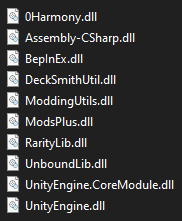
BepInEx, open it, then open the core folder within it0Harmony.dll and BepInEx.dll into your Libs folderUnboundLib.dll to your Libs folder.ModsPlus.dll to your Libs folder.ModdingUtils.dll to your Libs folder.DeckSmithUtil.dll to your Libs folder.Libs folder path as the "Library Folder" under Mod ConfigurationUltimately the contents of your Libs folder should look like this:
Start the app in the dev environment:
npm start
To package apps for the local platform:
npm run package
