SOTFEdit - Sons of The Forest Savegame Editor





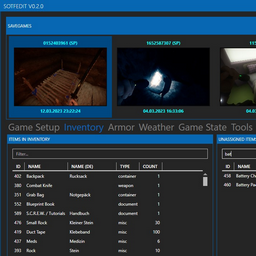
A savegame editor for "Sons of The Forest".
Disclaimer
This project is in no way or form associated with the developers of the game. It is just a fan project, nothing more, nothing less.
Features
- Edit Player Stats (Strength, MaxHealth, CurrentHealth, Fullness etc.)
- Move Player to Virginia & Kelvin
- Edit Game Setup (Game Mode, Spawn Rate etc.)
- Edit Inventory (Add/Remove items, change quantities)
- Edit Armor Data (Add Armor Pieces, change durability)
- Edit Weather Data (Weather, Seasons...)
- Edit Game State Data (Playtime,..)
- Edit Storage Data (Unlimited Logs, sticks etc.)
- Edit Influences of Players towards Kelvin and Virginia
- Modify Virginias equipped items
- Change Virginias and Kelvins outfits
- Several experiments
- Revive Virginia & Kelvin
- Set stats for Virginia & Kelvin
- Move Kelvin & Virginia to Player or each other
- Regrow Trees selectively (All, Removed, Half-Chopped, Stumps)
- Reset containers, crates and pickups in caves and open world
- Backup changed files automatically
- ... more features are planned
Download
Requirements
Usage
- Start the application using SOTFEdit.exe
- It should autodetect your savegame location. If it doesn't, you can click the orange "folder" button at the savegame chooser to select the savegame folder, which is usually at "C:\Users[YourUser]\AppData\LocalLow\Endnight\SonsOfTheForest\Saves"
- You'll get a list of all savegames, ordered by the last write time
- Do some changes and save them using the button at the top right
If you use one of the "Tools" this will trigger a reload of the savegames, which will discard any pending changes. I'd recommend to use the tools after you're done with editing.
Inventory
- In order to add or remove items, just double click on the row
- There is no sanity check on the values entered at the player's inventory. So something like "100" for backpack will most likely lead to undesired behaviors.
Armor
Armor protects you from most hazards. However you are still going to drown and die from fall damage.
Weather
There is one very important thing. If you only change the season, it will be reverted immediately when the game progresses.
To fix that, you also have to adjust the played time at "Game State". It is calculated based on the length of the season. Here is an example:
- Starting Season: Spring
- Season Length: Long
- Played Time: 31 Days
The in-game season will be winter, because:
- Day 0-9 = Spring
- Day 10-19 = Summer
- Day 20-29 = Autumn
- Day 30-39 = Winter
So if you want to change the weather to Summer, you need to adjust the playtime days to something between 10 and 19.
Here is a list of number of days per season per season length setting:
- Short: ???
- Default (non-custom games): 5 days
- Long: 10 days
- Realistic: 90 days
Troubleshooting
One of the items in inventory is listed as "Unknown"?
- Please report the ItemId so that I can add it to the list of known items
My game does not work anymore?
- If you have selected to create backups before saving, you can just delete the old files and restore the files that are suffixed with ".bak*".
I get errors and the application does strange things
I can not change "IsRobbyDead" or "IsVirginiaDead"
- In order to revive both there is a special button at "Followers" that does the job
Contributing
Feel free to report any unknown items or any feature requests. PRs are also welcome.
Final Words
Big thanks to Gronkh for your many years of "Influenz". Especially without your "The Forest" streams I would have never known anything about that game.
Links and Credits