This Package
- R2Modman (Automated)
- Steamapps (Manual)
VFX assets by Alessandro "NeatWolf" Salvati: https://www.facebook.com/NeatWolfCreations/
Includes
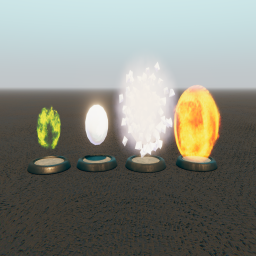
Projectile/Effect
- x1 acid splash
- x1 fireball
- x1 ice knife
- x1 ray of frost
Screenshots

Installing via R2ModMan
- Open up r2modman, select talespire and the profile you want to install this on.
- Navigate to Online, find this pack and click Download (Latest).
- Make sure EAR is also installed.
- Make sure ProjectilePlugin (https://talespire.thunderstore.io/package/LordAshes/ProjectilePlugin/) is also installed.
Install via SteamApps
- On Thunderstore download the zip via Manual Download
- Extract the package and navigate into
\TaleSpire_CustomData\Minis\
- Copy all the files without extensions and paste them in
..\steamapps\common\TaleSpire\TaleSpire_CustomData\Minis
- Make Sure EAR is installed to steamapps. (Should also be CMP and Replication compatible)
- Make Sure ProjectilePlugin (https://talespire.thunderstore.io/package/LordAshes/ProjectilePlugin/) is installed
- Extract the images and projectiles and navigate into
\TaleSpire_CustomData\
- Copy the images and projectiles without extensions and paste them in
..\steamapps\common\TaleSpire\TaleSpire_CustomData\
License:
The models are licensed under https://creativecommons.org/licenses/by-sa/4.0/legalcode
Due to this, the package itself will inherit the same license.
Changelog
Disclaimer this package has and will always comply to CC 4.0 license and is not for sale.