
ULTRAKILL
You are viewing a potentially older version of this package. View Latest Version
Custom music in Cyber Grind playlist is an upcoming feature of ULTRAKILL, so you can use this mod until custom tracks are officially supported.
This mod does not affect the folder with original soundtrack, so you can combine it with your custom tracks.
Most likely, CyberGrind is going to officially support custom tracks by the end of the year.
The initial purpose of this mod was exactly that, so it'll become obsolete in that sense by the end of the year.
However, for the last 6 months I've been adding extra features in order to make CG experience as customisable and pleasant as I can (including volume boost, calm themes, intros and loops, downloader, things like that) and I'm not planning to stop since the mod has become much more than just custom tracks support, and I'll continue to work in that direction.
Once the custom tracks support is released, and in case you want to stick with the official part of the functionality, it'll be up to you and I hope you've enjoyed the mod!
Again, it will not stop me from developing the mod, and I'll get back to you with updates soon!
Or you can just use r2modman for that. Both methods are described in the video below (click to open):
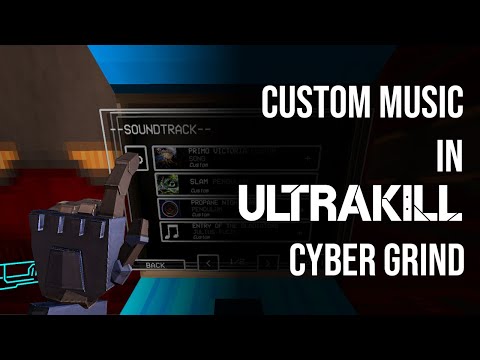
All the settings for the mod are available by pressing CGME Menu hotkey (F4 by default). The main screen of the menu contains the following options:
For other settings like key bindings and Themes, use the respective tab.
Allows you to switch between the tracks mid-game. Available by pressing Tab by default.
If the whole menu is an overkill for you, just switch between tracks using Next track hotkey.
You can now download tracks directly from YouTube and SoundCloud.
Downloader section supports both playlists and individual tracks URLs. All you have to do is to paste track/playlist URL in the input field and download each track individually or download every track of playlist at once. Downloaded tracks will be placed inside ULTRAKILL/Cybergrind/Music directory in YouTube and SoundCloud folders.
Note that you'll have to restart CyberGrind in order for tracks to appear in Terminal!
This feature uses ffmpeg. It's a 3rd-party library which you'll be offered to download automatically from the official source. You're at liberty not to do it, but in this case Downloader functionality won't be available to you. ffmpeg executables will be placed within the folder where CybergrindMusicExplorer.dll is located.
Please also note that this feature is in early stage of development and may not work consistently.
Known issues:
You can also add multi-segmented looped tracks with an intro and loop parts. In order to make such a track, place your intro and loop files in the same folder and add _intro and _loop postfixes into their file names respectively. Please note that these parts must have the same extension!
Like this.
If everything's been done correctly, it now should be displayed as a single track.
You know how in original ULTRAKILL campaign there's a light, calm theme playing when there are no enemies around, followed by an intense variation once the battle has started? Now you can enable it in Cyber Grind for original ULTRAKILL soundtrack and create your own tracks.
But unlike the campaign mode, you can decide when to play the calm theme by yourself (otherwise it would've been stupid since enemies are almost always present in Cyber Grind). Go to Themes tab and you'll see three controls:
"Play calm theme when there's 4 or less enemies around. Unless there's 1 or more Insurrectionists or >= 2 Mindflayers"
Alright, but what about custom tracks?
Well, to create such a track, use the same technique as for intros and loops: postfixes in your track file name. Any track is treated as a "battle theme" by default. To add its calm variation, add another, similarly named track with _calm postfix. Again, these files must have the same extension!
And what about segmented tracks? They already contain two files! How do I even make a calm variation to its intro and loop? Can I add a calm theme only to loop or only to intro specifically? Yes, you can. Customize it the way you want. Calm loop part can either have a _calm or _calmloop postfix, but intro has to end with _calmintro. More on that in the Manual section of the menu.
Create a folder called CGME inside your ULTRAKILL/Cybergrind/Music directory (or use the one created by the mod), and you'll be able to replace some of the sound effects in Cybergrind. This folder is ignored by Music terminal. Please note that these files must have an .mp3 extension.
Here's the list of file names and the references to the sound effects these files are intended to replace:
If a regular Cyber Grind experience is too boring for you, you can turn it into a bloody karaoke (he-he, "bloody"). Place subtitles file named exactly as your track in the same folder where this track is located. Currently, only .srt and .vtt files are supported. The hierarchy and naming should be something like this:
ULTRAKILL/
├─ Cybergrind/
├─ Music/
│  ├─ Darude/
│  │  ├─ Darude - Sandstorm.mp3
│  │  ├─ Darude - Sandstorm.srt
Please note that if your track has into and loop segments, there must be two separate subtitles files
ULTRAKILL/
├─ Cybergrind/
│  ├─ Music/
│  │  ├─ Darude/
│  │  │  ├─ Darude - Sandstorm_loop.mp3
│  │  │  ├─ Darude - Sandstorm_loop.srt
│  │  │  ├─ Darude - Sandstorm_intro.mp3
│  │  │  ├─ Darude - Sandstorm_intro.srt
Created by Flazhik
For SoundCloud support, client_id was borrowed from SoundCloudExplode by jerry08, licensed under MIT License