
AI Disclaimer: Claude Code was used to review and identify issues in the codebase. All code was written by me.
UltraAchievements-Revamped is both a mod and library for the hit indie game ULTRAKILL. The Core (library) provides utilities for mod developers to create their own achievements. The Mod uses the library to add 15 achievements that are interesting compared to basic progression achievements (of which there are none in this mod).
Trailer: https://youtu.be/Rlao2NaAiWk
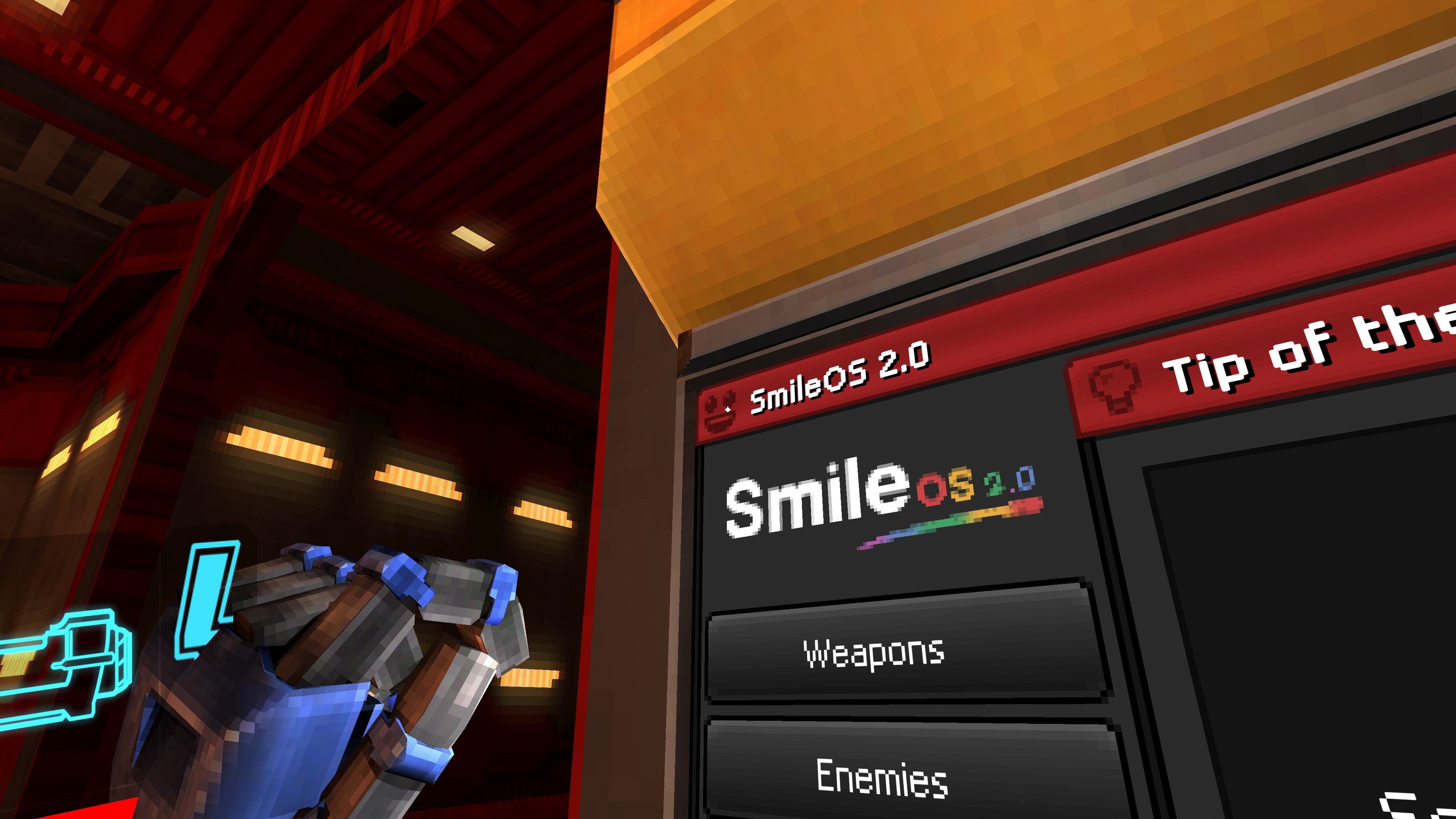
Completed achievements are displayed inside the in-game Shop UI, which can be accessed by clicking on the SmileOS icon in the top left of the Shop UI. This may lead to conflicts with other mods which also use the same icon.
The settings menu currently doesn't work. It'll probably have settings for the Achievement PopUp in a future version.
Achievements currently don't have icons. This is a WIP which will be done in a later version.


Both the Mod and Core can be installed the same way. Choose whichever method works best for you:
Thunderstore (Recommended) - Install via the release published on Thunderstore using a mod manager like r2ModMan. This will automatically detect your ULTRAKILL install and handle all setup for you. Here are the Mod and Core Thunderstore links
Manual - Download the latest release from GitHub Releases, set up BepInEx manually for ULTRAKILL, then move release files into a subfolder in the BepInEx plugins folder.
Build from source - See Building from Source below.
UltraAchievementsRevamped.Core is a library that lets mod developers add custom achievements to ULTRAKILL. It handles saving, loading, and in-game display, so you only need to define what an achievement is and when it should be unlocked. To get started, create a new C# project from scratch or use the ULTRAKILL Template Project, which sets up all the necessary boilerplate.
Achievements can be created in two ways, as a Unity ScriptableObject or entirely in code. This guide covers the code approach, so you don't need Unity set up.
Call AchievementInfo.Create<AchievementInfo>() or ProgressiveAchievementInfo.Create() to create a new AchievementInfo or ProgressiveAchievementInfo instance. The sourceMod parameter should be a human-readable name for your mod, as it's used to group your achievements together in the Shop UI.
Call AchievementManager.RegisterAchievementInfos(infos) to register it. Once registered, the achievement will appear in the Shop UI.
You need to call AchievementManager.MarkAchievementComplete(id) when the triggering event occurs in-game using a [HarmonyPatch]. To find the right method to patch, use UnityExplorer and dnSpy to identify where the event happens in the game's code.
Note: For
ProgressiveAchievementInfo, completion is handled automatically oncecurrentProgressreachesmaxProgress. UseAchievementManager.AddProgressToAchievement(id, amount)to increment progress instead.
A complete sample Plugin.cs file based on the ULTRAKILL Template Project can be seen below. For more examples, see the UltraAchievementsRevamped.Mod folder in this repository.
using BepInEx;
using BepInEx.Logging;
using HarmonyLib;
using UltraAchievementsRevamped.Core.Achievements;

namespace TemplateMod;

[BepInPlugin(PluginInfo.Guid, PluginInfo.Name, PluginInfo.Version)]
[BepInDependency("protract.ultrakill.ultra_achievements_core")]
[HarmonyPatch]
public class Plugin : BaseUnityPlugin
{
    private static class PluginInfo {
        public const string Guid = "yourname.modname";
        public const string Name = "Template";
        public const string Version = "1.0.0";
    }

    internal new static ManualLogSource Logger;

    private void Awake()
    {
        Logger = base.Logger;

        new Harmony(PluginInfo.Guid).PatchAll();
        Logger.LogInfo($"{PluginInfo.Name} v{PluginInfo.Version} has been loaded.");

        var achInfo = AchievementInfo.Create<AchievementInfo>(id, sourceMod, icon, displayName, description, isHidden);

        var progressiveAchInfo = ProgressiveAchievementInfo.Create(id, sourceMod, icon, displayName, description, isHidden, maxProgress);

        AchievementManager.RegisterAchievementInfos([achInfo, progressiveAchInfo]);
    }

    [HarmonyPatch(typeof(FerrymanFake), "BlowCoin")]
    [HarmonyPostfix]
    private static void FerrymanCoinCheck() =>
        AchievementManager.MarkAchievementComplete("id");

    [HarmonyPatch(typeof(NewMovement), "Respawn")]
    [HarmonyPrefix]
    private static void DeathPatch() =>
        AchievementManager.AddProgressToAchievement("ultraAchievementsRevamped.deathSimulator", 1);
}
Building from source has two parts: the C# solution (the DLL files) and the Unity Addressables (the mod's assets). You can build either or both depending on your needs. Building just the DLLs is much simpler compared to building Addressables which requires more setup.
Requirements: .NET 10 SDK, Git
The following commands clone the repository and build both Mod and Core DLLs for release:
git clone https://github.com/Protract-123/UltraAchievements-Revamped.git
cd ./UltraAchievements-Revamped/src
dotnet build -c Release
If your ULTRAKILL install is at the default Steam path (C:\Program Files (x86)\Steam\steamapps\common\ULTRAKILL), the build will work without any additional changes. If your install is elsewhere, create a file named ULTRAKILLPATH.user in src/ with the following contents, replacing the path as needed.
<Project>
    <PropertyGroup>
        <ULTRAKILLPath>C:/your/path/to/ULTRAKILL/</ULTRAKILLPath>
    </PropertyGroup>
</Project>
The built DLLs will be located at:
./UltraAchievementsRevamped.Core/bin/Release/netstandard2.1/UltraAchievementsRevamped.Core.dll./UltraAchievementsRevamped.Mod/bin/Release/netstandard2.1/UltraAchievementsRevamped.Mod.dllRequirements: Unity 2022.3.28f1, Vanity Reprised, Git
Building the Addressables requires first extracting ULTRAKILL's assets using Vanity Reprised. Follow these steps:
Clone this repository:
git clone https://github.com/Protract-123/UltraAchievements-Revamped.git
Download and unzip the latest release of Vanity Reprised, then run AssetRipper.GUI.Free.exe. This launches Vanity Reprised and opens a browser window.
In the browser, point Vanity Reprised to your ULTRAKILL folder (the folder named ULTRAKILL). Click Generate RUDE project to extract the assets. Assets will be extracted to a subdirectory called Rude in the selected directory.
Copy the following folders from the extracted output into the root of the cloned repository. When prompted, choose to merge or replace existing files:
LibrariesPackagesScriptsTextMesh ProULTRAKILL AssetsULTRAKILL OthersOpen the project in Unity 2022.3.28f1. Note: ULTRAKILL officially targets 2022.3.29f1, but 2022.3.28f1 works without issues. If you encounter problems, try 2022.3.29f1 instead.
Build the Addressables via the Addressable Build Pipeline menu item. Use Debug Build for a faster build which is great for local testing, or Release Build for a production build intended for distribution.
UltraAchievements-Revamped is released under the MIT License.