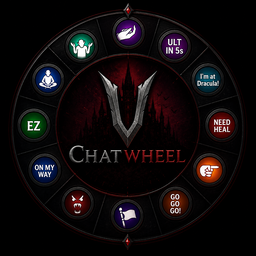
ChatWheel is a server-side modification for V Rising that transforms the emote wheel into a fully functional chat wheel.
It supports chat commands and dynamic placeholders that provide precise information such as cooldowns, debuff timers, and player locations in real time. By reducing language barriers and improving clarity of communication, ChatWheel enables teams to coordinate more effectively and perform at a higher competitive level.
Feel free to contact me on Discord (nova_nova) if you have any questions or need assistance with the mod.
Watch video here: https://www.youtube.com/watch?v=SIQk_3QC4V8
.cw bind (scope) (message)
local or clan.cw unbind
.cw list
.cw enable
.cw disable
$location
$combatTimer
$baneTimer and $deathTimer
$cdUlt
.cw rc (name)
V Rising Modding Discord | V Rising Modding Wiki
Install BepInEx, which is required for modding VRising. Follow the instructions provided at BepInEx Installation Guide to set it up correctly in your VRising game directory.
Download the ChatWheel mod along with its dependency (VCF). Ensure you select the correct versions that are compatible with your game.
After downloading, locate the .dll files for ChatWheel and its dependency. Move or copy these .dll files into the BepInEx\Plugins directory within your VRising installation folder.
BepInEx\Plugins directory.Launch the Game: Start VRising. If everything has been set up correctly, ChatWheel should now be active in the game. Test by typing .cw list.
This project is licensed under the AGPL-3.0 license.