

Valheim
You are viewing a potentially older version of this package. View Latest Version
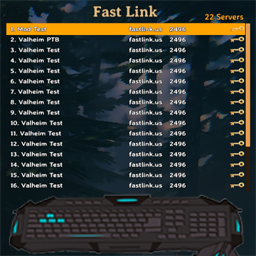
Vanilla UI to quickly join servers configured in a YAML file.
Client side mod with live updated configurations via Azumatt.FastLink_servers.yml
Configuration Options
[UI]
[General]
Example (default) YAML
# Configure your servers for Azumatt's FastLink mod in this file.
# Servers are automatically sorted alphabetically when shown in the list.
# This file live updates the in-game listing. Feel free to change it while in the main menu.

Example Server:
  address: example.com
  port: 1234
  password: somepassword

Some IPv6 Server:
  address: 2606:2800:220:1:248:1893:25c8:1946
  port: 4023
  password: a password with spaces

Passwordless IPv4 Server:
  address: 93.184.216.34
  port: 9999

# You can optionally change the color of your server name. Does not work for the address and port. Also, can show PvP status.
<color=red>Another IPv4 Server</color>:
  address: 192.0.2.146
  port: 9999
  ispvp: true

# You can specify if a server is crossplay or not. This will show the crossplay's "Shuffle" icon. Please note, this is not fully supported at this time.
Crossplay Server:
  address: 92.183.211.42
  port: 9999
  password: somepassword
  iscrossplay: true
  ispvp: true

# You can specify if a server uses the whitelist for players or not. This will show in the tooltip only.
Whitelisted Server:
  address: 92.183.211.42
  port: 9999
  password: somepassword
  iscrossplay: true
  ispvp: true
  iswhitelisted: true
Installation Instructions
You must have BepInEx installed correctly! I can not stress this enough.
This mod is not needed on a server. It's client only. Install on each client that you wish to have the mod load.
Feel free to reach out to me on discord if you need manual download assistance.
DISCORD: Azumatt#2625
STEAM: https://steamcommunity.com/id/azumatt/
For Questions or Comments, find me in the Odin Plus Team Discord or in mine:


Update Information (Latest listed first)
v1.3.4
- Add a property to the YAML file to specify if a server is using a whitelist for players or not. This will show in the tooltip hover only.
v1.3.3
- Add configuration option to hide IP address and port in the tooltip when hovering a server listing as well as in the panel. (For Streamers mainly). Thank you for the suggestion Polyminae and Lyralia!
v1.3.2
- Remove Auga incompatibliity now that Randy is back and confirmed to always keep the main menu disabled in Auga.
v1.3.1
- Allow turning off the sorting of the server names. This is useful if you want to keep the order of the servers in the file.
- Switch to using Toggle data type for all true/false options. This allows for the use of a button in the configuration manager instead of a checkbox. (It's more appealing)
- This shouldn't cause issues with your configuration file being messed up, but might cause an overwrite of the values affected.
v1.3.0
- Added YAML editor for use in the BepInEx Configuration Manager. This will allow you to edit the YAML file without having to exit the game.
v1.2.2
- Add tooltip on server listing hover
- Add configuration option to change the LocalScale of the UI. Previously was 0.85, 0.85, 0.85. It is now defaulted to 1, 1, 1 just like the panel it's cloned from.
- Add configuration option to show the password in the tooltip when hovering a server listing as part of the new tooltip addition.
- Fix the UI selecting the first element by default when it loads.
v1.2.1
- Fix issue with password. The password could be correct, but the server would still reject it.
v1.2.0
- Add compatibility for 0.211.7
- You can specify if a server is crossplay or not. This will show the crossplay's "Shuffle" icon. Please note, this is not fully supported at this time. I am adding in anticipation of when Crossplay in Vanilla is stable.
- Updated the example file to show this. Parameter is
iscrossplay: truev1.1.0
- Added ability to still prompt for the password. This is for servers that have a password but don't want to store it in the config file. Requested by ALo#8803 in my discord
- Make the GUI disappear as soon as the loading screen shows. It was bothering some people.
v1.0.1
- Toggle the new Game.IsModded variable
- Fix the GUI being disabled automatically after the new patch.
v1.0.0
- Initial Release