

Dyson Sphere Program
You are viewing a potentially older version of this package. View Latest Version
Mod for Dyson Sphere Program. Needs BepInEx.
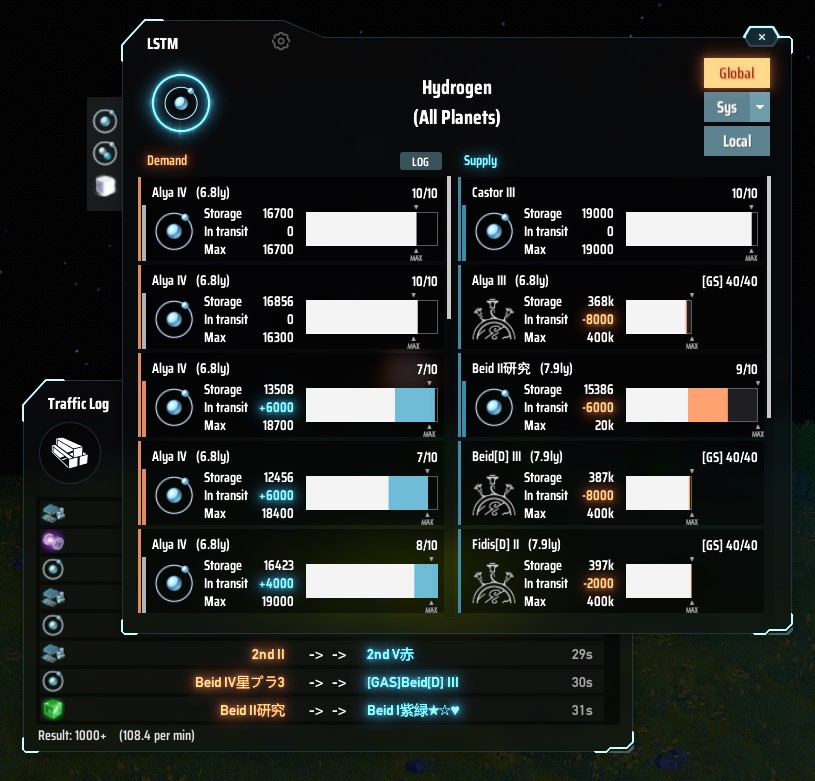
Lists the supply and demand balance of the Logistics Station by item and by planet.
Show overall status for each item
Show the status of all stations on specific planet
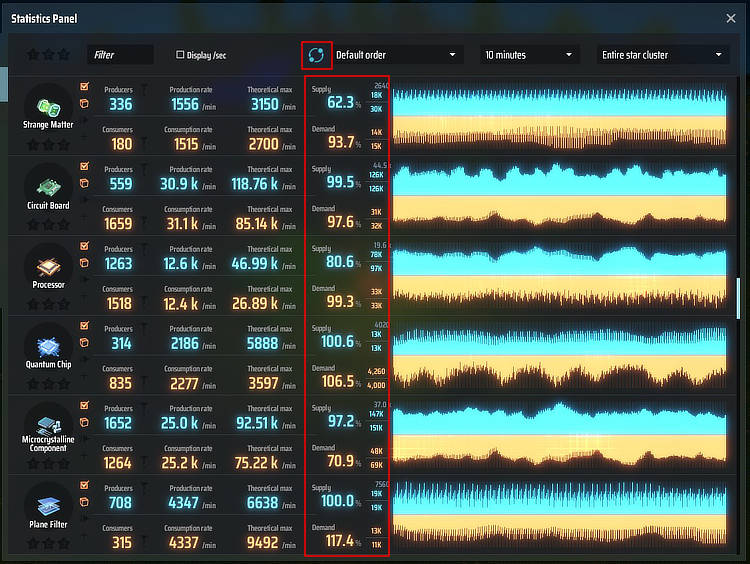
Show station storage ratio and total actual amounts information in the statistics panel
Improve transport behavior
Display the target planet in the starmap (Universe Exploration lv4 is required)
Display navigation of the target station location
Open station window directly (right-click locate button)(only current local planet)
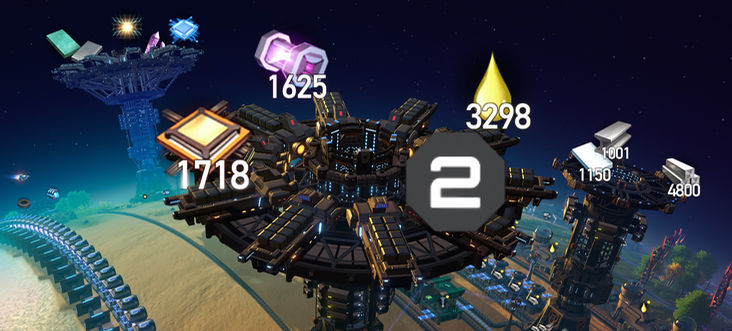
Display station contents and empty slot count as icon
How to open a window
When opening with the keyboard shortcut, if the item information is found under the mouse pointer, it is used as a item filter (e.g. Inventory, Storage, Replicator, Statistics Panel and much places where item icon is displayed).
Compatibility with other mods has not yet been checked.
Main Window
Statistics Panel
Icon Info
Change transport behavior. Can be turned on and off individually. Default is all off. It must be turned on in the configuration file to be used.
Incompatible with some mods (GalacticScale, StationRangeLimiter, etc.). TrafficLogic will not work if you use these mods.
TLSmartTransport (experimental)Priority will be given to nearby stations as much as possible. For now, only remote transports is supported.
This is a rough implementation, so it may not work as expected. If this is enabled, TLDCBalance will be forced disabled because of some incompatibilities. Only this setting can be used with some of the above mods, but using with IntelligentTransport may have unexpected results.
TLConsiderOppositeRangeThe partner's maximum transport distance will now be calculated too, and the transport will not be executed unless both maximum transport distances are exceeded. Applies to all transport, local and remote.
As an exception, remote transports with a maximum demand capacity of less than 1,000 and the Space Warper will be transported ignoring this settings.
TLRemoteClusterGroups stations together and separates them from other groups or unconfigured stations.
You can include the string [C:name] in the station name to belong to the name cluster, where C: is UPPER CASE.
Once a cluster has been established, stations can only be transported by stations that belong to the same cluster.
The cluster name any has a special meaning. A cluster with this name can interact with all other clusters and unconfigured stations. Demanding from any cluster is likely to upset the balance of other clusters, so it is better to keep it supply only.
As an exception, the Space Warper will be transported ignoring the cluster settings.
For now, the only way to set it up is to edit the name directly (You can edit the name in the station window by clicking on it. This is a default game feature). Please wait for additional features such as a settings UI.
TLLocalClusterThis is the same function as Remote Cluster. Applies to local transport. The configuration is almost the same as Remote Cluster, with [c:name] in the station name, where c: is lower case.
Remote Cluster and Local Cluster can be configured simultaneously.
Example: [C:r01][c:l01]station#1
TLDCBalanceIncrease and decrease the maximum transport distance according to the storage ratio. In addition to turning the function itself on and off, you also need to set how much you want to change the distance. The value is a number between 1.0 and 100.0.
TLDCSupplyMultiplier: multiply the distance by x while the supply storage is 70%-100%.TLDCDemandMultiplier: multiply the distance by x while the demand storage is 0%-30%.TLDCSupplyDenominator: divide the distance by x while the supply storage is 0%-30%.When the value is set to 1, the distance does not change. There is no setting to reduce the demand distance. It does not affect storage with a maximum capacity of less than 2,000.
TLRemoteDemandDelayDelays the triggering of remote demand. This applies to slots with a maximum storage capacity is 5,000 or more. Remote demand will not be executed until the total stock (actual stock + the amount in transit) falls below 98%. This subtle deviation solves a situation where there is no room for a local demand to occur.
TLLocalDemandDelayDelays the triggering of local demand.
Same as TLRemoteDemandDelay but threshold is 2,500 / 99%.
LSTM has some settings depend on BepInEx (file name is com.hetima.dsp.LSTM.cfg). Most settings can be edited in the config window (from gear icon at the top of the main window).
| Key | Type | Default | Description |
|---|---|---|---|
| mainWindowHotkey | shortcut | LCtrl+T | Hotkey to open/close LSTM window |
| showMaterialPicker | bool | true | Add Material Picker for quick item switching to LSTM window |
| showButtonInStationWindow | bool | true | Add open LSTM button to Station Window |
| showButtonInStatisticsWindow | bool | false | Add open LSTM button to statistics panel |
| showButtonInStarmap | bool | true | Add open LSTM button to detail panel on starmap |
| showStatInStatisticsWindow | bool | true | Add station stat to statistics panel |
| actAsStandardPanel | bool | true | true: close with other panels by esc key. false: one more esc needed |
| indicatesWarperSign | bool | false | true: show sign on the list if station has warper |
| reactClosePanelKeyE | bool | true | true: close window when close panel key(E) is pressed |
| setConstructionPointToGround | bool | false | true: set the construction point of stations to ground level instead of top of the tower |
| showStationInfo | bool | false | Show station contents and empty slot count as icon. Also affected by in-game building icon display setting |
| showStationInfoOnlyInPlanetView | bool | false | showStationInfo is only displayed in planet view |
| switchDisplayModeHotkey | shortcut | Tab | Hotkey to switch between planet name and station name of LSTM window |
| dropSorterKeyEracesNavi | bool | false | clear navi line when "Remove Copied Sorter Previews" shortcut is pressed |
| enableNaviToEverywhere | bool | false | double-click (left and/or right click) on Planet View to display navigation to anywhere |
TrafficLogic settings
| Key | Type | Default | Description |
|---|---|---|---|
| TLSmartTransport | bool | false | enable TrafficLogic:Smart Transport |
| TLConsiderOppositeRange | bool | false | enable TrafficLogic:Consider Opposite Range |
| TLRemoteCluster | bool | false | enable TrafficLogic:Remote Cluster |
| TLLocalCluster | bool | false | enable TrafficLogic:Local Cluster |
| TLDCBalance | bool | false | enable TrafficLogic:Remote Distance/Capacity Balance |
| TLDCSupplyMultiplier | float | 1.0 | Multiplier for Remote Supply Distance/Capacity Balance (1-100) |
| TLDCDemandMultiplier | float | 1.0 | Multiplier for Remote Demand Distance/Capacity Balance (1-100) |
| TLDCSupplyDenominator | float | 1.0 | Denominator for Remote Supply Distance/Capacity Balance (1-100) |
| TLRemoteDemandDelay | bool | false | enable TrafficLogic:Remote Demand Delay |
| TLLocalDemandDelay | bool | false | enable TrafficLogic:Local Demand Delay |
輸送ステーションの状況をアイテムごとや惑星ごとに一覧表示して需給バランスを確認できます。
アイテムごとに全体の状況を表示
惑星内の全ステーションの状況を表示
ステーションの貯蔵率と実数を統計パネルに表示
輸送ロジックの改良
対象の惑星を星間ビューで表示(宇宙探査レベル4が必要)
対象のステーションの場所をナビ表示
ステーションウィンドウを開く(ナビボタンを右クリック)(現在の惑星のみ対象)
ステーションの内容をアイコンサインで表示
ウィンドウの開き方
キーボードショートカットで開くときに、マウスポインタ上にアイテム情報を見つけたらそのアイテムでフィルタ表示します(インベントリ、ストレージ、合成機、統計パネル、その他のアイコンが表示されている場所)
輸送の挙動を変更します。個別に設定でオンオフできます。デフォルトはすべてオフです。使用するには設定ファイルでオンにする必要があります。
一部のmod(GalacticScale, StationRangeLimiter 等)とは互換性がありません。これらのmodを使用している場合 TrafficLogic は機能しません。
TLSmartTransport (experimental)なるべく近くのステーションを優先して輸送します。いまのところリモートのみ対応です。
雑な実装なので期待通りには動かないかもしれません。これをオンにすると TLDCBalance は若干相性が悪いため強制的にオフになります。この設定のみ上記の一部modと併用可能ですが、IntelligentTransport との併用は予期せぬ結果になるかもしれません。
TLConsiderOppositeRange相手の最大輸送距離も考慮されるようになり、双方の最大輸送距離を越えていないと輸送が実行されなくなります。ローカル/リモートすべてのステーションに適用されます。
例外としてリモート demand の最大貯蔵量が1,000未満の場合と、 空間歪曲器 はこの設定を無視して輸送されます。
TLRemoteClusterステーションをグループ化し、他のグループや未設定のステーションと切り離します。
ステーション名に [C:name] という文字列を含めることで name のクラスターに属します。 C:は大文字 です。
クラスターが設定されたステーションは同じクラスターに属するステーションとしか輸送できなくなります。
any というクラスター名は特別な意味を持ちます。この名前のクラスターは他のすべてのクラスター、および未設定のステーションとやりとりできます。 any クラスターで要求を実行すると他クラスターのバランスが崩れる可能性が高いので、供給専用にした方が良いでしょう。
例外として 空間歪曲器 はクラスター設定を無視して輸送されます。
今のところ直接名前を編集するしか設定方法がありません(ステーションウィンドウの名前をクリックすることで編集できます。これはデフォルトの機能です)。設定UIなどの機能追加をする予定なのでお待ち下さい。
TLLocalClusterRemote Cluster と同じ機能です。ローカル輸送に適用されます。設定方法は Remote Cluster とほぼ同じで、ステーション名に [c:name] と記述します。 c:は小文字 です。
Remote Cluster と Local Cluster は同時に設定できます。
例:[C:r01][c:l01]station#1
TLDCBalance貯蔵量に応じて最大輸送距離を増減させます。機能自体のオンオフに加えて、どのくらい距離を変更するか設定する必要があります。値は1.0~100.0の数値です。
TLDCSupplyMultiplier: supply の貯蔵量が 70%-100% の間は距離をx倍にTLDCDemandMultiplier: demand の貯蔵量が 0%-30% の間は距離をx倍にTLDCSupplyDenominator: supply の貯蔵量が 0%-30% の間は距離を1/x倍に値を1にすると距離は変化しません。demand の距離を縮める設定はありません。最大貯蔵量が2,000未満のストレージには影響しません。
TLRemoteDemandDelayリモート輸入の発動を遅らせます。最大貯蔵量 5,000 以上のスロットが対象で、総在庫(実在庫+輸送中の数)が 98% を下回るまでリモート輸入を実行しません。これによりローカル側の demand やベルト搬入が発生する隙がない状態を回避できます。
TLLocalDemandDelayローカル輸入の発動を遅らせます。TLRemoteDemandDelay と同じような機能ですが、発動条件は最大貯蔵量 2,500 以上 / 貯蔵率 99% です
enableNaviToEverywhere. default is off) (this feature is basically unrelated to this mod, but I introduced it because it's easy to incorporate)showStationInfoOnlyInPlanetView)setConstructionPointToGround and showStationInfo have been changed to falseshowStationInfo or ConfigWindow) (also affected by in-game building icon display setting)TLLocalDemandDelay default is falsesetConstructionPointToGround for faster construction. default is trueshowStatInStatisticsWindow default is true)showMaterialPicker for customize this)reactClosePanelKeyE close window when close panel key(E) is pressed. default is true.switchDisplayModeHotkey for customize this)indicatesWarperSignTLRemoteDemandDelay will now be applied to all remote demandsTLSmartTransportTLConsiderOppositeRange ignores when the capacity of demand is smallTLDCBalance wrong demand rangeTLRemoteDemandDelayTLDCBalanceTLConsiderOppositeRange, TLRemoteCluster and TLLocalClusterdropSorterKeyEracesNaviactAsStandardPanel (I forgot to list it)