Valheim
You are viewing a potentially older version of this package. View Latest Version
| Description | Installing | Compatibility | Contact Author | Other Info | Config | Source | Changelog | Screenshots |
|---|
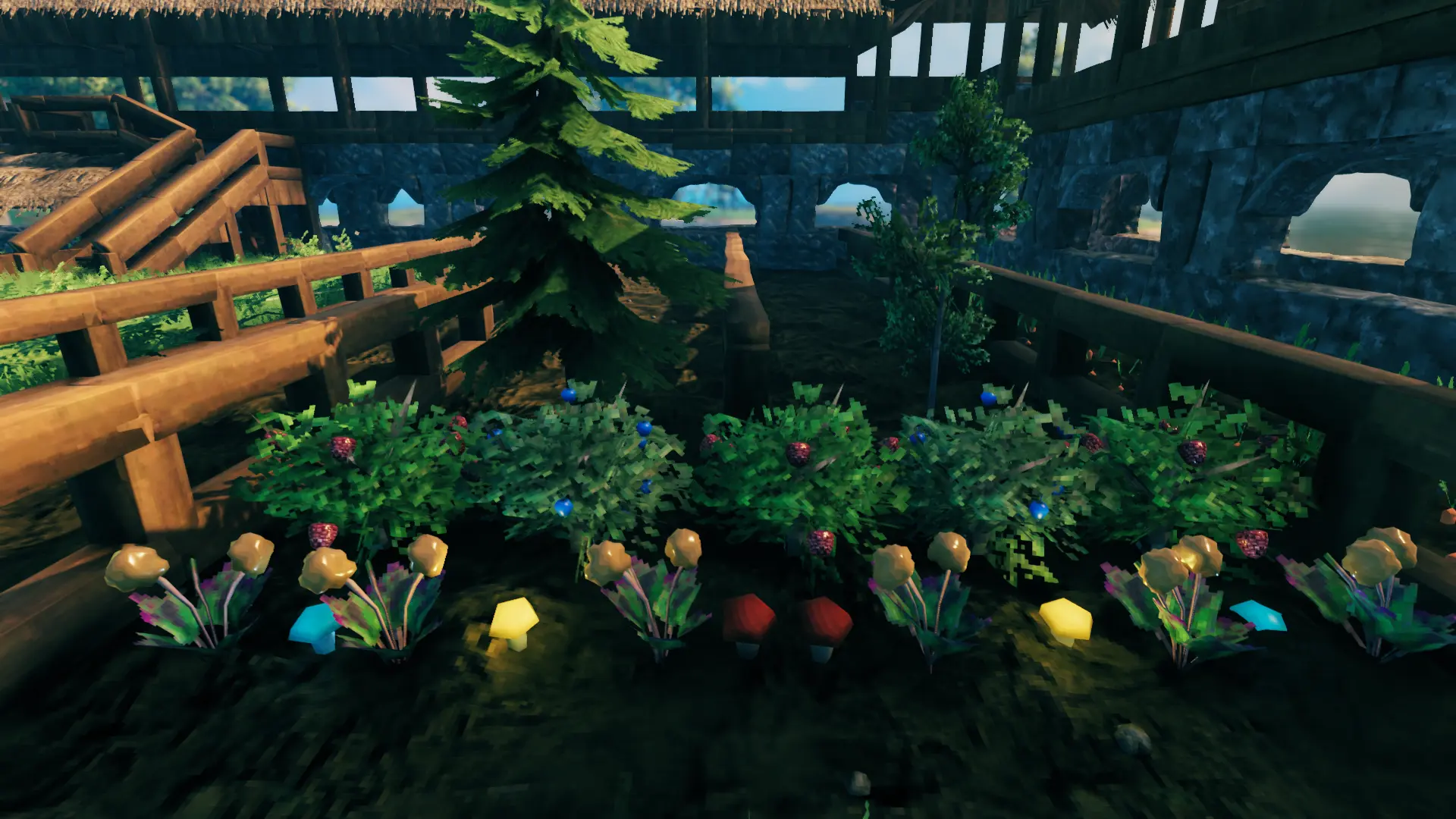
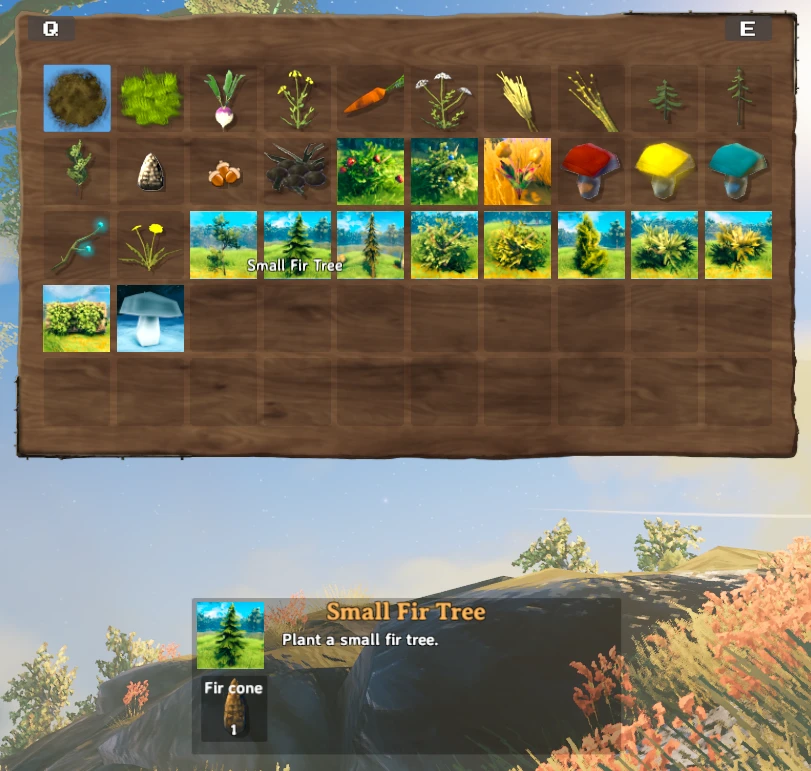
A rewrite of the Planting Plus mod by bkeyes93. This mod allows you to plant and harvest gathered and pickable resources found throughout the world, such as berry bushes, mushrooms, thistle, dandelion, as well as previously unavailable saplings and flora. The following recipes have been added to the cultivator.
Raspberry Bush, Blueberry Bush, Cloudberry Bush
Mushrooms, Yellow Mushrooms, Blue Mushrooms
Thistle, Dandelion
Birch Sapling, Oak Sapling, Ancient Sapling
With EnableMiscFlora enabled in config:
Small Beech Tree, Small Fir Tree, Small Dead Fir Tree
Small Plains Bush, Small Fruitless Bush (2 tints), Small Shrub (2 tints)
Vines, Glowing Mushroom
Obtaining the recipes: Seeds for the new saplings can be obtained by cutting them down, just like regular trees. For all other pickables, you must obtain at least 1 of the item before the recipe will unlock in your cultivator.
If you need to remove a bush or spawner, press your deconstruct key (middle click by default) with your cultivator in your hand the way you would destroy a building piece with your hammer equipped.
First be sure to uninstall the Planting Plus mod if you haven't already or there will be errors.
Extract the Advize_PlantEverything.dll file into the BepinEx/plugins folder. Directory structure should look like this:
BepInEx ->
    plugins ->
        Advize_PlantEverything.dll
Here you'll find info about known mod conflicts and possible solutions.
Directly conflicts, but the saplings added by plant all trees are already included within this mod. You must remove Plant All Trees in order to use this mod.
The FarmGrid config file requires a bit of tweaking in order to support the resources added in this mod. See following guide.
Open your FarmGrid config file in a text editor or in game using the Configuration Manager mod. Find the line beginning with

plantObjectMasks =

Change it to:

plantObjectMasks = piece, piece_nonsolid, item

Find the line beginning with

customPlants =

Change it to:

customPlants = RaspberryBush(Clone): 0.5, RaspberryBush: 0.5, BlueberryBush(Clone): 0.5, BlueberryBush: 0.5, Pickable_Mushroom(Clone): 0.5, Pickable_Mushroom: 0.5, Pickable_Mushroom_yellow(Clone): 0.5, Pickable_Mushroom_yellow: 0.5, Pickable_Mushroom_blue(Clone): 0.5, Pickable_Mushroom_blue: 0.5, CloudberryBush: 0.5, CloudberryBush(Clone): 0.5, Pickable_Thistle(Clone): 0.5, Pickable_Thistle: 0.5, Pickable_Dandelion(Clone): 0.5, Pickable_Dandelion: 0.5


Tweak grid spacing as you see fit.

Additionally, you can cause the other pieces added by this mod to align to the grid. In order to support all pieces added by this mod, I believe you would need to add 'Default_small' to plantObjectMasks. As for the customPlants field, the following are the names of the remaining prefabs. Adjust grid spacing as necessary.

Beech_small1(Clone): 0.5, Beech_small1: 0.5, FirTree_small(Clone): 0.5, FirTree_small: 0.5, FirTree_small_dead(Clone): 0.5, FirTree_small_dead: 0.5, Bush01(Clone): 0.5, Bush01: 0.5, Bush01_heath(Clone): 0.5, Bush01_heath: 0.5, Bush02_en(Clone): 0.5, Bush02_en: 0.5,  shrub_2(Clone): 0.5, shrub_2: 0.5, shrub_2_heath(Clone): 0.5, shrub_2_heath: 0.5, vines(Clone): 0.5, vines: 0.5
You can reach me on the Nexus to provide bug reports or feedback https://www.nexusmods.com/valheim/mods/1042
For further mod or mod dev support, I can be found at the following Discord server:

Mod is highly configurable, a config file will be generated after first loading the mod and can be found in BepInEx/config/advize.PlantEverything.cfg
The config can be edited out of game with a text editor, or modified in game using the Configuration Manager mod. If using the latter, changes will not take effect until you reload a world. This is to ensure that the server config is respected.
Authoritative Server Configuration Files:
As of 1.3.0: Clients will by default receive configuration settings from a server hosting the mod unless ServerIsAuthoritative is set to false in the config file (server side). However, settings falling under the [General] category of the config file will not be enforced by the server (with the exception of AlternateIcons, AlwaysShowSpawners, and EnableMiscFlora). Though authoritative, servers will not permanently alter a client's locally stored configuration file.
This is thanks to a custom implementation of the AuthoritativeConfig code written by Nextek for their Speedy Paths mod.
Localized Language Support:
The mod does offer localization support, but the mod has yet to be translated to all languages. Users can help to translate the mod to other languages by enabling "EnableLocalization" in the config, and then re-launching the game once. This will generate a .json file in the plugins directory alongside Advize_PlantEverything.dll named 'english_PlantEverything.json'. Using any text editor, edit the names and descriptions in the right column and re-save the file as '{language}_PlantEverything.json'. Finally, change the language setting in the mod's config file to match {language} of your json file. For example, if you launch the game while "spanish_PlantEverything.json" is present alongside the .dll file AND the config language option is set to "spanish", it will load strings for names and decriptions from the Spanish json file.
If you are willing to translate to other languages, I would be more than happy to offer them as optional downloads with the mod.
## Settings file was created by plugin PlantEverything v1.8.1
## Plugin GUID: advize.PlantEverything

[Berries]

## Number of raspberries required to place a raspberry bush
# Setting type: Int32
# Default value: 5
RaspberryCost = 5

## Number of blueberries required to place a blueberry bush
# Setting type: Int32
# Default value: 5
BlueberryCost = 5

## Number of cloudberries required to place a cloudberry bush
# Setting type: Int32
# Default value: 5
CloudberryCost = 5

## Number of minutes it takes for a raspberry bush to respawn berries
# Setting type: Int32
# Default value: 300
RaspberryRespawnTime = 300

## Number of minutes it takes for a blueberry bush to respawn berries
# Setting type: Int32
# Default value: 300
BlueberryRespawnTime = 300

## Number of minutes it takes for a cloudberry bush to respawn berries
# Setting type: Int32
# Default value: 300
CloudberryRespawnTime = 300

## Number of berries a raspberry bush will spawn
# Setting type: Int32
# Default value: 1
RaspberryReturn = 1

## Number of berries a blueberry bush will spawn
# Setting type: Int32
# Default value: 1
BlueberryReturn = 1

## Number of berries a cloudberry bush will spawn
# Setting type: Int32
# Default value: 1
CloudberryReturn = 1

[Crops]

## The minimum scaling factor used to scale crops upon growth
# Setting type: Single
# Default value: 0.9
CropMinScale = 0.9

## The maximum scaling factor used to scale crops upon growth
# Setting type: Single
# Default value: 1.1
CropMaxScale = 1.1

## Minimum number of seconds it takes for crops to grow (will take at least 10 seconds after planting to grow)
# Setting type: Single
# Default value: 4000
CropGrowTimeMin = 4000

## Maximum number of seconds it takes for crops to grow (will take at least 10 seconds after planting to grow)
# Setting type: Single
# Default value: 5000
CropGrowTimeMax = 5000

## Radius of free space required for crops to grow
# Setting type: Single
# Default value: 0.5
CropGrowRadius = 0.5

## Crops can only be planted on cultivated ground
# Setting type: Boolean
# Default value: true
CropsRequireCultivation = true

[Difficulty]

## Pickable resources can only be planted on cultivated ground
# Setting type: Boolean
# Default value: false
RequireCultivation = false

## Allow resources to be placed anywhere (not just on the ground). Does not apply to mushrooms or flowers
# Setting type: Boolean
# Default value: false
PlaceAnywhere = false

## Restrict modded plantables to being placed in their respective biome
# Setting type: Boolean
# Default value: false
EnforceBiomes = false

## Restrict vanilla plantables to being placed in their respective biome
# Setting type: Boolean
# Default value: true
EnforceBiomesVanilla = true

## Enables the [Crops] section of this config
# Setting type: Boolean
# Default value: false
EnableCropOverrides = false

## Recover resources when pickables are removed with the cultivator. Applies to berries, mushrooms, and flowers
# Setting type: Boolean
# Default value: false
RecoverResources = false

## Specifies whether resources should spawn empty or full. Currently only applies to berry bushes
# Setting type: Boolean
# Default value: false
ResourcesSpawnEmpty = false

[Flowers]

## Number of thistle required to place a pickable thistle spawner
# Setting type: Int32
# Default value: 5
ThistleCost = 5

## Number of dandelion required to place a pickable dandelion spawner
# Setting type: Int32
# Default value: 5
DandelionCost = 5

## Number of minutes it takes for thistle to respawn
# Setting type: Int32
# Default value: 240
ThistleRespawnTime = 240

## Number of minutes it takes for dandelion to respawn
# Setting type: Int32
# Default value: 240
DandelionRespawnTime = 240

## Number of thistle a pickable thistle spawner will spawn
# Setting type: Int32
# Default value: 1
ThistleReturn = 1

## Number of dandelion a pickable dandelion spawner will spawn
# Setting type: Int32
# Default value: 1
DandelionReturn = 1

[General]

## Nexus mod ID for updates.
# Setting type: Int32
# Default value: 1042
NexusID = 1042

## Enable mod debug messages in console
# Setting type: Boolean
# Default value: false
EnableDebugMessages = false

## Use berry icons in the cultivator menu rather than the default ones
# Setting type: Boolean
# Default value: false
AlternateIcons = false

## Continue to show mushroom, thistle, and dandelion spawners after being picked. Thistle will lose the glow effect until ready to harvest.
# Setting type: Boolean
# Default value: false
AlwaysShowSpawners = false

## Enables small trees, bushes, shrubs, and vines.
# Setting type: Boolean
# Default value: true
EnableMiscFlora = true

## Enables display of growth time remaining on pickable resources.
# Setting type: Boolean
# Default value: true
EnablePickableTimers = true

## Enable this to attempt to load localized text data for the language set in the following setting
# Setting type: Boolean
# Default value: false
EnableLocalization = false

## Language to be used. If EnableLocalization is enabled, game will attempt to load localized text from a file named {language}_PlantEverything.json
# Setting type: String
# Default value: english
Language = english

[Mushrooms]

## Number of mushrooms required to place a pickable mushroom spawner
# Setting type: Int32
# Default value: 5
MushroomCost = 5

## Number of yellow mushrooms required to place a pickable yellow mushroom spawner
# Setting type: Int32
# Default value: 5
YellowMushroomCost = 5

## Number of blue mushrooms required to place a pickable blue mushroom spawner
# Setting type: Int32
# Default value: 5
BlueMushroomCost = 5

## Number of minutes it takes for mushrooms to respawn
# Setting type: Int32
# Default value: 240
MushroomRespawnTime = 240

## Number of minutes it takes for yellow mushrooms to respawn
# Setting type: Int32
# Default value: 240
YellowMushroomRespawnTime = 240

## Number of minutes it takes for blue mushrooms to respawn
# Setting type: Int32
# Default value: 240
BlueMushroomRespawnTime = 240

## Number of mushrooms a pickable mushroom spawner will spawn
# Setting type: Int32
# Default value: 1
MushroomReturn = 1

## Number of yellow mushrooms a pickable yellow mushroom spawner will spawn
# Setting type: Int32
# Default value: 1
YellowMushroomReturn = 1

## Number of blue mushrooms a pickable blue mushroom spawner will spawn
# Setting type: Int32
# Default value: 1
BlueMushroomReturn = 1

[Saplings]

## The minimum scaling factor used to scale a birch tree upon growth
# Setting type: Single
# Default value: 0.5
BirchMinScale = 0.5

## The maximum scaling factor used to scale a birch tree upon growth
# Setting type: Single
# Default value: 2
BirchMaxScale = 2

## The minimum scaling factor used to scale an oak tree upon growth
# Setting type: Single
# Default value: 0.5
OakMinScale = 0.5

## The maximum scaling factor used to scale an oak tree upon growth
# Setting type: Single
# Default value: 2
OakMaxScale = 2

## The minimum scaling factor used to scale an ancient tree upon growth
# Setting type: Single
# Default value: 0.5
AncientMinScale = 0.5

## The maximum scaling factor used to scale an ancient tree upon growth
# Setting type: Single
# Default value: 2
AncientMaxScale = 2

## Number of seconds it takes for a birch tree to grow from a birch sapling (will take at least 10 seconds after planting to grow)
# Setting type: Single
# Default value: 3000
BirchGrowthTime = 3000

## Number of seconds it takes for an oak tree to grow from an oak sapling (will take at least 10 seconds after planting to grow)
# Setting type: Single
# Default value: 3000
OakGrowthTime = 3000

## Number of seconds it takes for an ancient tree to grow from an ancient sapling (will take at least 10 seconds after planting to grow)
# Setting type: Single
# Default value: 3000
AncientGrowthTime = 3000

## Radius of free space required for a birch sapling to grow
# Setting type: Single
# Default value: 2
BirchGrowRadius = 2

## Radius of free space required for an oak sapling to grow
# Setting type: Single
# Default value: 2
OakGrowRadius = 2

## Radius of free space required for an ancient sapling to grow
# Setting type: Single
# Default value: 2
AncientGrowRadius = 2

## Number of seconds it takes for a beech tree to grow from a beech sapling (will take at least 10 seconds after planting to grow)
# Setting type: Single
# Default value: 3000
BeechGrowthTime = 3000

## Number of seconds it takes for a pine tree to grow from a pine sapling (will take at least 10 seconds after planting to grow)
# Setting type: Single
# Default value: 3000
PineGrowthTime = 3000

## Number of seconds it takes for a fir tree to grow from a fir sapling (will take at least 10 seconds after planting to grow)
# Setting type: Single
# Default value: 3000
FirGrowthTime = 3000

## The minimum scaling factor used to scale a beech tree upon growth
# Setting type: Single
# Default value: 0.5
BeechMinScale = 0.5

## The maximum scaling factor used to scale a beech tree upon growth
# Setting type: Single
# Default value: 2
BeechMaxScale = 2

## The minimum scaling factor used to scale a pine tree upon growth
# Setting type: Single
# Default value: 0.5
PineMinScale = 0.5

## The maximum scaling factor used to scale a pine tree upon growth
# Setting type: Single
# Default value: 2
PineMaxScale = 2

## The minimum scaling factor used to scale a fir tree upon growth
# Setting type: Single
# Default value: 0.5
FirMinScale = 0.5

## The maximum scaling factor used to scale a fir tree upon growth
# Setting type: Single
# Default value: 2
FirMaxScale = 2

## Radius of free space required for a beech sapling to grow
# Setting type: Single
# Default value: 2
BeechGrowRadius = 2

## Radius of free space required for a pine sapling to grow
# Setting type: Single
# Default value: 2
PineGrowRadius = 2

## Radius of free space required for a fir sapling to grow
# Setting type: Single
# Default value: 2
FirGrowRadius = 2

[ServerAuthoritativeConfig]

## <Server Only> Forces Clients to use Server defined configs.
# Setting type: Boolean
# Default value: true
ServerIsAuthoritative = true
Github Repo: Advize_ValheimMods
Showcase of some the additional flora added in 1.4.0
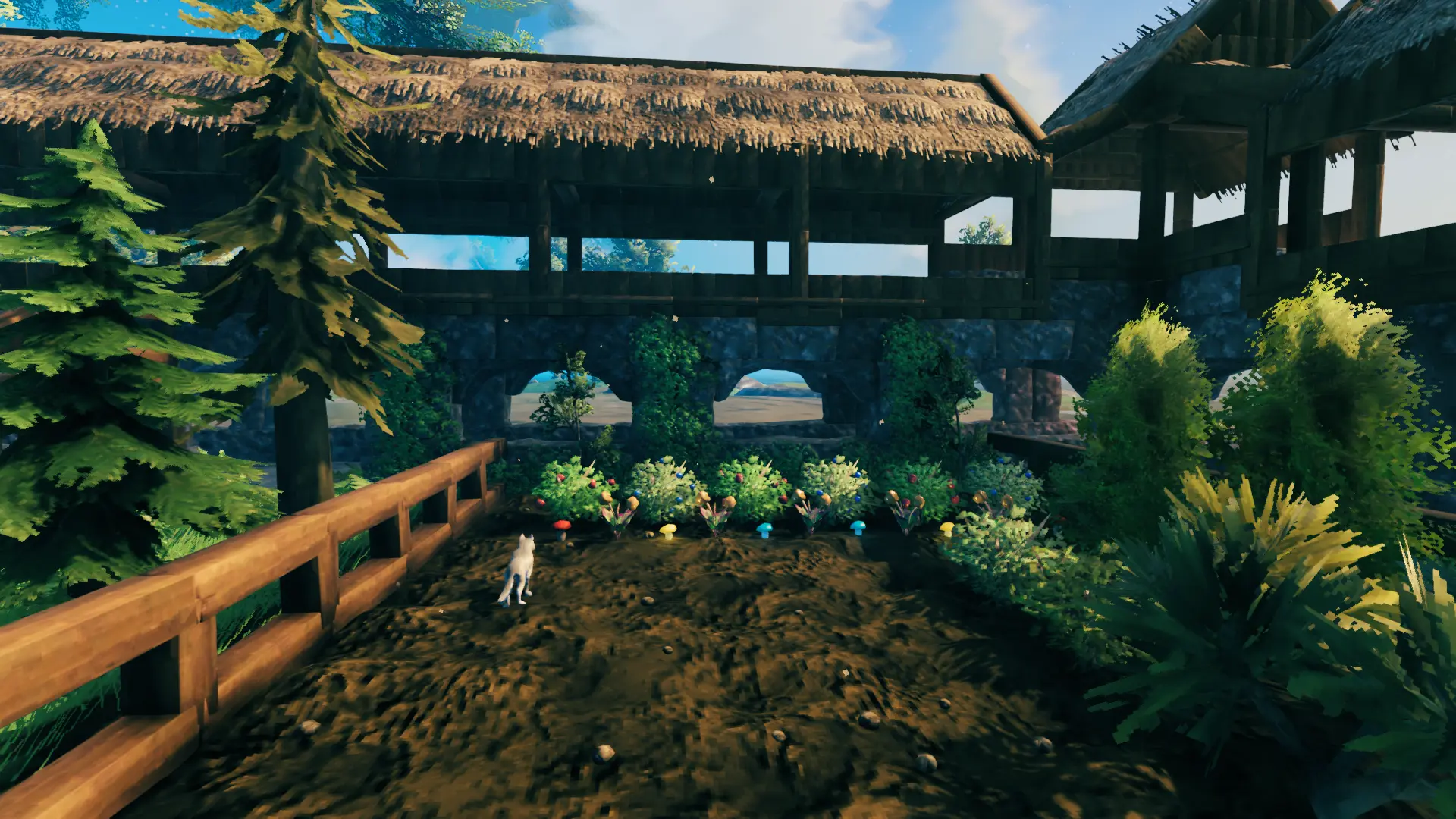
Added cultivator recipes
Tree seed icons (Pine, Beech, Fir, Birch, Oak, Ancient)