
SkyLands
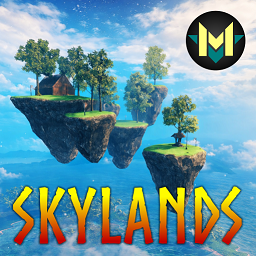
Take your creativity to new heights! SkyLands introduces floating islands, offering unique terrains and breathtaking views for the base of your dreams.Details





SkyLands Description
Tired of the same old lands? With SkyLands, gravity is just a suggestion! This innovative mod allows you to elevate your Valheim
experience, giving you the power to create and customize your very own floating island in the sky.
Prepare for a vertical adventure like never before. SkyLands isn't just a mod; it's an invitation to redefine your Valheim journey. What will you build in the skies?
YOUR ISLAND, YOUR RULES: (click to expand)
Unleash your creativity and build the fortress of your dreams on your own slice of the sky. Each island is a blank canvas, awaiting your vision.
• Total Control: Build your island from scratch and enjoy the peace of mind knowing that only you can deconstruct it, ensuring the safety of your floating base.
• The Heart of the Island: To manifest your celestial haven, you will need the mystical Floating Crystal – an essential resource to anchor your home in the skies.
• Limitless Customization: Go beyond the structure! Customize your island's terrain with various textures to give it the look you desire. Add ornaments and decorations to create a truly unique and inviting space.
• Life on High: Raise and manage your animals on your suspended island. A boar farm in the clouds? A herd of lox grazing among the mists? The sky's the limit for your ambitions!
• Limitless Building: All your favorite structures and buildings from Valheim can be erected on your island. Create houses, forges, portals, and whatever else your imagination can conjure.
• Attention, Vikings: While you can create a complete ecosystem in the sky, farming is not supported on your floating islands. The secrets of fertile soil still belong to the mainland, for now...
PREFAB LIST (click to expand)
| Prefab Name | In-Game Name | Description | Crafting Recipe |
|---|---|---|---|
SL_Isle01 |
Skylands 01 | Floating Isle (radius 25m) | FloatingCrystal x1, SurtlingCore x10, Stone x250 |
SL_Isle02 |
Skylands 02 | Floating Isle (radius 48m) | FloatingCrystal x1, SurtlingCore x10, Stone x350 |
SL_Isle03 |
Skylands 03 | Floating Isle (radius 58m) | FloatingCrystal x1, SurtlingCore x10, Stone x400 |
SL_Isle04 |
Skylands 04 | Floating Isle (radius 64m) | FloatingCrystal x1, SurtlingCore x10, Stone x500 |
SL_Isle05 |
Skylands 05 | Floating Island (radius 80m) | FloatingCrystal x1, SurtlingCore x10, Stone x600 |
SL_Isle06 |
Skylands 06 | Floating Archipelago (radius 75m) | FloatingCrystal x1, SurtlingCore x10, Stone x500, Wood x150 |
FloatingCrystal |
Floating Crystal | Crystal used to create floating islands | Drops from vanilla bosses. 5% drop chance. |
HOW TO REACH YOUR ISLAND? (click to expand)
The SkyLands mod focuses on the creation and customization of floating islands, but it does not include a method of transportation to reach them. To travel to the skies and access your new base, you will need an aerial transport mod.
For a thematic and fully compatible experience, the official recommendation is AirShipPlus! This mod adds fantastic airships that perfectly match the theme of SkyLands, allowing you to explore the skies and dock at your island in style.
HOW TO DISABLE THE FLOATING CRYSTAL DROP (click to expand)
You can customize which creatures drop the Floating Crystal and the chance of this happening directly in the marlthon.Skylands.cfg configuration file.
If you don't want the Floating Crystal to drop from any creatures, follow these steps:
- Open the
.cfgfile in yourBepInEx/configfolder. - Find the section for the item you wish to change (e.g.,
[Floating Crystal]). - Locate the line that starts with
Drops from =. - Important: Delete all the text after the equals sign (
=), leaving the value completely empty.
Example:
## Floating Crystal drops from this creature.
# Setting type: String
# Default value: Eikthyr:0.05:1:,gd_king:0.05:1:,Bonemass:0.05:1:,Dragon:0.05:1:,SeekerQueen:0.05:1:,Fader:0.05:1:
Drops from =
MANUAL INSTALL (click to expand)
• Mod is required on Server for Config Sync (this is still in development).
• Download the latest copy of Bepinex per author's instructions.
• Place the SkyLands.dll inside of the "Bepinex\plugins\" folder.
❤️ Support the Development
By supporting me on Patreon, you help ensure continued support, regular updates, and the creation of new mods.
Your support is completely optional, but greatly appreciated.


SkyLands Photo Gallery
Skylands 01 (click to expand)

Skylands 02 (click to expand)

Skylands 03 (click to expand)

Skylands 04 (click to expand)

Skylands 05 (click to expand)

Skylands 06 (click to expand)

Skylands 07 (click to expand)

