

Valheim
You are viewing a potentially older version of this package. View Latest Version
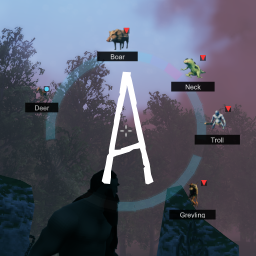
Adds a suite of Valheim-focused accessibility features.
This is a client-side mod created with my close friends in mind, and for the broader gaming communities including Deaf, Blind, low-vision, hard-of-hearing, color-blind, neurodivergent, and accessibility-seeking players.
If there are accessibility features you’d like to see added, feel free to join the Discord and share your ideas. I’m always open to expanding support, including adding entries to the Creature Dictionary for modded creatures when sprite support is available and approved by their respective authors.

- Directional awareness radar for creatures and threats
- Optional audio-based detection logic
- Segment-based threat ring UI
- Icon and silhouette creature indicators
- Multiplayer-safe and dedicated-server compatible
- Designed to enhance awareness without providing unfair automation
How to use:
The primary feature, the Threat Radar Ring, is enabled by default and activates automatically when loading into the world.
Accessibility is highly configurable, I encouraged you to explore configuration options such as:
- Colorblind-friendly UI overlays
- Gamma and brightness adjustments
- Radar detection range tuning
- Threat intensity scaling
- Icon and silhouette display options
- Segment color and contrast adjustments
- Audio awareness synchronization settings
- Threat Radar | Directional creature and enemy awareness ring
- Multi-Channel Identification | Uses icons, shapes, colors, contrast, and labeling for clearer recognition
- Audio Awareness Sync | Prioritizes creatures producing audible cues
- Silhouette Icons | Clean, minimal creature indicators
- Threat Weighting | Dangerous creatures increase radar intensity
- Configurable Range | Adjustable detection distance
Radar and indicators are passive by default.
Optional hotkeys and UI toggles may be configured, an in-game configuration manager is suggested.
This is a client-side mod and does not need to be installed on servers, but is safe if present server-side.
Installation:
Ensure you are running the latest version of BepInEx (linked above).Place the mod DLL inside
BepInEx/Plugins/, including on dedicated servers if applicable.Mod managers will usually handle installation automatically and are recommended.
Mods that replace or heavily modify HUD or radar systems may conflict.
- Spencer & Katie | Design Inspiration, love y'all!


Thanks for using my mods and sharing the love of Valheim! ❤️