English |
  Polish |
  French |
  German |
  Ukrainian
Note: This plugin is currently under active development. Bugs may occur and features may change in future versions.
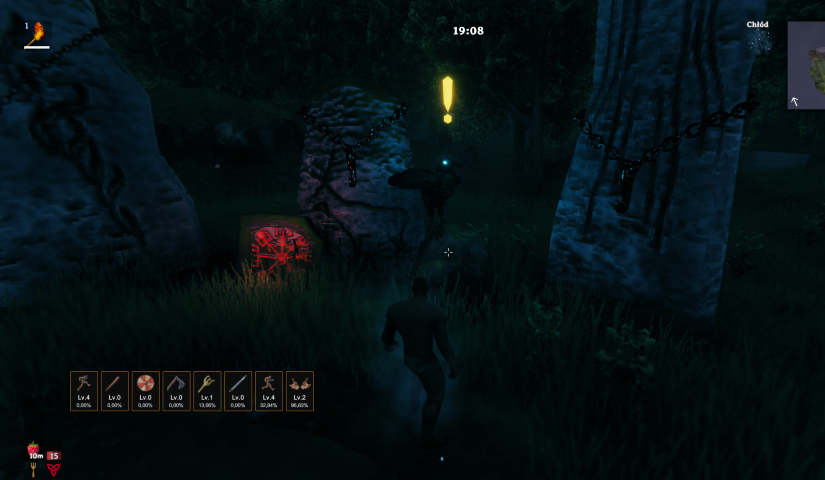
Skills Preview is a Valheim mod that adds compact HUD widgets for your chosen skills. It gives you a quick glance at each skill's level and progress without ever opening the character window.
Each widget shows:
Lv.45),72.00%),SkillsPreview.dll into:<game_directory>/BepInEx/plugins/
Search for Skills Preview in the manager and click "Install".
L by default).The plugin includes a built-in settings panel accessible directly from the skills window. You can change the following without leaving the game:
Numeric settings (sizes, font sizes, spacing, scale, etc.) are adjusted with sliders directly in the panel; position X/Y still use text input fields.
Every option has a ↺ button to reset it individually, or you can hit Reset all to restore all defaults at once.
Settings are saved automatically to:
<game_directory>/BepInEx/config/godzki.skills_preview.cfg
You can edit this file in any text editor. Each option has a comment explaining what it does. Changes made manually take effect after restarting the game.
[1 - General]
| Key | Description |
|---|---|
DebugMode |
Enables verbose logging in the BepInEx console |
HudWidgetsVisible |
Shows or hides the HUD widgets (does not affect the skills panel) |
[2 - Skill Panel]
| Key | Description |
|---|---|
FavoriteStarColor |
Star colour for a favourited skill |
UnfavoriteStarColor |
Star colour for a non-favourited skill |
[3 - HUD Position]
| Key | Default | Description |
|---|---|---|
PositionX |
150 |
Horizontal position of the widget panel (px from the left edge of the screen) |
PositionY |
200 |
Vertical position of the widget panel (px from the bottom edge of the screen) |
Scale |
100 |
50–150 |
[4 - HUD Widget]
| Key | Default | Range | Description |
|---|---|---|---|
Width |
60 |
30–200 | Width of each widget in pixels |
Height |
86 |
30–200 | Height of each widget in pixels |
IconSize |
40 |
10–100 | Skill icon size inside the widget (px) |
FontSizeLevel |
13 |
6–30 | Font size for the level text (e.g. Lv.45) |
FontSizeProgress |
11 |
6–24 | Font size for the progress text (e.g. 72.00% or MAX) |
Spacing |
6 |
0–30 | Gap between widgets in the horizontal panel (px) |
BorderSize |
2 |
0–10 | Border thickness for each widget (px) |
CornerRadius |
6 |
0–20 | Corner rounding radius (px); 0 disables rounding |
LevelUpDuration |
1.5 |
0–5 | Duration of the level-up flash effect (seconds) |
BorderColor |
Widget border colour | ||
BackgroundColor |
Widget background colour (RGBA) | ||
LevelColor |
Skill level text colour | ||
ProgressColor |
Progress percentage text colour | ||
ProgressMaxColor |
Text colour for MAX when a skill reaches level 100 |
||
LevelUpColor |
Border flash colour on level-up |
Delete the config file — a corrupted or incompatible config can prevent the plugin from loading. The file is located at:
<game_directory>/BepInEx/config/godzki.skills_preview.cfg
Delete it and start the game again — it will be recreated with default values.
Check your BepInEx version — this plugin requires BepInEx 5.x. Version 6.x is not currently supported.
Make sure the .dll is in the right folder — the path should be BepInEx/plugins/, not BepInEx/ directly.
godzki.skills_preview.cfg in a text editor.[1 - General], set:DebugMode = true
BepInEx/LogOutput.log). The detailed logs should point you to the root cause.DebugMode = false.Check BepInEx/LogOutput.log for errors. If it looks like a conflict with a specific mod, please open a report in the Issues tab — include your mod list and the relevant error from the log.
AI-powered tools were used during development to assist with problem analysis and code refactoring.