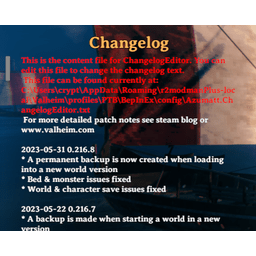
This mod uses a file watcher. If the configuration file is not changed with BepInEx Configuration manager, but changed in the file directly, upon file save, it will auto update your configurations.
This is a client only mod!The configuration file is located at BepInEx/config/Azumatt.ChangelogEditor.cfg
The content file is read from BepInEx/config/Azumatt.ChangelogEditor.txt
The ChangeLog supports using colors, so go wild? Examples below.
<color=red>YOUR RED TEXT HERE</color>
<color=blue>YOUR BLUE TEXT HERE</color>
<color=green>YOUR GREEN TEXT HERE</color>
<color=yellow>YOUR YELLOW TEXT HERE</color>
<color=orange>YOUR ORANGE TEXT HERE</color>
<color=#00afd4>YOUR CUSTOM COLOR TEXT HERE</color>
You must have BepInEx installed correctly! I can not stress this enough.
Note: (Manual installation is likely how you have to do this on a server, make sure BepInEx is installed on the server correctly)
BepInEx/plugins folder.Install r2modman or Thunderstore Mod Manager.
For r2modman, you can also install it through the Thunderstore site.
For Thunderstore Mod Manager, you can also install it through the Overwolf app store
Open the Mod Manager and search for "ChangelogEditor" under the Online
tab. Note: You can also search for "Azumatt" to find all my mods.
The image below shows VikingShip as an example, but it was easier to reuse the image.

Click the Download button to install the mod.
Launch the game.
Feel free to reach out to me on discord if you need manual download assistance.
DISCORD: Azumatt#2625
STEAM: https://steamcommunity.com/id/azumatt/
For Questions or Comments, find me in the Odin Plus Team Discord or in mine: