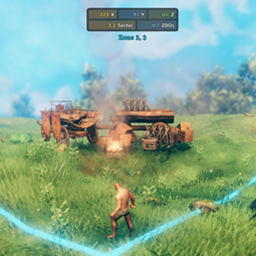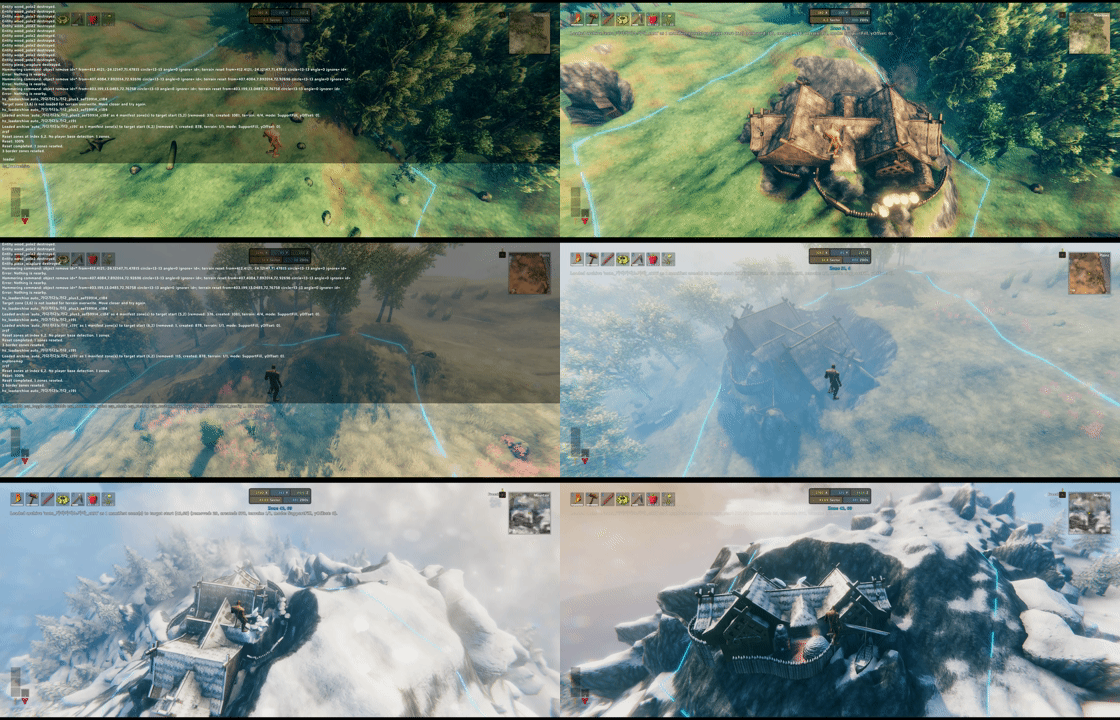

ZoneSavior is the server zone-maintenance half of the Homestead/ZoneSavior split.
It automatically archives inactive player structures(+ tamed animals within the zone), restores saved zone bundles, enforces optional per-zone WearNTear limits, tracks player activity, and provides a small optional client zone UI.
ZoneSavior can run on the server only. Clients may also install it if they want the zone number/boundary UI or if an admin wants to run ZoneSavior commands from an admin client instead of the server console or RCON.
ZoneSavior does not require Upgrade World, World Edit Commands, Infinity Hammer, Server Devcommands, Jotunn, or Homestead.
ZoneSavior uses one normal BepInEx config file plus a data folder under BepInEx/config/ZoneSavior/.
BepInEx/config/
  sighsorry.ZoneSavior.cfg
  ZoneSavior/
    activity.yml
    zones.yml
    Diagnostics/
    ZoneBundles/
      example_tag/
        manifest.yml
        bundle001.zonebundle.yml
        bundle002.zonebundle.yml
sighsorry.ZoneSavior.cfgMain BepInEx config.
Important sections:
01 - General
Lock Configuration: lets the server control synced settings.Zone WearNTear Limit: enables or disables per-zone WearNTear placement limits from zones.yml.02 - Client
Build Counter Visible Seconds: how long the build counter stays visible after placement.Zone UI Toggle Hotkey: toggles current-zone HUD and floor boundary line on clients.03 - Admin Zone Bundle
WearNTear Save Mode: controls whether manual zone saves include creatorless WearNTear.Zone Bundle Support Fill Feather Width: terrain blend width around restored support cells.Support Fill Contact Tolerance: how close terrain must be to a WearNTear bottom to be captured as a support contact.04 - Admin Auto Archive
ZoneSavior/activity.ymlServer-owned activity and scanner state.
It records:
Most admins should not edit this by hand. Prefer zs_archive_status, zs_archive_mark_seen, zs_archive_ignore_player, and zs_archive_schedule.
ZoneSavior/zones.ymlServer-owned zone rule file.
It has two jobs:
Default shape:
version: 1
archive_protection:
  steam_ids:
    - "76561198000000000"
    - "76561198000000001"
  player_ids:
    - 123456789
  player_names:
    - "GreatViking"
    - "Xcxcx"
defaults:
  count_creatorless: false
rules:
  - name: center_keep
    x: [-1, 1]
    z: [-1, 1]
    limit: 40
    count_creatorless: true
  - name: outer_ring
    x: [-3, 3]
    z: [-3, 3]
    limit: 80
Rules are evaluated top to bottom. The first matching rule wins. Zones that match no rule are unlimited.
archive_protection prevents matching creators from being archived/reset by the auto archive scanner. Use Steam IDs when possible; player names are convenient but can change.
ZoneSavior/ZoneBundles/<tag>/manifest.ymlArchive manifest for one saved tag.
It records:
Use the manifest when you want to restore a complete saved shape, especially non-rectangular auto archives.
ZoneSavior/ZoneBundles/<tag>/bundleNNN.zonebundle.ymlOne saved source zone.
Each bundle stores:
ZoneSavior intentionally skips many volatile or unsafe objects such as players, tombstones, item drops, projectiles, ragdolls, fish, terrain modifiers, terrain comps, and locations. WearNTear prefabs without a normal build recipe/resource cost are skipped.
ZoneSavior/Diagnostics/Created by zs_archive_debug_zone.
Diagnostic files explain why one zone would or would not be selected by auto archive. This is the first place to look when a zone is not being archived as expected.
Manual zone save and auto archive both focus on player structures, not arbitrary world objects.
ZoneSavior saves:
Auto archive scans only creator-linked WearNTear with creator != 0. Creatorless structures can be included by manual save when WearNTear Save Mode = IncludeCreatorless, but they are not enough by themselves to make a zone inactive-owner eligible.
ZoneSavior uses SupportFill.
When saving a loaded zone, it checks the lower WearNTear footprint cells and records terrain contacts where the terrain was close enough to the structure bottom. When loading, those saved contacts can raise or cut terrain so structures regain support.
If saved contacts are missing, ZoneSavior can fall back to the saved collider/footprint information and place terrain near the lowest reasonable WearNTear support plane. This fallback is clamped to avoid extreme terrain spikes.
Zone Bundle Support Fill Feather Width blends changed terrain back toward native terrain around support cells.
Commands can be run from:
If a command is run from a dedicated server console, provide explicit target zones for load commands because there is no local player position.
zs_savezoneSave one source zone or a rectangular source range.
Use this when:
Syntax:
zs_savezone (x,z) tag
zs_savezone (x~x,z~z) tag
Examples:
zs_savezone (-21,-4) test_base
zs_savezone (-21~-20,-4) old_base
The tag becomes the folder name under ZoneSavior/ZoneBundles/.
zs_loadzoneLoad one saved source zone, or a rectangular saved source range, into another location.
Use this when:
Syntax:
zs_loadzone (x,z) tag [to (x,z)] [offset=Y]
zs_loadzone (x~x,z~z) tag [to (x,z)] [offset=Y]
Examples:
zs_loadzone (-21,-4) test_base to (10,3)
zs_loadzone (-21~-20,-4) old_base to (10,3)
zs_loadzone (-21,-4) test_base to (10,3) offset=2
Notes:
to (x,z) is the target start zone.to (x,z) is omitted, ZoneSavior uses the local player's current zone.to (x,z).offset=Y adds a vertical offset after the normal support anchor is calculated.zs_loadarchive for non-rectangular archive shapes.zs_loadarchiveLoad every bundle listed in a manifest, preserving the saved shape.
Use this when:
Syntax:
zs_loadarchive tag [to (x,z)] [offset=Y]
Examples:
zs_loadarchive auto_halla_c178 to (-4,0)
zs_loadarchive auto_Snack_plus1_b7a5018f_c103 to (20,-3) offset=1.5
The target zone is treated as the new anchor for the saved manifest's minimum source X/Z zone. Every other saved zone keeps its relative offset from that anchor.
zs_archive_scanRun the inactive-player scanner manually.
Use this when:
Syntax:
zs_archive_scan [dry|save|reset]
Examples:
zs_archive_scan dry
zs_archive_scan save
zs_archive_scan reset
Modes:
dry: report candidates only.save: write archives but do not reset source zones.reset: write archives and reset eligible source zones.If the mode is omitted, ZoneSavior uses the current config values.
zs_archive_statusPrint activity and auto archive status.
Use this when:
Syntax:
zs_archive_status
zs_archive_playerRun a manual archive scan filtered to one owner.
Use this when:
Syntax:
zs_archive_player steamID [dry|save|reset]
Examples:
zs_archive_player 76561198000000000 dry
zs_archive_player steam:76561198000000000 reset
Steam ID is preferred. A short Valheim player ID fallback is supported only when ZoneSavior has not linked a Steam platform ID yet.
zs_archive_listList recent archive scanner runs and cluster records.
Use this when:
Syntax:
zs_archive_list
zs_archive_mark_seenMark a Valheim player ID as seen now.
Use this when:
Syntax:
zs_archive_mark_seen playerID
Example:
zs_archive_mark_seen 123456789
zs_archive_ignore_playerProtect or unprotect a Valheim player ID from auto archive.
Use this for a quick activity-file ignore flag. For long-term server policy, prefer archive_protection in zones.yml.
Syntax:
zs_archive_ignore_player playerID [on|off]
Examples:
zs_archive_ignore_player 123456789
zs_archive_ignore_player 123456789 on
zs_archive_ignore_player 123456789 off
Omitting on|off means on.
zs_archive_restoreRestore an archived tag back to its original source zones.
Use this when:
Syntax:
zs_archive_restore tag
Example:
zs_archive_restore auto_halla_c178
This differs from zs_loadarchive tag to (x,z): restore uses the original zones recorded in the manifest.
zs_archive_scheduleShow or adjust the automatic archive scan schedule anchor.
Use this when:
activity.ymlSyntax:
zs_archive_schedule [status|now|clear|last yyyy-MM-dd HH:mm|next yyyy-MM-dd HH:mm]
Examples:
zs_archive_schedule
zs_archive_schedule status
zs_archive_schedule now
zs_archive_schedule clear
zs_archive_schedule last 2026-05-02 15:00
zs_archive_schedule next 2026-05-03 03:00
zs_archive_schedule next 2026-05-02T18:00:00Z
Notes:
Scan Interval Minutes = 0.now sets the last auto scan time to the current server time.clear clears the last auto scan time.last ... sets the last scan anchor directly.next ... sets the anchor so the next scan is due at the supplied time.Z or an offset are parsed as the server computer's local time.zs_archive_debug_zoneWrite a YAML diagnostic report explaining one zone's archive eligibility.
Use this when:
Syntax:
zs_archive_debug_zone (x,z)
Example:
zs_archive_debug_zone (-7,12)
Reports are written under BepInEx/config/ZoneSavior/Diagnostics/.
zs_savezone (-21,-4) test_base
zs_loadzone (-21,-4) test_base to (10,3)
Use this before trusting a large auto archive workflow.
zs_archive_scan dry
zs_archive_list
Review candidate clusters without changing the world.
zs_archive_scan save
zs_archive_list
Use this when you want archive files first and will reset manually later.
zs_archive_scan reset
Use only after testing dry and confirming the output. This writes archive bundles and then resets eligible source zones.
zs_archive_list
zs_loadarchive auto_halla_c178 to (20,-3)
Ask the player for the target zone if they have the client zone UI enabled.
zs_archive_restore auto_halla_c178
Use when the original place should be restored exactly.
Dry Run = On and Reset After Save = Off.zs_savezone and zs_loadzone on a disposable area before enabling reset runs.Minimum Pieces Per Cluster and Small Cluster Action decide how small clutter-like clusters are handled.Max Zones Per Run limits the blast radius of one automatic scan.Require Loaded Terrain For Reset can be enabled for stricter terrain-contact safety, but it may skip resets for unloaded zones.If ZoneSavior is installed on a client, the configured Zone UI Toggle Hotkey shows:
This is useful when a returning player wants to tell an admin where to restore an archive.
ZoneSavior stores new zone bundles using its own zs-zdo-v1 ZDO data payload.
Older pre-split or external World Edit Command data formats are not supported.
Homestead is optional. If both Homestead and ZoneSavior are installed, Homestead-built blueprint structures can still be counted by ZoneSavior's WearNTear zone limit safety path.